> ## Documentation Index
> Fetch the complete documentation index at: https://docs.cubic.dev/llms.txt
> Use this file to discover all available pages before exploring further.
# Custom context
> Give cubic custom context to help it better understand your codebase.
You can give cubic more context about your codebase to help it understand your patterns, architecture, and conventions. You can do this in a couple of ways.
If you want a copy-paste `AGENTS.md`, `CLAUDE.md`, or `.cursorrules` snippet for your coding
workflow, see [Local CLI review](/ide/cli-review).
## Context files in your repository
cubic automatically detects and uses context files in your repository, including `README.md`, `context.md`, `AGENTS.md`, `.cursorrules`, agent skills directories, and files in `.ai/` directories. These files help the AI understand your project structure, conventions, and guidelines without any additional configuration.
**README files**
* `README.md`, `readme.txt`, `ReadMe.rst` (any variation)
* `read.me`, `read-me.md`
**AI tool configuration files**
* `AGENTS.md` - OpenAI/Codex instructions
* `CLAUDE.md`, `claude.md` - Claude-specific guidelines
* `.cursorrules`, `.cursor.json` - Cursor editor rules
* `copilot-instructions.md`, `copilot.yaml` - GitHub Copilot configuration
* `.coderabbit.yaml` - CodeRabbit configuration
**AI tool skill directories**
* Files in the `.claude/skills/` directory - Claude Code skills
* Files in the `.codex/skills/` directory - OpenAI Codex skills
* Files in the `.opencode/skills/` directory - OpenCode skills
* Files in the `.cursor/skills/` directory - Cursor skills
* Files in the `.windsurf/skills/` directory - Windsurf skills
* Files in the `.gemini/skills/` directory - Gemini skills
* Files in the `.agents/skills/` directory - Cross-tool skills
**Generic context files**
* `context.md` - General project context
* `project_context.md` - Project-specific information
* `llm-context.md` - LLM-specific guidelines
* `ai_guidelines.md` - AI coding assistant instructions
* `CODEBASE-CONTEXT.md` - Codebase overview
* Any file ending with `-context.md` (e.g., `auth-context.md`, `api-context.md`)
**Other directories**
* Files in the `.ai/` directory
* Files in the `.cursor/` directory (including `.cursor/rules/`)
* Files in the `.github/` directory
* Files in the `.continue/` directory
### What to include in context files
Effective context files typically include:
* **Architecture overview**: High-level system design and component relationships
* **Coding conventions**: Team-specific patterns and practices
* **Domain knowledge**: Business logic and terminology
* **Common patterns**: Preferred approaches for common tasks
* **Dependencies**: Key libraries and their usage patterns
## Manual instructions via settings
For repository-specific guidelines that don't fit into files, you can add custom instructions directly in the cubic dashboard.
Navigate to [AI review settings](https://cubic.dev/ai-review) and use the **AI review instructions** field to provide plaintext instructions that will be included in every review.
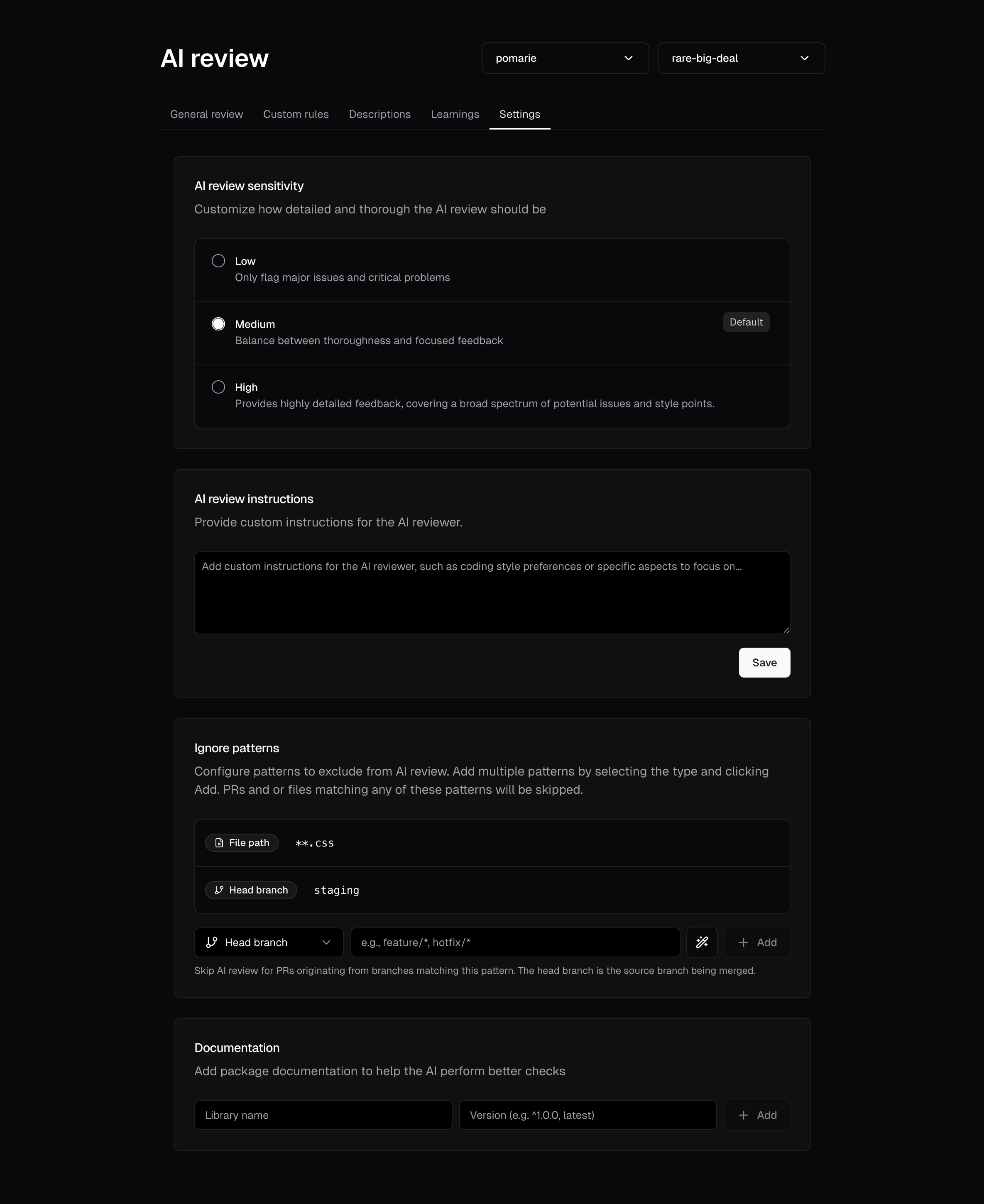 This is useful for:
* Temporary guidelines during migrations or refactoring
* High-priority reminders that need immediate attention
* General review preferences that apply across the entire codebase
AI review instructions are configured at the repository level. Different repositories can have
different instructions based on their specific needs.
## One-off context in PR comments
You can also provide temporary context when manually triggering a review in GitHub comments.
For example:
* `@cubic-dev-ai review this and use https://docs.composio.dev/llms.txt`
* `@cubic-dev-ai rerun and focus on auth edge cases`
cubic will use this context for that run only. It does not change your saved settings.
## Custom agents for specific checks
When you want cubic to actively flag specific issues or patterns, use [custom agents](/ai-review/custom-agents) instead of general context.
If your team already has a style guide or review checklist in the repository, point a file-backed custom agent at that file from the dashboard or `cubic.yaml`. cubic will use the file as the enforceable agent instruction, while regular context files continue to provide background understanding.
Custom agents are ideal for:
* Enforcing specific coding standards
* Detecting anti-patterns unique to your codebase
* Preventing known security vulnerabilities
* Ensuring compliance with team conventions
Learn more about creating and managing custom agents in the [custom agents documentation](/ai-review/custom-agents).
## Best practices
Your main README is the most important context file. Ensure it clearly explains the project's purpose, architecture, and key conventions.
Outdated context can lead to incorrect suggestions. Review and update your context files
regularly, especially after major architectural changes.
Provide concrete examples and clear guidelines. Instead of "write good code," specify "use React
hooks instead of class components" or "prefer async/await over Promise chains."
For large projects, create separate context files for different domains (e.g.,
`frontend-context.md`, `backend-context.md`) to keep information focused and manageable.
Context files provide background information, while custom agents actively flag violations. Use
custom agents when you need cubic to consistently catch specific issues.
This is useful for:
* Temporary guidelines during migrations or refactoring
* High-priority reminders that need immediate attention
* General review preferences that apply across the entire codebase
AI review instructions are configured at the repository level. Different repositories can have
different instructions based on their specific needs.
## One-off context in PR comments
You can also provide temporary context when manually triggering a review in GitHub comments.
For example:
* `@cubic-dev-ai review this and use https://docs.composio.dev/llms.txt`
* `@cubic-dev-ai rerun and focus on auth edge cases`
cubic will use this context for that run only. It does not change your saved settings.
## Custom agents for specific checks
When you want cubic to actively flag specific issues or patterns, use [custom agents](/ai-review/custom-agents) instead of general context.
If your team already has a style guide or review checklist in the repository, point a file-backed custom agent at that file from the dashboard or `cubic.yaml`. cubic will use the file as the enforceable agent instruction, while regular context files continue to provide background understanding.
Custom agents are ideal for:
* Enforcing specific coding standards
* Detecting anti-patterns unique to your codebase
* Preventing known security vulnerabilities
* Ensuring compliance with team conventions
Learn more about creating and managing custom agents in the [custom agents documentation](/ai-review/custom-agents).
## Best practices
Your main README is the most important context file. Ensure it clearly explains the project's purpose, architecture, and key conventions.
Outdated context can lead to incorrect suggestions. Review and update your context files
regularly, especially after major architectural changes.
Provide concrete examples and clear guidelines. Instead of "write good code," specify "use React
hooks instead of class components" or "prefer async/await over Promise chains."
For large projects, create separate context files for different domains (e.g.,
`frontend-context.md`, `backend-context.md`) to keep information focused and manageable.
Context files provide background information, while custom agents actively flag violations. Use
custom agents when you need cubic to consistently catch specific issues.