> ## Documentation Index
> Fetch the complete documentation index at: https://docs.cubic.dev/llms.txt
> Use this file to discover all available pages before exploring further.
# Interactive comments
> Interact with cubic to ask questions, trigger reviews, and request fixes safely.
Interact with cubic in PR comments to ask questions, trigger reviews, and fix issues. You can tag
`@cubic-dev-ai` directly, or reply to cubic's existing comments to continue the conversation.
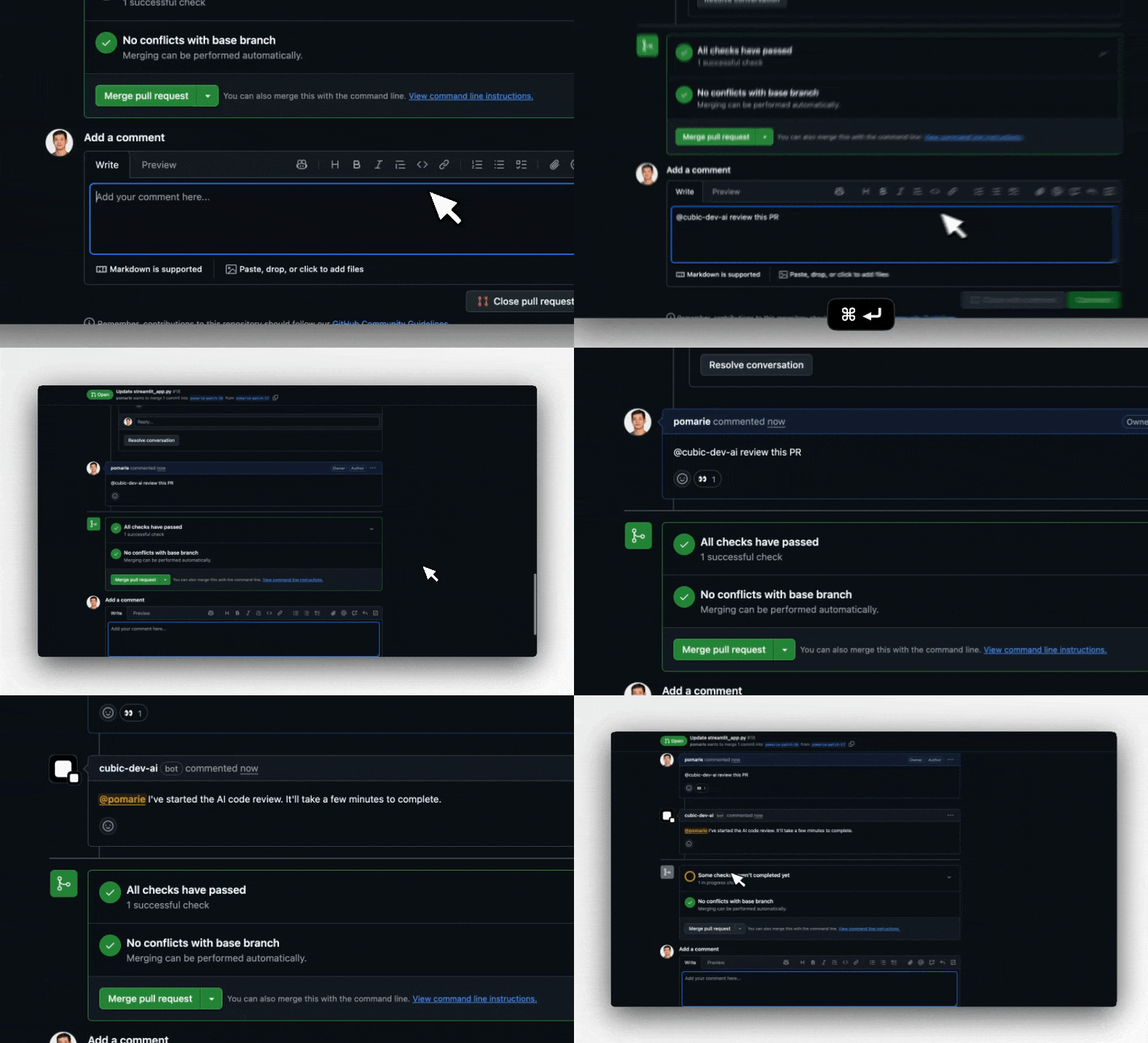 ## Why use interactive comments
* Ask follow-up questions about code changes without leaving the PR
* Re-trigger AI reviews after addressing feedback
* Get instant clarification on AI suggestions
* Build context through natural, threaded conversations
## How to interact with cubic
cubic responds when you:
### 1. Tag it directly
Mention `@cubic-dev-ai` anywhere in your comment.
cubic won't appear in GitHub's @ mention autocomplete dropdown. GitHub doesn't allow GitHub Apps
to be included in the autocomplete list. Just type the mention manually and it will work.
### 2. Reply to its comments
Simply reply to any of cubic's existing comments to continue the conversation. No @ mention is
needed for questions or feedback. cubic will react with 👀 to acknowledge your comment in both
cases.
Replying without explicitly tagging cubic does **not** authorize code changes. If you want cubic
to edit code, the current comment must explicitly include `@cubic-dev-ai`, or you can use the
**Fix with cubic** button.
## What you can do
### Ask questions
Get instant answers about code, design decisions, or implementation details:
* "@cubic-dev-ai will this color code work well in dark mode?"
* "@cubic-dev-ai can you explain how this function works?"
* "@cubic-dev-ai is there a better way to handle this error?"
### Trigger reviews
Tag `@cubic-dev-ai` to trigger a new AI review:
* `@cubic-dev-ai`
* "@cubic-dev-ai review this PR"
* Or simply tag `@cubic-dev-ai` with any request - it will understand you want a review
### When cubic can't review
Manual review requests run regardless of the repository's maximum changed-lines setting. If a pull
request is above cubic's technical review maximum, cubic replies with the reviewable line count, the
largest files contributing to the diff, and what to do next: ignore generated or fixture files in
AI review settings or `cubic.yaml`, or split the change into smaller pull requests.
### Ultrareview
For high-risk or complex pull requests, ask cubic for an [ultrareview](/ai-review/ultrareview) —
a longer, deeper review using cubic's most capable review models:
* `@cubic-dev-ai ultrareview`
* `@cubic-dev-ai ultrareview: focus on auth edge cases`
Ultrareviews can also [start automatically](/ai-review/ultrareview#auto-trigger-ultrareviews)
based on file rules or a per-repository risk policy. See the
[ultrareview docs](/ai-review/ultrareview) for how it works, billing, and configuration.
### Add one-off context to a review run
You can include extra guidance in the same comment when you trigger a review. cubic forwards the
text from your `@cubic-dev-ai` comment as context for that specific run.
Examples:
* `@cubic-dev-ai review this and use https://docs.composio.dev/llms.txt`
* `@cubic-dev-ai rerun and focus on auth edge cases`
* `@cubic-dev-ai review this with the migration notes in https://internal.docs/migration`
This context is one-off. It only applies to the run triggered by that comment and does not update
your repository-level AI review instructions.
To stop an in-progress AI review, use the **Cancel AI review** button in the GitHub Checks UI.
### Request fixes
Ask `@cubic-dev-ai` to generate fixes for identified issues with the "Fix with cubic" button in
the GitHub comment, or by tagging `@cubic-dev-ai` in the current comment. For example:
* "@cubic-dev-ai fix this issue in this branch"
* "@cubic-dev-ai can you generate a fix for this in a new PR?"
By default, cubic pushes fix commits directly to your PR branch. To override, say "open a fix PR"
and cubic will create a separate PR targeting your feature branch. Learn more about
[AI-powered code fixes](/ai-review/coding-agents).
A reply like "can we change this to..." inside a cubic thread is treated as discussion unless that
same comment explicitly tags `@cubic-dev-ai`.
### Provide feedback and continue conversations
Reply directly to cubic's review comments (no @ mention needed) to:
**Continue the discussion:**
* "This would break our legacy API compatibility"
* "What about error handling in this case?"
* "Can you suggest an alternative approach?"
**Provide feedback for learning:**
* "This is a false positive, Next.js handles this automatically"
* "The rule is too strict for our use case"
* "This doesn't apply to React Server Components"
cubic will respond to your replies, maintaining the full context of the conversation thread.
## Tips and best practices
* **Natural conversations**: After cubic's initial comment, just reply normally for questions and feedback
* **Fixes require a fresh explicit tag**: Use `@cubic-dev-ai` or the **Fix with cubic** button whenever you want cubic to edit code
* **Context awareness**: cubic maintains the full thread context, understanding both the original suggestion and all previous replies
* **Be specific**: More detailed questions get more helpful answers
* **Natural language**: Write as you would to a teammate
* **Multi-turn discussions**: Feel free to have back-and-forth conversations to refine suggestions or explore alternatives
## Why use interactive comments
* Ask follow-up questions about code changes without leaving the PR
* Re-trigger AI reviews after addressing feedback
* Get instant clarification on AI suggestions
* Build context through natural, threaded conversations
## How to interact with cubic
cubic responds when you:
### 1. Tag it directly
Mention `@cubic-dev-ai` anywhere in your comment.
cubic won't appear in GitHub's @ mention autocomplete dropdown. GitHub doesn't allow GitHub Apps
to be included in the autocomplete list. Just type the mention manually and it will work.
### 2. Reply to its comments
Simply reply to any of cubic's existing comments to continue the conversation. No @ mention is
needed for questions or feedback. cubic will react with 👀 to acknowledge your comment in both
cases.
Replying without explicitly tagging cubic does **not** authorize code changes. If you want cubic
to edit code, the current comment must explicitly include `@cubic-dev-ai`, or you can use the
**Fix with cubic** button.
## What you can do
### Ask questions
Get instant answers about code, design decisions, or implementation details:
* "@cubic-dev-ai will this color code work well in dark mode?"
* "@cubic-dev-ai can you explain how this function works?"
* "@cubic-dev-ai is there a better way to handle this error?"
### Trigger reviews
Tag `@cubic-dev-ai` to trigger a new AI review:
* `@cubic-dev-ai`
* "@cubic-dev-ai review this PR"
* Or simply tag `@cubic-dev-ai` with any request - it will understand you want a review
### When cubic can't review
Manual review requests run regardless of the repository's maximum changed-lines setting. If a pull
request is above cubic's technical review maximum, cubic replies with the reviewable line count, the
largest files contributing to the diff, and what to do next: ignore generated or fixture files in
AI review settings or `cubic.yaml`, or split the change into smaller pull requests.
### Ultrareview
For high-risk or complex pull requests, ask cubic for an [ultrareview](/ai-review/ultrareview) —
a longer, deeper review using cubic's most capable review models:
* `@cubic-dev-ai ultrareview`
* `@cubic-dev-ai ultrareview: focus on auth edge cases`
Ultrareviews can also [start automatically](/ai-review/ultrareview#auto-trigger-ultrareviews)
based on file rules or a per-repository risk policy. See the
[ultrareview docs](/ai-review/ultrareview) for how it works, billing, and configuration.
### Add one-off context to a review run
You can include extra guidance in the same comment when you trigger a review. cubic forwards the
text from your `@cubic-dev-ai` comment as context for that specific run.
Examples:
* `@cubic-dev-ai review this and use https://docs.composio.dev/llms.txt`
* `@cubic-dev-ai rerun and focus on auth edge cases`
* `@cubic-dev-ai review this with the migration notes in https://internal.docs/migration`
This context is one-off. It only applies to the run triggered by that comment and does not update
your repository-level AI review instructions.
To stop an in-progress AI review, use the **Cancel AI review** button in the GitHub Checks UI.
### Request fixes
Ask `@cubic-dev-ai` to generate fixes for identified issues with the "Fix with cubic" button in
the GitHub comment, or by tagging `@cubic-dev-ai` in the current comment. For example:
* "@cubic-dev-ai fix this issue in this branch"
* "@cubic-dev-ai can you generate a fix for this in a new PR?"
By default, cubic pushes fix commits directly to your PR branch. To override, say "open a fix PR"
and cubic will create a separate PR targeting your feature branch. Learn more about
[AI-powered code fixes](/ai-review/coding-agents).
A reply like "can we change this to..." inside a cubic thread is treated as discussion unless that
same comment explicitly tags `@cubic-dev-ai`.
### Provide feedback and continue conversations
Reply directly to cubic's review comments (no @ mention needed) to:
**Continue the discussion:**
* "This would break our legacy API compatibility"
* "What about error handling in this case?"
* "Can you suggest an alternative approach?"
**Provide feedback for learning:**
* "This is a false positive, Next.js handles this automatically"
* "The rule is too strict for our use case"
* "This doesn't apply to React Server Components"
cubic will respond to your replies, maintaining the full context of the conversation thread.
## Tips and best practices
* **Natural conversations**: After cubic's initial comment, just reply normally for questions and feedback
* **Fixes require a fresh explicit tag**: Use `@cubic-dev-ai` or the **Fix with cubic** button whenever you want cubic to edit code
* **Context awareness**: cubic maintains the full thread context, understanding both the original suggestion and all previous replies
* **Be specific**: More detailed questions get more helpful answers
* **Natural language**: Write as you would to a teammate
* **Multi-turn discussions**: Feel free to have back-and-forth conversations to refine suggestions or explore alternatives