> ## Documentation Index
> Fetch the complete documentation index at: https://docs.cubic.dev/llms.txt
> Use this file to discover all available pages before exploring further.
# Issue tracker integration
> Track if PRs meet the requirements from your linked issues.
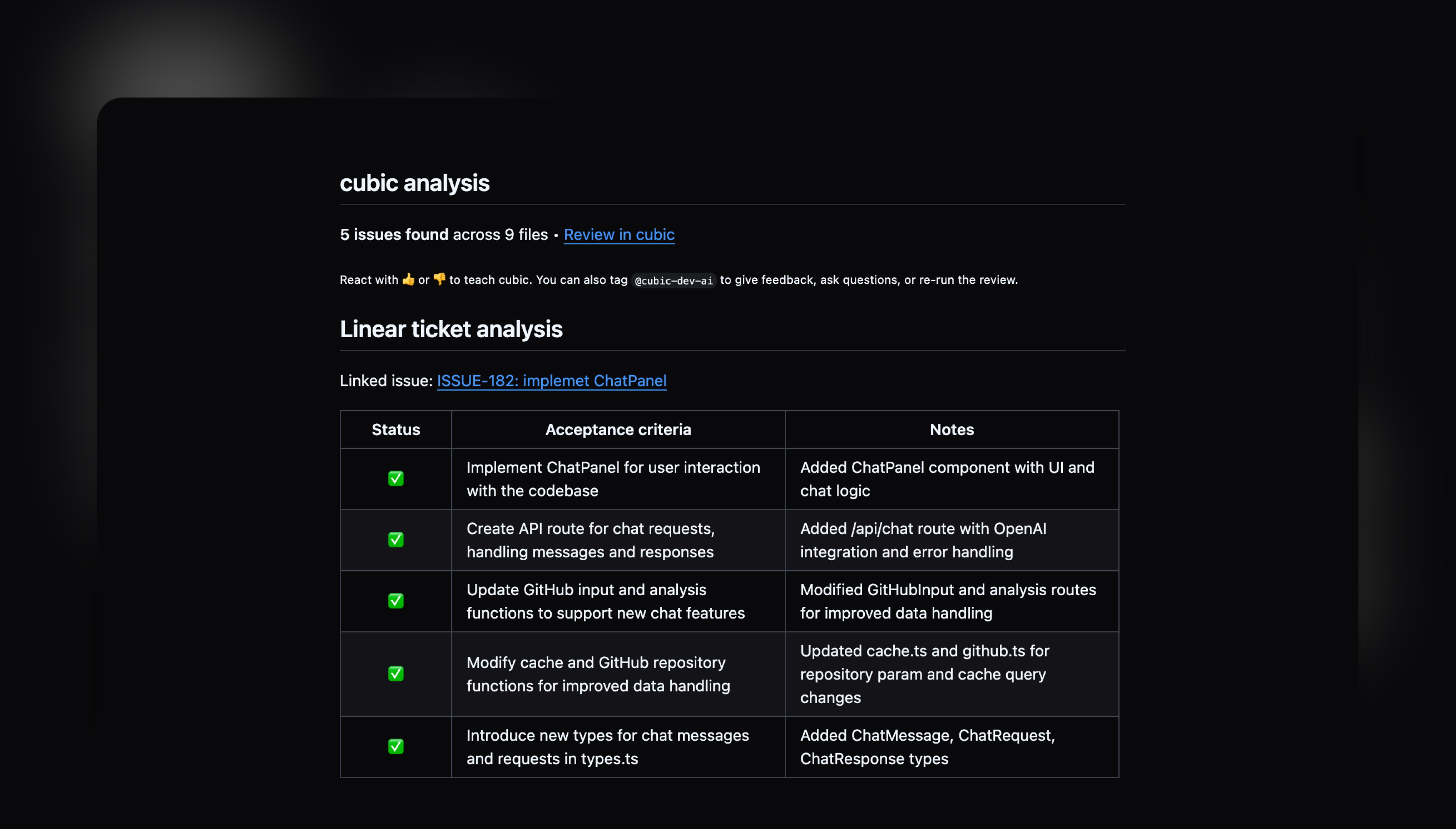
cubic can automatically analyze your pull requests to see if they meet the requirements from your linked Linear or Jira issues.
Connect cubic to your issue tracker (like Linear or Jira) to verify your PRs meet the objectives laid out in the linked issue.
cubic also uses context from the linked issue to inform its AI code review and PR description.
 ## How it works
When you create a pull request with a linked issue, cubic:
1. **Finds your issue** - Looks for issue IDs like `ABC-123` in your PR title or branch name
2. **Reads requirements** - Extracts the requirements from your issue description
3. **Checks your code** - Compares your changes against those requirements
4. **Shows results** - Adds a table to your PR review showing what's done and what's missing
## Requirements
For issue analysis to work:
1. **Link an issue** - Include the issue ID in your PR title or branch name
2. **Add requirements** - Your issue must have a description with clear objectives
3. **Enable AI review and connect your issue tracker** - Make sure AI review is enabled and that you've connected your issue tracker in the [integrations page](https://www.cubic.dev/settings?tab=integrations)
If the linked issue doesn't have a description or requirements, the analysis won't run.
## Writing good requirements
cubic looks for requirements written as:
* Bullet points or numbered lists
* Sections labeled "Acceptance Criteria" or "Requirements"
* Clear action items starting with "Should", "Must", or "Can"
### Good example
```
## Acceptance Criteria
- User can submit the contact form
- Form shows validation errors for invalid email
- Form data is saved to the database
- User receives a confirmation message
```
### What won't work
```
Make the form work better
```
## Tips for better results
* **Be specific** - Write clear, testable requirements
* **Break it down** - Use multiple small requirements instead of one big one
* **Include details** - Mention specific features or behaviors
## Troubleshooting
**Not seeing the analysis?**
* Check that your issue ID is in the PR title or branch
* Make sure your issue has requirements in the description
* Verify AI review is enabled in settings
**Results seem wrong?**
* The analysis only checks files changed in the PR
* Very general requirements might be hard to verify
* Try making your requirements more specific
## How it works
When you create a pull request with a linked issue, cubic:
1. **Finds your issue** - Looks for issue IDs like `ABC-123` in your PR title or branch name
2. **Reads requirements** - Extracts the requirements from your issue description
3. **Checks your code** - Compares your changes against those requirements
4. **Shows results** - Adds a table to your PR review showing what's done and what's missing
## Requirements
For issue analysis to work:
1. **Link an issue** - Include the issue ID in your PR title or branch name
2. **Add requirements** - Your issue must have a description with clear objectives
3. **Enable AI review and connect your issue tracker** - Make sure AI review is enabled and that you've connected your issue tracker in the [integrations page](https://www.cubic.dev/settings?tab=integrations)
If the linked issue doesn't have a description or requirements, the analysis won't run.
## Writing good requirements
cubic looks for requirements written as:
* Bullet points or numbered lists
* Sections labeled "Acceptance Criteria" or "Requirements"
* Clear action items starting with "Should", "Must", or "Can"
### Good example
```
## Acceptance Criteria
- User can submit the contact form
- Form shows validation errors for invalid email
- Form data is saved to the database
- User receives a confirmation message
```
### What won't work
```
Make the form work better
```
## Tips for better results
* **Be specific** - Write clear, testable requirements
* **Break it down** - Use multiple small requirements instead of one big one
* **Include details** - Mention specific features or behaviors
## Troubleshooting
**Not seeing the analysis?**
* Check that your issue ID is in the PR title or branch
* Make sure your issue has requirements in the description
* Verify AI review is enabled in settings
**Results seem wrong?**
* The analysis only checks files changed in the PR
* Very general requirements might be hard to verify
* Try making your requirements more specific