> ## Documentation Index
> Fetch the complete documentation index at: https://docs.cubic.dev/llms.txt
> Use this file to discover all available pages before exploring further.
# Automated PR descriptions
cubic helps your team spend less time writing PR descriptions automatically by generating clear, concise summaries.
 ## Auto-generate PR descriptions
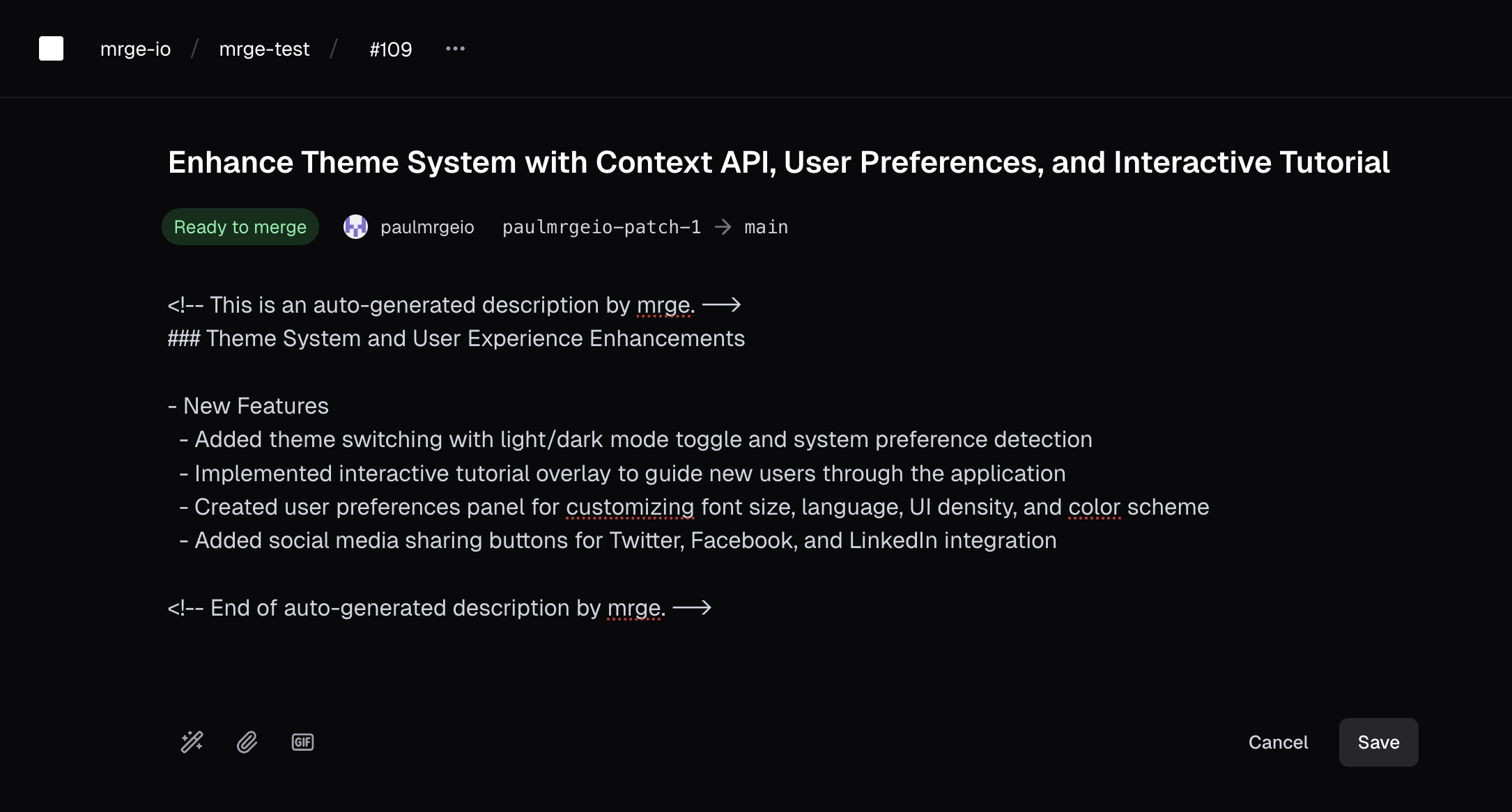
AI-generated PR descriptions summarize changes clearly, helping reviewers quickly understand the context and impact of your pull requests.
By default, cubic generates PR descriptions automatically whenever a new pull request is opened, provided that the setting is enabled for your repository.
To enable or disable auto-generated descriptions:
1. Navigate to the AI review settings for your repository
2. Toggle **AI-generated PR descriptions** on or off
## Auto-generate PR descriptions
AI-generated PR descriptions summarize changes clearly, helping reviewers quickly understand the context and impact of your pull requests.
By default, cubic generates PR descriptions automatically whenever a new pull request is opened, provided that the setting is enabled for your repository.
To enable or disable auto-generated descriptions:
1. Navigate to the AI review settings for your repository
2. Toggle **AI-generated PR descriptions** on or off
 ## Manual generation
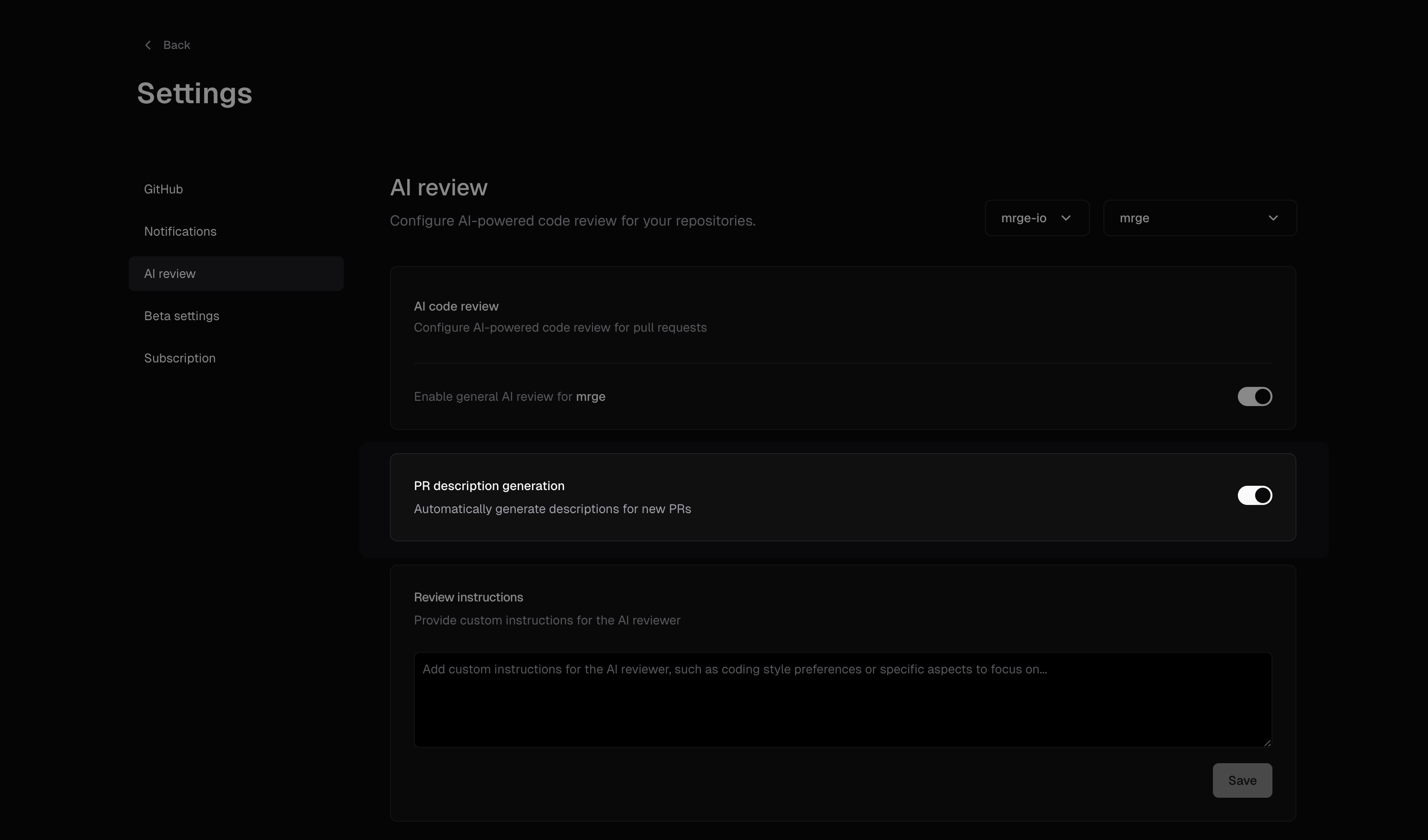
You can manually trigger AI-generated descriptions at any time:
* Click the **AI button** located in the PR description editor
When manually triggering a description:
* If existing text is present, cubic considers this context and enhances it
* If the description field is empty, cubic creates a comprehensive summary from scratch
## Manual generation
You can manually trigger AI-generated descriptions at any time:
* Click the **AI button** located in the PR description editor
When manually triggering a description:
* If existing text is present, cubic considers this context and enhances it
* If the description field is empty, cubic creates a comprehensive summary from scratch
 ## \[beta] Automatic updates on new commits
AI-generated PR descriptions now refresh automatically whenever you push new commits, so reviewers always see an up to date summary. The beta rollout keeps your human-written notes untouched while refreshing the AI block and its commit attribution, and the feature is enabled for all teams by default.
## Custom instructions
Customize how cubic generates PR descriptions to match your team's documentation standards and review needs.
### Setting custom instructions
1. Navigate to [AI review settings](https://cubic.dev/ai-review?tab=descriptions)
2. Click the **Descriptions** tab
3. In the "Description instructions" card, enter your custom guidelines
4. Click **Save** to apply to all future PR descriptions
### What to include in custom instructions
Custom instructions help cubic understand what's important to your team:
**Structure preferences:**
* "Use bullet points for all changes"
* "Include sections for: Summary, Changes, Testing, Deployment"
* "Start with a one-line summary, then detailed explanation"
**Content focus:**
* "Emphasize business impact over technical implementation"
* "Include database migration requirements"
* "Mention affected microservices and API contracts"
* "Highlight security considerations"
**Team-specific needs:**
* "Reference Jira ticket acceptance criteria"
* "Include performance benchmarks for optimization PRs"
* "List manual testing steps required"
* "Note any feature flags added or modified"
### How custom instructions work
* Instructions apply when cubic generates descriptions automatically or manually
* They guide the AI without replacing your ability to edit
* Instructions persist across all PRs in the repository
* Different repositories can have different instructions
### Tips for effective instructions
1. **Be specific:** Instead of "be detailed", say "include database schema changes and migration steps"
2. **Set formatting preferences:** Specify if you want lists, paragraphs, or specific sections
3. **Focus on what matters:** Highlight what reviewers in your team care about most
4. **Iterate:** Refine instructions based on generated descriptions over time
## Best practices
To get the most out of AI PR descriptions:
* Include brief context or bullet points before triggering manual generation
* Clearly mention acceptance criteria or key points you'd like highlighted
This ensures AI-generated content is precisely tailored to your team's needs.
## \[beta] Automatic updates on new commits
AI-generated PR descriptions now refresh automatically whenever you push new commits, so reviewers always see an up to date summary. The beta rollout keeps your human-written notes untouched while refreshing the AI block and its commit attribution, and the feature is enabled for all teams by default.
## Custom instructions
Customize how cubic generates PR descriptions to match your team's documentation standards and review needs.
### Setting custom instructions
1. Navigate to [AI review settings](https://cubic.dev/ai-review?tab=descriptions)
2. Click the **Descriptions** tab
3. In the "Description instructions" card, enter your custom guidelines
4. Click **Save** to apply to all future PR descriptions
### What to include in custom instructions
Custom instructions help cubic understand what's important to your team:
**Structure preferences:**
* "Use bullet points for all changes"
* "Include sections for: Summary, Changes, Testing, Deployment"
* "Start with a one-line summary, then detailed explanation"
**Content focus:**
* "Emphasize business impact over technical implementation"
* "Include database migration requirements"
* "Mention affected microservices and API contracts"
* "Highlight security considerations"
**Team-specific needs:**
* "Reference Jira ticket acceptance criteria"
* "Include performance benchmarks for optimization PRs"
* "List manual testing steps required"
* "Note any feature flags added or modified"
### How custom instructions work
* Instructions apply when cubic generates descriptions automatically or manually
* They guide the AI without replacing your ability to edit
* Instructions persist across all PRs in the repository
* Different repositories can have different instructions
### Tips for effective instructions
1. **Be specific:** Instead of "be detailed", say "include database schema changes and migration steps"
2. **Set formatting preferences:** Specify if you want lists, paragraphs, or specific sections
3. **Focus on what matters:** Highlight what reviewers in your team care about most
4. **Iterate:** Refine instructions based on generated descriptions over time
## Best practices
To get the most out of AI PR descriptions:
* Include brief context or bullet points before triggering manual generation
* Clearly mention acceptance criteria or key points you'd like highlighted
This ensures AI-generated content is precisely tailored to your team's needs.