> ## Documentation Index
> Fetch the complete documentation index at: https://docs.cubic.dev/llms.txt
> Use this file to discover all available pages before exploring further.
# Review in cubic
> Understand, discuss, and merge GitHub pull requests in cubic.
As AI writes more code, it gets harder for people to understand what's shipping. cubic's review
page is built to help.
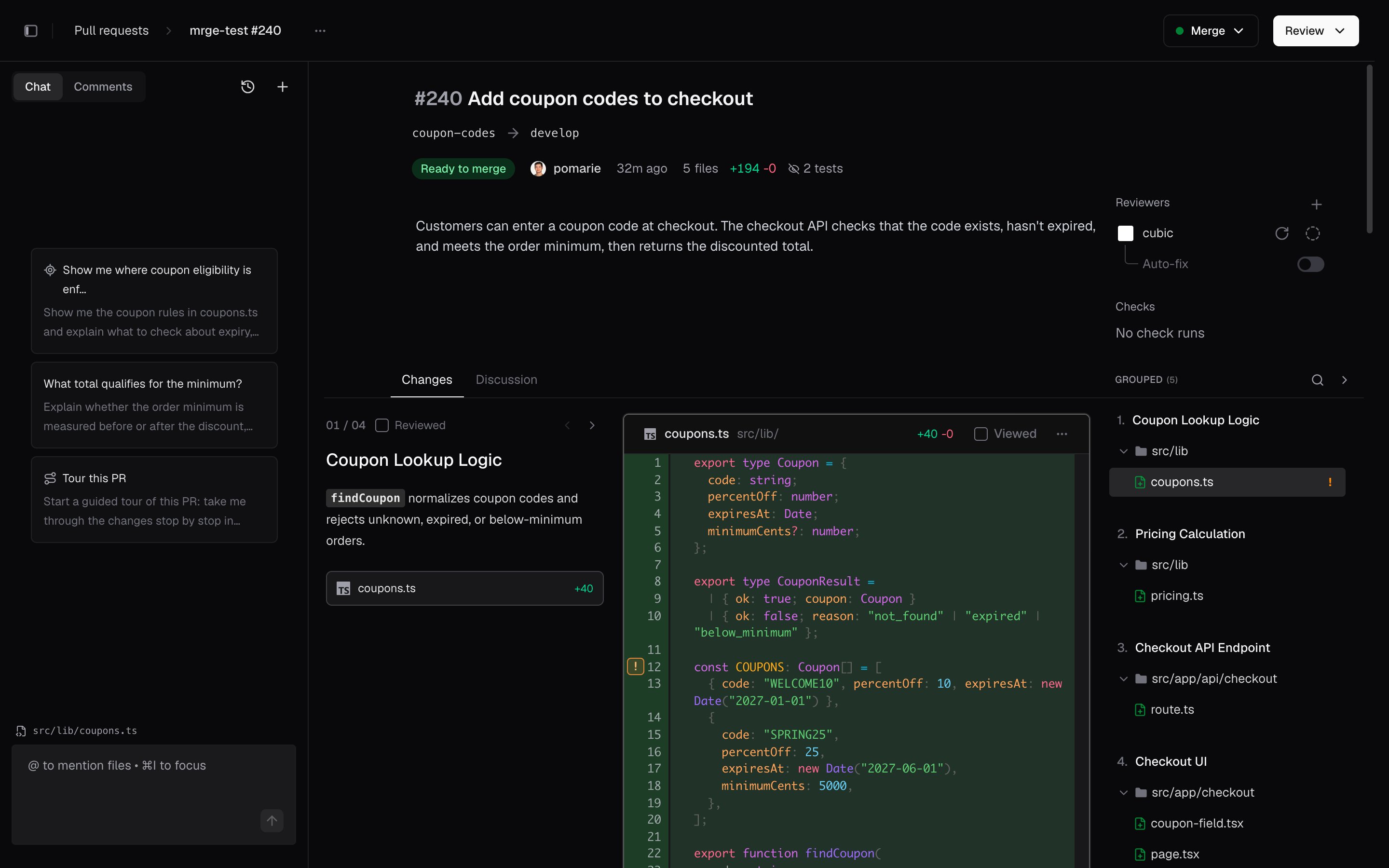
Every GitHub pull request gets its own page in cubic. GitHub lists a PR's files alphabetically. In
cubic, related files are grouped together, the core change comes first, and each group comes with
a short explanation. The PR reads the way a teammate would explain it.
For a guided walkthrough, ask AI chat to tour the PR. It goes stop by stop, opens the code at each
one, and tells you what to check. When you're done, comment, approve, and merge from the same
page. Everything syncs back to GitHub, so nobody else on the team has to switch.
The page works alongside cubic's [AI code review](/ai-review/introduction). The AI reviewer is
designed to flag technical problems, like bugs and security issues. Deciding what matters is still
up to people, and that's the step this page is for.
 ## Open any PR in cubic
Change `github.com` to `cubic.dev` in any pull request link:
```diff theme={null}
- https://github.com/your-org/your-repo/pull/123
+ https://cubic.dev/your-org/your-repo/pull/123
```
You can also open a PR from your [pull request inbox](https://www.cubic.dev/inbox). The first time,
sign in with your GitHub account. If your team hasn't connected its repositories yet, start with
the [developer quickstart](/ai-review/quickstart).
## Read the PR in order
The **Changes** tab splits the PR into groups of files that work together. For example, a change
to an API, its caller, and its tests can be in one group. Read the groups from top to bottom, or
switch to **Tree** to browse by folder.
See [Grouped changes](/code-review-platform/intelligent-diff-ordering) for how cubic orders the
groups and how to track what you've read.
## Take a guided tour
Open AI chat in the left sidebar and ask **"tour this PR"**. AI chat takes you through the change
one stop at a time. At each stop, it opens the code, explains what the code does, and tells you
what to check. Ask a follow-up question at any stop.
To ask about one part of the change, select the code and choose **Add to AI chat**. See
[AI chat](/code-review-platform/ai-sidebar) for questions to try.
## Review only what changed
When the author pushes again, click the version label at the top of the file list. Then choose
**Since your last review** to see only the new changes, not the whole PR. If you haven't reviewed
this PR yet, choose **Since previous push** to see the latest update.
## Finish without leaving cubic
The **Review** and **Merge** buttons are at the top right of the PR page, and its checks are listed
beside the description. You can finish a review without opening GitHub.
Every step, from reading the diff to merging.
See which PRs are waiting on you.
Search PRs and review without leaving the keyboard.
Keep your review queue in the menu bar.
This documentation is built and hosted on [Mintlify](https://mintlify.com), a developer documentation platform.
## Open any PR in cubic
Change `github.com` to `cubic.dev` in any pull request link:
```diff theme={null}
- https://github.com/your-org/your-repo/pull/123
+ https://cubic.dev/your-org/your-repo/pull/123
```
You can also open a PR from your [pull request inbox](https://www.cubic.dev/inbox). The first time,
sign in with your GitHub account. If your team hasn't connected its repositories yet, start with
the [developer quickstart](/ai-review/quickstart).
## Read the PR in order
The **Changes** tab splits the PR into groups of files that work together. For example, a change
to an API, its caller, and its tests can be in one group. Read the groups from top to bottom, or
switch to **Tree** to browse by folder.
See [Grouped changes](/code-review-platform/intelligent-diff-ordering) for how cubic orders the
groups and how to track what you've read.
## Take a guided tour
Open AI chat in the left sidebar and ask **"tour this PR"**. AI chat takes you through the change
one stop at a time. At each stop, it opens the code, explains what the code does, and tells you
what to check. Ask a follow-up question at any stop.
To ask about one part of the change, select the code and choose **Add to AI chat**. See
[AI chat](/code-review-platform/ai-sidebar) for questions to try.
## Review only what changed
When the author pushes again, click the version label at the top of the file list. Then choose
**Since your last review** to see only the new changes, not the whole PR. If you haven't reviewed
this PR yet, choose **Since previous push** to see the latest update.
## Finish without leaving cubic
The **Review** and **Merge** buttons are at the top right of the PR page, and its checks are listed
beside the description. You can finish a review without opening GitHub.
Every step, from reading the diff to merging.
See which PRs are waiting on you.
Search PRs and review without leaving the keyboard.
Keep your review queue in the menu bar.
This documentation is built and hosted on [Mintlify](https://mintlify.com), a developer documentation platform.