> ## Documentation Index
> Fetch the complete documentation index at: https://docs.cubic.dev/llms.txt
> Use this file to discover all available pages before exploring further.
# Configure with cubic.yaml
> Version-control your AI review settings with a single YAML file in each repository.
> **Public Beta:** `cubic.yaml` configuration is now available in public beta.
## Repository configuration
`cubic.yaml` lives in the root of your repository and becomes the source of truth for AI review behavior, ignore patterns, PR descriptions, and custom agents. Commit the file, open a PR, and cubic automatically applies those settings to every future review.
## Organization configuration
You can also manage cubic settings for your entire organization from a single repository. Create a repository named `cubic-config` in your organization and add a `cubic.yaml` file to the root directory. cubic automatically applies these settings to any repository that doesn't have its own configuration.
Organization configuration uses the same schema as repository configuration, including auto-approve settings such as `reviews.auto_approve_behavior`, `reviews.auto_approve`, and `reviews.auto_approve_custom_prompt`.
Organization configuration is read from the default branch of `cubic-config`. Changes are picked up automatically when you push to the default branch, and cubic invalidates its cache so the next review on any repository in the org uses the updated settings.
You must add the `cubic-config` repository to your cubic installation. cubic needs access to read the configuration file.
Individual repositories can still override organization settings by adding their own `cubic.yaml` file. The `cubic-config` repository itself is always treated as organization configuration. Its `cubic.yaml` is never interpreted as a repo-level override.
## Configuration hierarchy
cubic checks for configuration in this priority order:
| Priority | Source | Description |
| ----------- | ------------------------- | --------------------------------------------------------- |
| 1 (Highest) | Repository `cubic.yaml` | Settings defined in the repository root |
| 2 | Organization `cubic.yaml` | Settings from `{org}/cubic-config` repository |
| 3 | UI settings | Per-repository settings configured in the cubic dashboard |
| 4 (Lowest) | Defaults | Built-in cubic defaults |
UI settings are stored per-repository. The "All repositories" option in the dashboard applies changes to all **existing** repositories at once, but new repositories start with built-in defaults. Use organization `cubic.yaml` to ensure consistent defaults across all repositories, including new ones.
### Merging behavior
Partial YAML is supported at every level. Any field you set overrides lower-priority sources. Anything you leave out falls through to the next level.
When both repository and organization YAML exist, cubic **merges** them:
* The organization config acts as a base
* Repository settings override organization settings field-by-field
* Settings not defined in the repository YAML inherit from organization YAML
* Custom agents are **additive**: repository agents come first, then organization agents fill remaining slots
This allows you to define organization-wide defaults in the organization config while letting repositories customize specific settings.
To opt out of custom agents defined in organization config entirely, set `custom_rules: []` in your repository config. This explicitly clears inherited agents rather than adding to them.
**Organization config** (`cubic-config/cubic.yaml`):
```yaml theme={null}
version: 1
reviews:
enabled: true
sensitivity: high
custom_instructions: "Outline any project-specific guidance you want included in reviews."
custom_rules:
- name: No console logs in production
description: Ensure that console.log statements are removed before merging. These should not be present in production code to prevent leaking sensitive information and to improve performance.
```
**Repository config** (`my-repo/cubic.yaml`):
```yaml theme={null}
version: 1
reviews:
sensitivity: low # Override org's "high"
custom_rules:
- name: API validation
description: Check API contracts
- name: React style guide
file_paths:
- docs/react-style-guide.md
- docs/component-rules.md
```
**Effective config** (what cubic uses):
* `enabled: true` — inherited from organization
* `sensitivity: low` — overridden by repository
* `custom_instructions: "Outline any project-specific guidance..."` — inherited from organization
* Custom agents: "API validation" and "React style guide" (from repo), then "No console logs" (from organization)
### Error handling
Validation errors do not block reviews. If the YAML has an issue, cubic falls back to UI settings and shows the exact error on the AI review settings page so you can fix it on your next commit. Note that an invalid repository `cubic.yaml` falls back to UI settings, not to organization configuration—this keeps failure modes predictable.
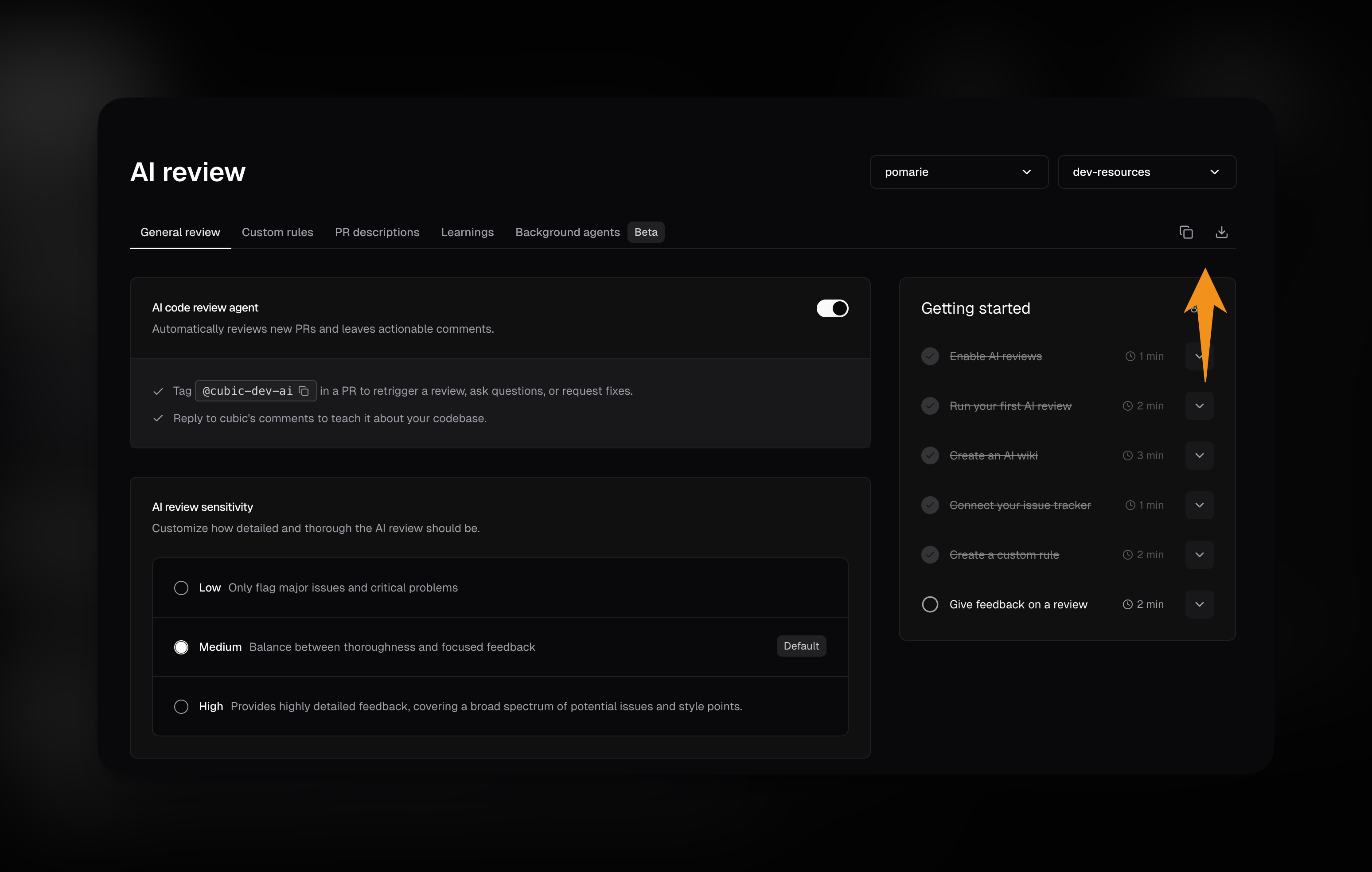
## Exporting current UI settings
If you've already configured AI review settings in the UI, you can export them as a `cubic.yaml` file instead of creating one manually.
1. Go to the [AI review settings page](/ai-review/ai-review-settings) and select a repository.
2. In the tabs area at the top, you'll see two buttons:
* **Copy button:** Copies the YAML configuration to your clipboard
* **Download button:** Downloads a `cubic.yaml` file with your current settings
3. Paste the copied content or use the downloaded file as a starting point for your repository configuration.
The exported YAML includes all your current UI settings. You can then commit this file to your repository root and customize it as needed.
 ## Template `cubic.yaml`
Copy this template into the root of your repository to get started, then delete any sections you don’t need to customize.
```yaml theme={null}
# yaml-language-server: $schema=https://cubic.dev/schema/cubic-repository-config.schema.json
version: 1
# Review settings control AI review behavior.
reviews:
enabled: true
sensitivity: medium
incremental_commits: true
check_drafts: false
architecture_diagrams: false
external_contributors_require_manual_review: false
resolve_threads_when_addressed: true
auto_approve_behavior: disabled
auto_approve: disabled
auto_approve_custom_prompt: |
Approve only documentation, test, and configuration changes.
auto_approve_rules:
exclude_external_contributors: false
exclude:
- '**/migrations/**'
- infra/**
auto_ultrareview: disabled
auto_ultrareview_custom_prompt: |
Run an ultrareview when auth or payment flows change.
# File patterns trigger ultrareviews even when auto_ultrareview is disabled —
# remove this list entirely to fully turn auto-trigger off.
auto_ultrareview_file_patterns:
- '**/migrations/**'
custom_instructions: |
Outline any project-specific guidance you want included in reviews.
# Optional ignore filters; cubic skips reviews when these match.
ignore:
files:
- path/to/generated/**
head_branches:
- wip/*
pr_labels:
- skip-review
max_changed_lines: 5000
# Optional YAML-defined custom agents.
custom_rules:
- name: Example rule
description: Describe what this rule should flag.
# include/exclude lists are optional—delete them to apply everywhere.
include:
- src/**
exclude:
- src/**/*.test.*
- name: Enforce style guide
description: Enforce the repository style guide.
file_paths:
- docs/style-guide.md
- docs/review-rules.md
pr_descriptions:
generate: true
instructions: |
Add reminders or release notes here.
# Issues block (delete if you don't use PR comment fixes or "Fix with cubic" buttons).
issues:
fix_with_cubic_buttons: true
pr_comment_fixes: true
fix_commits_to_pr: true
auto_fix_sign_commits: false
coding_agent_provider: cubic # cubic | cursor_cloud_agent
```
1. Create the file at the repo root.
2. Commit it to a branch and open a PR.
3. Watch the AI review settings page or PR timeline for validation errors or warnings.
See the [AI review settings page](/ai-review/ai-review-settings) for the UI view of these values.
## IDE validation
Editors such as VS Code, Cursor, and JetBrains detect the `# yaml-language-server: $schema=…` directive at the top of `cubic.yaml`. Keep that line (or add it yourself) and the editor downloads [`https://cubic.dev/schema/cubic-repository-config.schema.json`](https://cubic.dev/schema/cubic-repository-config.schema.json) to validate the file structure and surface inline errors before you commit.
## Configuration reference
| Key | Required | Purpose |
| ----------------- | -------- | ----------------------------------------------------------------- |
| `version` | Yes | Schema version. Must be `1`. |
| `reviews` | No | Mirrors AI review settings and lets you define custom agents. |
| `pr_descriptions` | No | Controls AI-authored PR summaries and optional instructions. |
| `issues` | No | Controls "Fix with cubic" buttons and PR comment-requested fixes. |
If you add a top-level key cubic doesn’t recognize yet, the value is ignored and an `unknown_top_level_key` warning appears on the [AI review settings page](/ai-review/ai-review-settings) so you know it had no effect.
## Reviews section
### Core options
| Field | Description |
| -------------------------------------------------- | ---------------------------------------------------------------------------------------------------------------------------------------------------------------- |
| `enabled` | Master toggle for AI reviews on the repository. |
| `sensitivity` | `low`, `medium`, or `high`—controls how picky the AI is about surfacing issues. |
| `incremental_commits` | `true` reviews new commits pushed to open PRs (only new issues are posted); `false` reviews only when the PR is first opened. Default: `true`. |
| `check_drafts` | `true` reviews draft PRs immediately when opened; `false` skips them. Default: `false`. |
| `architecture_diagrams` | `true` includes AI-generated architecture diagrams in review summaries; `false` skips them. Default: `false`. |
| `external_contributors_require_manual_review` | `true` skips automatic reviews for public-repository PRs from external contributors until a trusted installation member manually triggers one. Default: `false`. |
| `resolve_threads_when_addressed` | `true` automatically resolves GitHub threads when cubic detects an issue has been addressed; `false` only updates the comment. Default: `true`. |
| `auto_approve_behavior` | Controls whether auto-approval is disabled, simulated in `shadow` mode, or submitted live to GitHub. Values: `disabled`, `shadow`, `live`. |
| `auto_approve` | Controls when cubic approves clean reviews. Values: `disabled`, `always`, `low_risk_only`, `custom`. |
| `auto_approve_custom_prompt` | Custom approval criteria. cubic only uses this field when `auto_approve` is `custom`. |
| `auto_approve_rules.exclude` | File or directory globs that block auto-approval. If any changed file in a PR matches, cubic will not auto-approve that PR. |
| `auto_approve_rules.exclude_external_contributors` | `true` keeps reviewing public-repository PRs from external contributors, but prevents cubic from auto-approving them. Default: `false`. |
| `auto_ultrareview` | Controls when cubic auto-triggers an [ultrareview](/ai-review/ultrareview). Values: `disabled`, `high_risk_only`, `custom`. |
| `auto_ultrareview_custom_prompt` | Custom criteria describing which PRs warrant an ultrareview. cubic only uses this field when `auto_ultrareview` is `custom`. |
| `auto_ultrareview_file_patterns` | File or directory globs that always trigger an ultrareview. If any changed file in a PR matches, cubic runs an ultrareview. |
| `custom_instructions` | Free-form guidance for the reviewer. Whitespace is trimmed; empty strings clear the value. |
### Ignore filters
Ignore filters control when cubic skips running reviews. They map directly to the “Ignore patterns” controls in the [AI review settings UI](/ai-review/ai-review-settings). All lists accept glob strings, and duplicates/blank entries are dropped automatically.
| YAML path | Effect |
| ---------------------------------- | ---------------------------------------------------------------------------------------------------------------------------------------------------------------------------------------- |
| `reviews.ignore.files` | Skip matching files entirely (same syntax as `.gitignore`). |
| `reviews.ignore.head_branches` | Ignore PRs based on their source branch. |
| `reviews.ignore.base_branches` | Ignore PRs targeting specific base branches. |
| `reviews.ignore.pr_labels` | Ignore PRs with one of these labels. Supports wildcards. |
| `reviews.ignore.pr_titles` | Ignore PRs whose titles match the provided wildcard patterns. |
| `reviews.ignore.max_changed_lines` | Skip automatic reviews when added plus deleted lines exceed this positive integer. Manual review triggers can still override it unless cubic's hard infrastructure cap is also exceeded. |
### Common ignore recipes
Use labels or branch names to control when cubic jumps into a review.
#### Skip review with a label
The most common way to skip a review is by adding a specific label to your PR.
```yaml theme={null}
reviews:
ignore:
max_changed_lines: 5000
pr_labels:
- skip-review
- WIP
- draft
```
#### Skip entire categories of labels
You can use wildcards to ignore any label matching a pattern.
```yaml theme={null}
reviews:
ignore:
pr_labels:
- 'no-ai-*'
```
### Custom agents
* Each agent needs a `name` plus inline `description` text, an ordered `file_paths` list, or both. Optional `include`/`exclude` glob lists apply to both modes.
* Order matters. When you exceed the installation’s rule limit, only the first *N* agents take effect.
* Identical patterns are deduplicated. If an exclude matches an include, the exclude wins.
* Agents defined in YAML appear in the dashboard as read-only “Managed by cubic.yaml” entries so teammates can still see them. Learn more about how agents behave in the UI on the [Custom agents page](/ai-review/custom-agents).
* File-backed agents use repo-relative paths only. Absolute paths, globs, parent-directory traversal, directories, binary files, and unreadable files are rejected or surfaced as warnings.
* The description and file contents are concatenated in the order listed. cubic uses only the first 10,000 characters per custom agent; characters after that limit are not included in the review prompt.
* YAML and Markdown files referenced by file-backed agents are treated as plain text, not parsed as structured rule definitions.
* In organization config, `file_paths` entries are relative to each target repository, not to the `cubic-config` repository. The files must exist in every repository where the org-level agent should apply.
```yaml theme={null}
reviews:
custom_rules:
- name: Enforce style guide
description: Enforce the repository style guide.
file_paths:
- docs/style-guide.md
- docs/react.md
include:
- "src/**/*.tsx"
```
## PR descriptions
| Field | Description |
| ---------------------------- | ------------------------------------------------------------------------------------------------------------------------------------------------------------------------------------- |
| `generate` | Toggle AI-authored PR descriptions. |
| `instructions` | Extra guidance for the summary. Only applied when `generate` is `true`; otherwise it is ignored with a warning. |
| `cubic_review_link` | Include a "Review in cubic" link. Default: `true`. |
| `skip_if_author_description` | Skip AI description generation on new PRs when the author already wrote a substantive description. Empty or template-only descriptions still get an AI description. Default: `false`. |
Some installations disable PR descriptions globally for compliance reasons. If that applies to you, the UI will show a warning even if the YAML enables the feature.
## Issues
| Field | Description |
| ------------------------ | -------------------------------------------------------------------------------------------------------------------------------------------------------------------------- |
| `fix_with_cubic_buttons` | Enable or disable AI-generated “Fix with cubic” calls-to-action inside the issue UI. |
| `pr_comment_fixes` | Allow cubic to make code changes when someone asks for a fix in a PR comment thread. |
| `fix_commits_to_pr` | When `true`, fix commits are pushed directly to the PR branch instead of opening a new PR. |
| `auto_fix_sign_commits` | When `true`, cubic signs the commits it pushes so GitHub marks them as verified. This applies only to the `cubic` coding agent; the Cursor agent always signs its commits. |
| `coding_agent_provider` | Which coding agent applies automatic fixes: `cubic` (built-in agent) or `cursor_cloud_agent` (dispatches a Cursor cloud agent; requires Cursor configuration). |
## Template `cubic.yaml`
Copy this template into the root of your repository to get started, then delete any sections you don’t need to customize.
```yaml theme={null}
# yaml-language-server: $schema=https://cubic.dev/schema/cubic-repository-config.schema.json
version: 1
# Review settings control AI review behavior.
reviews:
enabled: true
sensitivity: medium
incremental_commits: true
check_drafts: false
architecture_diagrams: false
external_contributors_require_manual_review: false
resolve_threads_when_addressed: true
auto_approve_behavior: disabled
auto_approve: disabled
auto_approve_custom_prompt: |
Approve only documentation, test, and configuration changes.
auto_approve_rules:
exclude_external_contributors: false
exclude:
- '**/migrations/**'
- infra/**
auto_ultrareview: disabled
auto_ultrareview_custom_prompt: |
Run an ultrareview when auth or payment flows change.
# File patterns trigger ultrareviews even when auto_ultrareview is disabled —
# remove this list entirely to fully turn auto-trigger off.
auto_ultrareview_file_patterns:
- '**/migrations/**'
custom_instructions: |
Outline any project-specific guidance you want included in reviews.
# Optional ignore filters; cubic skips reviews when these match.
ignore:
files:
- path/to/generated/**
head_branches:
- wip/*
pr_labels:
- skip-review
max_changed_lines: 5000
# Optional YAML-defined custom agents.
custom_rules:
- name: Example rule
description: Describe what this rule should flag.
# include/exclude lists are optional—delete them to apply everywhere.
include:
- src/**
exclude:
- src/**/*.test.*
- name: Enforce style guide
description: Enforce the repository style guide.
file_paths:
- docs/style-guide.md
- docs/review-rules.md
pr_descriptions:
generate: true
instructions: |
Add reminders or release notes here.
# Issues block (delete if you don't use PR comment fixes or "Fix with cubic" buttons).
issues:
fix_with_cubic_buttons: true
pr_comment_fixes: true
fix_commits_to_pr: true
auto_fix_sign_commits: false
coding_agent_provider: cubic # cubic | cursor_cloud_agent
```
1. Create the file at the repo root.
2. Commit it to a branch and open a PR.
3. Watch the AI review settings page or PR timeline for validation errors or warnings.
See the [AI review settings page](/ai-review/ai-review-settings) for the UI view of these values.
## IDE validation
Editors such as VS Code, Cursor, and JetBrains detect the `# yaml-language-server: $schema=…` directive at the top of `cubic.yaml`. Keep that line (or add it yourself) and the editor downloads [`https://cubic.dev/schema/cubic-repository-config.schema.json`](https://cubic.dev/schema/cubic-repository-config.schema.json) to validate the file structure and surface inline errors before you commit.
## Configuration reference
| Key | Required | Purpose |
| ----------------- | -------- | ----------------------------------------------------------------- |
| `version` | Yes | Schema version. Must be `1`. |
| `reviews` | No | Mirrors AI review settings and lets you define custom agents. |
| `pr_descriptions` | No | Controls AI-authored PR summaries and optional instructions. |
| `issues` | No | Controls "Fix with cubic" buttons and PR comment-requested fixes. |
If you add a top-level key cubic doesn’t recognize yet, the value is ignored and an `unknown_top_level_key` warning appears on the [AI review settings page](/ai-review/ai-review-settings) so you know it had no effect.
## Reviews section
### Core options
| Field | Description |
| -------------------------------------------------- | ---------------------------------------------------------------------------------------------------------------------------------------------------------------- |
| `enabled` | Master toggle for AI reviews on the repository. |
| `sensitivity` | `low`, `medium`, or `high`—controls how picky the AI is about surfacing issues. |
| `incremental_commits` | `true` reviews new commits pushed to open PRs (only new issues are posted); `false` reviews only when the PR is first opened. Default: `true`. |
| `check_drafts` | `true` reviews draft PRs immediately when opened; `false` skips them. Default: `false`. |
| `architecture_diagrams` | `true` includes AI-generated architecture diagrams in review summaries; `false` skips them. Default: `false`. |
| `external_contributors_require_manual_review` | `true` skips automatic reviews for public-repository PRs from external contributors until a trusted installation member manually triggers one. Default: `false`. |
| `resolve_threads_when_addressed` | `true` automatically resolves GitHub threads when cubic detects an issue has been addressed; `false` only updates the comment. Default: `true`. |
| `auto_approve_behavior` | Controls whether auto-approval is disabled, simulated in `shadow` mode, or submitted live to GitHub. Values: `disabled`, `shadow`, `live`. |
| `auto_approve` | Controls when cubic approves clean reviews. Values: `disabled`, `always`, `low_risk_only`, `custom`. |
| `auto_approve_custom_prompt` | Custom approval criteria. cubic only uses this field when `auto_approve` is `custom`. |
| `auto_approve_rules.exclude` | File or directory globs that block auto-approval. If any changed file in a PR matches, cubic will not auto-approve that PR. |
| `auto_approve_rules.exclude_external_contributors` | `true` keeps reviewing public-repository PRs from external contributors, but prevents cubic from auto-approving them. Default: `false`. |
| `auto_ultrareview` | Controls when cubic auto-triggers an [ultrareview](/ai-review/ultrareview). Values: `disabled`, `high_risk_only`, `custom`. |
| `auto_ultrareview_custom_prompt` | Custom criteria describing which PRs warrant an ultrareview. cubic only uses this field when `auto_ultrareview` is `custom`. |
| `auto_ultrareview_file_patterns` | File or directory globs that always trigger an ultrareview. If any changed file in a PR matches, cubic runs an ultrareview. |
| `custom_instructions` | Free-form guidance for the reviewer. Whitespace is trimmed; empty strings clear the value. |
### Ignore filters
Ignore filters control when cubic skips running reviews. They map directly to the “Ignore patterns” controls in the [AI review settings UI](/ai-review/ai-review-settings). All lists accept glob strings, and duplicates/blank entries are dropped automatically.
| YAML path | Effect |
| ---------------------------------- | ---------------------------------------------------------------------------------------------------------------------------------------------------------------------------------------- |
| `reviews.ignore.files` | Skip matching files entirely (same syntax as `.gitignore`). |
| `reviews.ignore.head_branches` | Ignore PRs based on their source branch. |
| `reviews.ignore.base_branches` | Ignore PRs targeting specific base branches. |
| `reviews.ignore.pr_labels` | Ignore PRs with one of these labels. Supports wildcards. |
| `reviews.ignore.pr_titles` | Ignore PRs whose titles match the provided wildcard patterns. |
| `reviews.ignore.max_changed_lines` | Skip automatic reviews when added plus deleted lines exceed this positive integer. Manual review triggers can still override it unless cubic's hard infrastructure cap is also exceeded. |
### Common ignore recipes
Use labels or branch names to control when cubic jumps into a review.
#### Skip review with a label
The most common way to skip a review is by adding a specific label to your PR.
```yaml theme={null}
reviews:
ignore:
max_changed_lines: 5000
pr_labels:
- skip-review
- WIP
- draft
```
#### Skip entire categories of labels
You can use wildcards to ignore any label matching a pattern.
```yaml theme={null}
reviews:
ignore:
pr_labels:
- 'no-ai-*'
```
### Custom agents
* Each agent needs a `name` plus inline `description` text, an ordered `file_paths` list, or both. Optional `include`/`exclude` glob lists apply to both modes.
* Order matters. When you exceed the installation’s rule limit, only the first *N* agents take effect.
* Identical patterns are deduplicated. If an exclude matches an include, the exclude wins.
* Agents defined in YAML appear in the dashboard as read-only “Managed by cubic.yaml” entries so teammates can still see them. Learn more about how agents behave in the UI on the [Custom agents page](/ai-review/custom-agents).
* File-backed agents use repo-relative paths only. Absolute paths, globs, parent-directory traversal, directories, binary files, and unreadable files are rejected or surfaced as warnings.
* The description and file contents are concatenated in the order listed. cubic uses only the first 10,000 characters per custom agent; characters after that limit are not included in the review prompt.
* YAML and Markdown files referenced by file-backed agents are treated as plain text, not parsed as structured rule definitions.
* In organization config, `file_paths` entries are relative to each target repository, not to the `cubic-config` repository. The files must exist in every repository where the org-level agent should apply.
```yaml theme={null}
reviews:
custom_rules:
- name: Enforce style guide
description: Enforce the repository style guide.
file_paths:
- docs/style-guide.md
- docs/react.md
include:
- "src/**/*.tsx"
```
## PR descriptions
| Field | Description |
| ---------------------------- | ------------------------------------------------------------------------------------------------------------------------------------------------------------------------------------- |
| `generate` | Toggle AI-authored PR descriptions. |
| `instructions` | Extra guidance for the summary. Only applied when `generate` is `true`; otherwise it is ignored with a warning. |
| `cubic_review_link` | Include a "Review in cubic" link. Default: `true`. |
| `skip_if_author_description` | Skip AI description generation on new PRs when the author already wrote a substantive description. Empty or template-only descriptions still get an AI description. Default: `false`. |
Some installations disable PR descriptions globally for compliance reasons. If that applies to you, the UI will show a warning even if the YAML enables the feature.
## Issues
| Field | Description |
| ------------------------ | -------------------------------------------------------------------------------------------------------------------------------------------------------------------------- |
| `fix_with_cubic_buttons` | Enable or disable AI-generated “Fix with cubic” calls-to-action inside the issue UI. |
| `pr_comment_fixes` | Allow cubic to make code changes when someone asks for a fix in a PR comment thread. |
| `fix_commits_to_pr` | When `true`, fix commits are pushed directly to the PR branch instead of opening a new PR. |
| `auto_fix_sign_commits` | When `true`, cubic signs the commits it pushes so GitHub marks them as verified. This applies only to the `cubic` coding agent; the Cursor agent always signs its commits. |
| `coding_agent_provider` | Which coding agent applies automatic fixes: `cubic` (built-in agent) or `cursor_cloud_agent` (dispatches a Cursor cloud agent; requires Cursor configuration). |