> ## Documentation Index
> Fetch the complete documentation index at: https://docs.cubic.dev/llms.txt
> Use this file to discover all available pages before exploring further.
# AI wiki
> Transform your repository into a searchable knowledge base with AI-generated documentation.
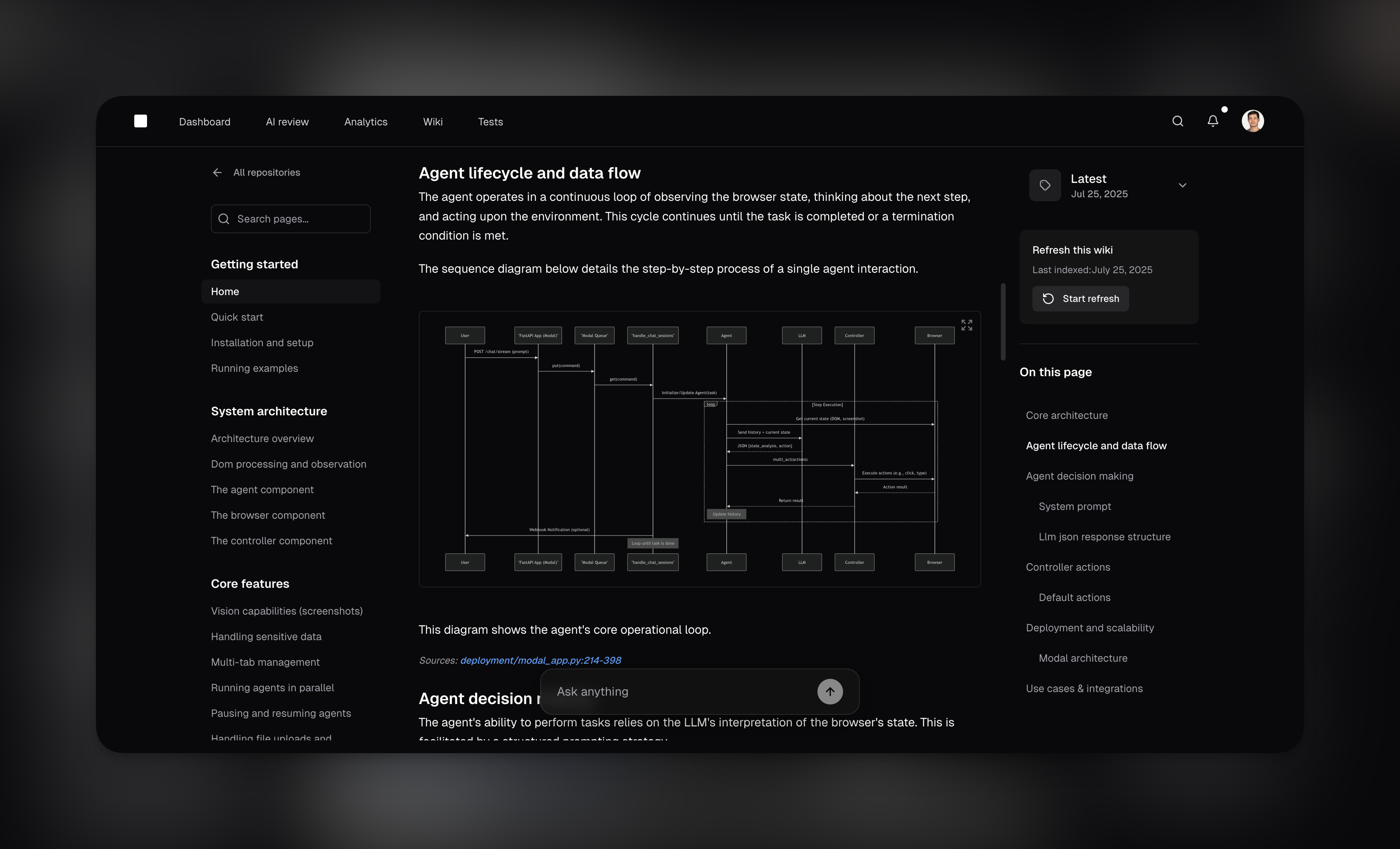
cubic's AI wiki automatically indexes your codebase and produces searchable wikis, complete with links to source code, architecture diagrams, and more.
Use it to get up to speed with unfamiliar codebases or to answer questions about your codebase.
It's especially valuable for onboarding new team members, enabling customer success teams to quickly understand product architecture, and helping anyone navigate complex codebases without deep tribal knowledge.
 ## Getting started
Go to [cubic.dev/wiki](https://cubic.dev/wiki) or click **Wiki** in the main navigation.
Select a repository and click **Generate**. Public repositories can generate wikis on the free
plan. Private repositories require a paid plan. cubic analyzes your codebase and creates
documentation in about 3 minutes.
Browse the documentation or ask questions in natural language to get instant answers.
## Auto-refresh
Keep your wiki documentation automatically up to date without manual intervention. When enabled, cubic periodically regenerates your wiki to reflect the latest code changes.
Scheduled auto-refresh is available on paid plans. Public repositories can still be refreshed
manually on the free plan, while private repository generation and refresh require a paid plan.
Weekly refresh works well for actively developed repositories. Monthly refresh is ideal for stable
codebases with less frequent changes.
## Repo sync
Bring the wiki to where your team and coding agents already work: your repository. When enabled, cubic exports the wiki as markdown files into a directory in your repo (default `.cubic/wiki`) and keeps them current through a rolling pull request.
Each export contains one markdown file per wiki page organized by section, an `index.md` table of contents, and an `AGENTS.md` entry point so coding agents like Claude Code and Cursor can discover and use your docs without any extra setup.
To enable it, open your wiki and turn on **Repo sync** on the wiki card. Confirm the target directory, and cubic opens a pull request from the `cubic/wiki-sync` branch. From then on:
* Every wiki refresh, scheduled or manual, updates the same rolling PR — merge it whenever you want the repo copy updated
* If the wiki content didn't change, cubic skips the commit, so there's no PR churn
* Use **Sync to repo now** from the wiki card's ••• menu to trigger a sync manually
* Sync status — including a link to the open PR — shows directly on the wiki card
The sync directory is managed by cubic: edits you make inside it are overwritten on the next
sync. To change the content, update your custom instructions and regenerate the wiki.
Repo sync requires a paid plan (the same entitlement as auto-refresh) and the cubic GitHub App needs write access to repository contents. If a sync fails with a permissions error, update the app's permissions from your GitHub installation settings. The feature is rolling out gradually — if you don't see the toggle yet, it hasn't reached your workspace.
## Custom instructions
Add custom instructions to guide how your wiki is generated (for example, "Focus on API docs" or "Write for beginners").
Open the ••• menu on a wiki and choose **Custom instructions**. Instructions are saved per repository and applied on the next regeneration. Custom instructions are capped at 10,000 characters.
## Wiki MCP
Your wiki is available through cubic's [MCP server](/ide/mcp-server). Connect Claude Code, Cursor, Windsurf, or any MCP-compatible tool and your AI assistant can query your wiki directly while you code.
This is especially useful when working across multiple repositories. Your AI agent can pull documentation from any repo's wiki without you leaving your editor.
Combine MCP access with auto-refresh to give your AI tools always-current documentation.
## Asking questions
Ask questions about your codebase in plain English and get comprehensive answers with code references. You can even request visual diagrams to better understand complex architectures and flows.
### Chat best practices
* **Be specific** - "How does the OAuth2 refresh token work?"
* **Include context** - "In the checkout flow, how are payments processed?"
* **Request visual outputs** - "Show me a diagram of the authentication flow"
* **Ask for examples** - "Show me examples of error handling"
* **Avoid vague questions** - "How does it work?"
* **Don't be too broad** - "Explain the entire codebase"
* **Don't expect real-time updates** - Regenerate for the latest code changes
### Sharing answers
Every search generates a shareable URL. Share the link with teammates. Anyone in your GitHub organization with repository access can view it.
## Frequently asked questions
When enabled, cubic automatically regenerates your wiki on your chosen schedule (weekly or
monthly). This runs in the background, so your documentation stays current without any manual
effort. Scheduled auto-refresh requires an active paid subscription. Public repositories can
still be refreshed manually on the free plan.
Yes, every search generates a shareable URL for your team members with repository access.
Yes. Wiki works with both public and private repositories, and access still follows GitHub
permissions. Public repositories can generate and refresh wikis on the free plan. Private
repositories require a paid plan for generation and refresh.
Wiki is especially valuable for new team members getting up to speed, customer success teams
understanding product architecture, and anyone who needs to navigate unfamiliar codebases
quickly. It eliminates the need to hunt through code or rely on tribal knowledge.
## Getting started
Go to [cubic.dev/wiki](https://cubic.dev/wiki) or click **Wiki** in the main navigation.
Select a repository and click **Generate**. Public repositories can generate wikis on the free
plan. Private repositories require a paid plan. cubic analyzes your codebase and creates
documentation in about 3 minutes.
Browse the documentation or ask questions in natural language to get instant answers.
## Auto-refresh
Keep your wiki documentation automatically up to date without manual intervention. When enabled, cubic periodically regenerates your wiki to reflect the latest code changes.
Scheduled auto-refresh is available on paid plans. Public repositories can still be refreshed
manually on the free plan, while private repository generation and refresh require a paid plan.
Weekly refresh works well for actively developed repositories. Monthly refresh is ideal for stable
codebases with less frequent changes.
## Repo sync
Bring the wiki to where your team and coding agents already work: your repository. When enabled, cubic exports the wiki as markdown files into a directory in your repo (default `.cubic/wiki`) and keeps them current through a rolling pull request.
Each export contains one markdown file per wiki page organized by section, an `index.md` table of contents, and an `AGENTS.md` entry point so coding agents like Claude Code and Cursor can discover and use your docs without any extra setup.
To enable it, open your wiki and turn on **Repo sync** on the wiki card. Confirm the target directory, and cubic opens a pull request from the `cubic/wiki-sync` branch. From then on:
* Every wiki refresh, scheduled or manual, updates the same rolling PR — merge it whenever you want the repo copy updated
* If the wiki content didn't change, cubic skips the commit, so there's no PR churn
* Use **Sync to repo now** from the wiki card's ••• menu to trigger a sync manually
* Sync status — including a link to the open PR — shows directly on the wiki card
The sync directory is managed by cubic: edits you make inside it are overwritten on the next
sync. To change the content, update your custom instructions and regenerate the wiki.
Repo sync requires a paid plan (the same entitlement as auto-refresh) and the cubic GitHub App needs write access to repository contents. If a sync fails with a permissions error, update the app's permissions from your GitHub installation settings. The feature is rolling out gradually — if you don't see the toggle yet, it hasn't reached your workspace.
## Custom instructions
Add custom instructions to guide how your wiki is generated (for example, "Focus on API docs" or "Write for beginners").
Open the ••• menu on a wiki and choose **Custom instructions**. Instructions are saved per repository and applied on the next regeneration. Custom instructions are capped at 10,000 characters.
## Wiki MCP
Your wiki is available through cubic's [MCP server](/ide/mcp-server). Connect Claude Code, Cursor, Windsurf, or any MCP-compatible tool and your AI assistant can query your wiki directly while you code.
This is especially useful when working across multiple repositories. Your AI agent can pull documentation from any repo's wiki without you leaving your editor.
Combine MCP access with auto-refresh to give your AI tools always-current documentation.
## Asking questions
Ask questions about your codebase in plain English and get comprehensive answers with code references. You can even request visual diagrams to better understand complex architectures and flows.
### Chat best practices
* **Be specific** - "How does the OAuth2 refresh token work?"
* **Include context** - "In the checkout flow, how are payments processed?"
* **Request visual outputs** - "Show me a diagram of the authentication flow"
* **Ask for examples** - "Show me examples of error handling"
* **Avoid vague questions** - "How does it work?"
* **Don't be too broad** - "Explain the entire codebase"
* **Don't expect real-time updates** - Regenerate for the latest code changes
### Sharing answers
Every search generates a shareable URL. Share the link with teammates. Anyone in your GitHub organization with repository access can view it.
## Frequently asked questions
When enabled, cubic automatically regenerates your wiki on your chosen schedule (weekly or
monthly). This runs in the background, so your documentation stays current without any manual
effort. Scheduled auto-refresh requires an active paid subscription. Public repositories can
still be refreshed manually on the free plan.
Yes, every search generates a shareable URL for your team members with repository access.
Yes. Wiki works with both public and private repositories, and access still follows GitHub
permissions. Public repositories can generate and refresh wikis on the free plan. Private
repositories require a paid plan for generation and refresh.
Wiki is especially valuable for new team members getting up to speed, customer success teams
understanding product architecture, and anyone who needs to navigate unfamiliar codebases
quickly. It eliminates the need to hunt through code or rely on tribal knowledge.