
@cubic-dev-ai directly, or reply to cubic’s existing comments to continue the conversation.
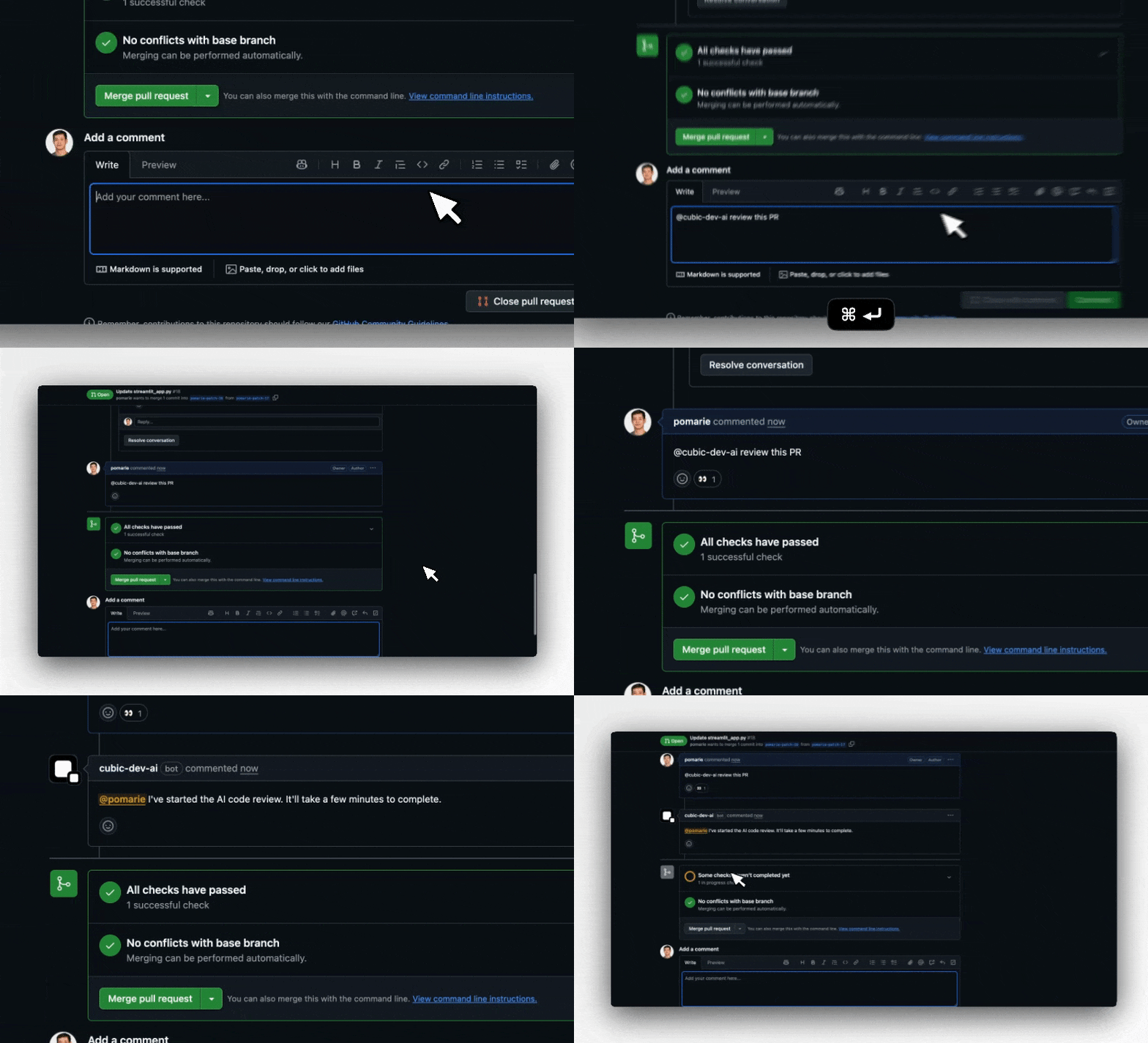
Why use interactive comments
- Ask follow-up questions about code changes without leaving the PR
- Re-trigger AI reviews after addressing feedback
- Get instant clarification on AI suggestions
- Build context through natural, threaded conversations
How to interact with cubic
cubic responds when you:1. Tag it directly
Mention@cubic-dev-ai anywhere in your comment.
cubic won’t appear in GitHub’s @ mention autocomplete dropdown. GitHub doesn’t allow GitHub Apps
to be included in the autocomplete list. Just type the mention manually and it will work.
2. Reply to its comments
Simply reply to any of cubic’s existing comments to continue the conversation. No @ mention is needed for questions or feedback. cubic will react with 👀 to acknowledge your comment in both cases.Replying without explicitly tagging cubic does not authorize code changes. If you want cubic
to edit code, the current comment must explicitly include
@cubic-dev-ai, or you can use the
Fix with cubic button.What you can do
Ask questions
Get instant answers about code, design decisions, or implementation details:- “@cubic-dev-ai will this color code work well in dark mode?”
- “@cubic-dev-ai can you explain how this function works?”
- “@cubic-dev-ai is there a better way to handle this error?”
Trigger reviews
Tag@cubic-dev-ai to run a full or incremental AI review.
- Full review:
@cubic-dev-aior@cubic-dev-ai review this PR - Incremental review:
@cubic-dev-ai incremental reviewor@cubic-dev-ai review changes since the last review
cubic.yaml. If cubic cannot establish a safe range from a completed review, it explains why and
does not fall back to a full review.
When cubic can’t review
Manual review requests run regardless of the repository’s maximum changed-lines setting. If a pull request is above cubic’s technical review maximum, cubic replies with the reviewable line count, the largest files contributing to the diff, and what to do next: ignore generated or fixture files in AI review settings orcubic.yaml, or split the change into smaller pull requests.
Ultrareview
For high-risk or complex pull requests, ask cubic for an ultrareview — a longer, deeper review using cubic’s most capable review models:@cubic-dev-ai ultrareview@cubic-dev-ai ultrareview: focus on auth edge cases
Add one-off context to a review run
You can include extra guidance in the same comment when you trigger a review. cubic forwards the text from your@cubic-dev-ai comment as context for that specific run.
Examples:
@cubic-dev-ai review this and use https://docs.composio.dev/llms.txt@cubic-dev-ai rerun and focus on auth edge cases@cubic-dev-ai review this with the migration notes in https://internal.docs/migration
This context is one-off. It only applies to the run triggered by that comment and does not update
your repository-level AI review instructions.
To stop an in-progress AI review, use the Cancel AI review button in the GitHub Checks UI.
Request fixes
Ask@cubic-dev-ai to generate fixes for identified issues with the “Fix with cubic” button in
the GitHub comment, or by tagging @cubic-dev-ai in the current comment. For example:
- “@cubic-dev-ai fix this issue in this branch”
- “@cubic-dev-ai can you generate a fix for this in a new PR?”
A reply like “can we change this to…” inside a cubic thread is treated as discussion unless that
same comment explicitly tags
@cubic-dev-ai.Provide feedback and continue conversations
Reply directly to cubic’s review comments (no @ mention needed) to: Continue the discussion:- “This would break our legacy API compatibility”
- “What about error handling in this case?”
- “Can you suggest an alternative approach?”
- “This is a false positive, Next.js handles this automatically”
- “The rule is too strict for our use case”
- “This doesn’t apply to React Server Components”
With live auto-approval, replying that cubic’s last blocking issue is wrong also makes cubic check
approval again. See Dismissed issues.
Tips and best practices
- Natural conversations: After cubic’s initial comment, just reply normally for questions and feedback
- Fixes require a fresh explicit tag: Use
@cubic-dev-aior the Fix with cubic button whenever you want cubic to edit code - Context awareness: cubic maintains the full thread context, understanding both the original suggestion and all previous replies
- Be specific: More detailed questions get more helpful answers
- Natural language: Write as you would to a teammate
- Multi-turn discussions: Feel free to have back-and-forth conversations to refine suggestions or explore alternatives