
Documentation Index
Fetch the complete documentation index at: https://docs.cubic.dev/llms.txt
Use this file to discover all available pages before exploring further.
May 21st 2026
Triage codebase scan issues from MCP
cubic’s MCP server can now update a codebase scan issue’s triage status by issue ID. Agents can include optional feedback, and cubic uses it in the same learning flow as in-app scan triage.Learn more in the MCP server docs.May 19th 2026
MCP now connects with OAuth
cubic’s MCP server now uses OAuth for new connections, so Cursor, Cursor Agent, Claude Code, Codex, Gemini CLI, OpenCode, Droid, Pi, VS Code, and other compatible MCP clients can connect without copying a cubic API key.Open your agent’s MCP settings, addhttps://www.cubic.dev/api/mcp, and complete the browser authorization flow. Cursor and VS Code also support one-click install links from the MCP docs and settings page.The updated setup keeps existing API-key clients working during the migration window, but new installs should use OAuth.Learn more in the MCP server docs.May 18th 2026
Searchable keyboard shortcuts
cubic now has a compact keyboard shortcuts drawer, so you can see the shortcuts available on the current page without leaving your PR.
May 18th 2026
Merge status at a glance
The merge button now shows a small color indicator for the current PR’s merge status, so you can tell whether it’s ready to merge without opening the dropdown.Green means ready to merge, orange means it needs attention, and red means there’s a blocker such as requested changes, failing checks, or merge conflicts.
May 16th 2026
Create custom agent proposals from PR chat
When a review discussion turns into a repeatable rule, PR chat can now help turn that into a custom agent proposal.Ask chat to enforce a pattern, flag a recurring issue, or update an existing custom agent. cubic will inspect the repository’s current agents, prepare a create or update proposal, and show the exact rule before anything changes.- Review the title, instructions, enabled state, and file patterns before applying
- Apply or cancel directly from the chat card
- Keep YAML-managed agents read-only from chat
- Avoid duplicate creates when the same proposal was already applied
May 14th 2026
Cross-repo reviews (beta)
Some changes span more than one repository, like a backend API change that needs a frontend update. Cross-repo reviews let cubic check related repositories during review and track companion PRs when the matching change ships.Learn more in Cross-repo reviews.May 11th 2026
Team filters for analytics
Analytics showed organization-wide trends, but managers often needed to understand delivery and AI adoption for a specific GitHub team. It’s now easier to compare team-level work without exporting data or switching views.- Filter Analytics by one or more GitHub teams
- Scope Delivery, AI Review, AI Coding, and Recent issues to selected teams
- Group Delivery and AI Coding member tables by team
May 10th 2026
Filter team members by GitHub team
The Team members table already supports filters for seat status and role, but admins in larger organizations still had to hunt by hand when a group is defined as a GitHub team. You can now narrow the table by one or more GitHub organization teams so only members of those teams remain visible.Teams are matched from GitHub org team membership on each member. Open Settings → Team members.May 9th 2026
High sensitivity preserves more thorough feedback
High sensitivity is meant to reflect a very thorough review, yet some comments in that spirit could still be discarded before they reached the pull request. cubic now keeps more of that grounded feedback—including specific nits on naming, readability, and small polish—when it stays factual, actionable, and tied to the changed code.Adjust the setting per repository under AI review settings.May 8th 2026
Import learnings from other AI code review tools
You can now bring existing learnings from other code reviewers into cubic by uploading a CSV.Open the Learnings Tab and select Import CSV from the three-dot menu. cubic will auto-detect column names and import the rows as learnings you can review and edit alongside the ones it generates automatically.May 7th 2026
Pick former team members as senior reviewers
The senior reviewers picker now surfaces former members (historical committers who are no longer in your installation) with a “Former member” badge, so you can keep learning from the review style of people who have since left the team.As part of this change, the history scan that builds learnings from past reviews now walks up to four years back instead of one, so reviewers whose activity is older still produce useful patterns.April 24th 2026
Recent issues in analytics
You can now open a full Recent issues view from Analytics to search, filter, and sort the issues cubic has flagged across your repositories.Use it to review what was found, see which issues were addressed, and jump back to the original PR context.April 23rd 2026
Analytics API
Analyze cubic adoption with your own tools. Call the Analytics API to get a PR-level data on cubic issues, time to merge, etc.Learn more in the Analytics API docs.April 19th 2026
Bring your ChatGPT or Claude Code subscription to cubic CLI
You can now connect your ChatGPT or Claude Code account and power your local reviews with your favorite models.- Run
cubic auth setupto get started - Switch providers with
Ctrl+Por models withmat any time - Start running reviews, cubic handles the rest
April 19th 2026
Shadow mode for auto-approve
You can now test auto-approve safely before trusting cubic to submit real GitHub approvals. This is useful when you want to tune approval rules, verify what would happen on real PRs, and avoid accidentally bypassing your normal human review process while you roll the feature out.Auto-approve now has separate behavior and policy controls, so you can decide both when cubic should approve and whether it should actually submit approvals to GitHub.- Use Shadow to simulate auto-approval safely while cubic still leaves a normal review comment
- Switch to Live when you’re ready for cubic to submit real approvals
- Keep using Low-risk only, Always, or Custom as the approval policy for clean PRs
April 13th 2026
Better filtering for team members
Managing subscription seats is now faster. The Team members page now has better filtering, so you can quickly narrow the list by seat status and role without manually scanning the full table.
April 9th 2026
Organization-wide YAML configuration
Defining an organization-wide cubic config is now possibile with acubic.yaml file defined in a single central cubic-config repository. This way, organizations with many repositories can define a consistent config once instead of having to configure each repository individually.Create a repository named cubic-config in your organization and add a cubic.yaml file to its root. cubic applies these settings to every repository that doesn’t have its own configuration. The cubic-config repository must be added (be visible) to cubic.Repository-level cubic.yaml override organization settings on a per-property basis, and custom agents are combined with repo-level YAML and UI-defined ones. Learn more in the configuration documentation.April 6th 2026
Review Onboarding Tips
Review comments now include a small tip to help you learn how to use cubic. Each tip will introduce a new feature or tool.April 2nd 2026
New anti-slop custom agent template
The rules library now includes a built-in custom agent for spotting obvious low-quality AI slop in pull requests.It focuses on concrete signals like fabricated references, placeholder text, patchwork overengineering, debug leftovers, and weak tests, while avoiding false positives on cohesive, well-scoped high-quality PRs.You can find it in the rules library and apply it like any other shared custom agent.April 1st 2026
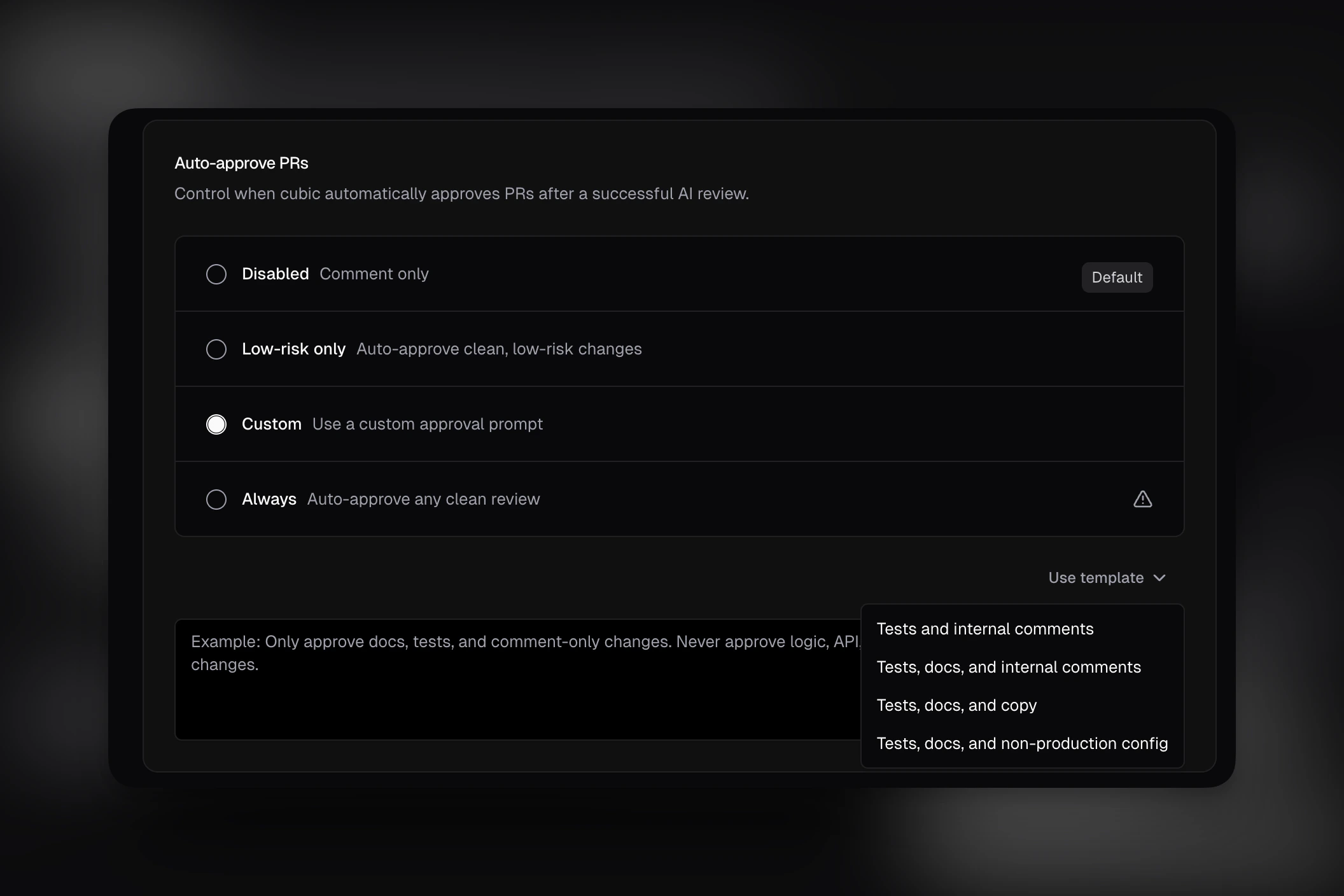
Auto-approve prompt templates
Writing a custom auto-approve rule from scratch was slower than it needed to be. You can now start from built-in templates directly in AI review settings.- Insert a template for tests, docs, copy, internal comments, or non-production config changes
- Edit the generated text before saving
- Use the simplified custom prompt UI without the extra setup chrome
March 30th 2026
Experimental: Skip auto-reviews for external contributors
You can now opt into an experimental setting that prevents cubic from automatically reviewing pull requests from external contributors on public repositories.This is especially useful for large open source projects that receive a high volume of outside contributions and want more control over when those pull requests enter the review flow.When enabled, cubic will skip automatic reviews for those PRs. A trusted installation member can still trigger a review later by manually commenting@cubic review this.March 20th 2026
Link external documentation in custom agent descriptions
Agent descriptions could link to style guides, API docs, or ADRs, but those references weren’t used during review. cubic now reads linked pages and applies that context during review.March 17th 2026
Bulk ticket creation for scan findings
Creating tracking tickets for multiple scan findings one by one was slow. It’s now easier to triage multiple issues at once with bulk ticket creation.Select multiple findings in your codebase scan results and create Linear or Jira tickets for all of them in a single action. You can assign them to the same project, issue type, and team in one go.March 16th 2026
More reliable CLI review model
CLI reviews now run on a better, more consistent model. This fixes cases where reviews produced garbled non-English characters instead of actionable feedback.March 12th 2026
Automatic issue creation for codebase scans
Moving codebase scan findings into your team’s backlog required manual triage. cubic can now automatically create Linear or Jira tickets for high-risk issues after a scan completes.- Risk thresholds: Only create tickets for issues that meet your minimum risk score
- Category filtering: Limit automatic tickets to specific categories like Security or Data Integrity
- Rate limits: Set a maximum number of issues created per day to prevent backlog noise
- Smart routing: Send issues directly to the relevant Linear team or Jira project
March 10th 2026
Confluence and Notion integrations
Reviewing code without the original technical specifications leads to missed architectural requirements. You can now connect Confluence and Notion to bring your documentation directly into AI reviews.When you link a Confluence or Notion page in your PR description, cubic reads it to understand your architecture decisions and requirements.- Context-aware reviews: The AI checks your code against documented specifications and ADRs
- Smarter PR descriptions: cubic references relevant documentation when generating PR summaries
- Automatic linking: cubic detects Confluence and Notion URLs in your PR and associates them automatically
March 9th 2026
Per-member filtering in analytics
Understanding how AI coding tools impact individual developer workflows was difficult with only team-wide metrics. You can now filter your analytics dashboard by specific team members.- Individual insights: Track PR velocity, review times, and AI interaction stats for specific developers
- Multi-select: Compare metrics across a subset of your team
- Consistent filtering: Your member selection applies across all charts, including review effort, time to merge, and violation density
March 6th 2026
Fix requests now require explicitly tagging cubic in the current comment
We tightened how cubic interprets GitHub comment threads for code changes.Questions and feedback can still happen naturally by replying to cubic comments, but cubic will only generate or push code changes when the current comment explicitly tags cubic, for example with@cubic or @cubic-dev-ai.- Replies in an existing cubic thread without a fresh mention are treated as discussion, feedback, or questions
- Fix requests still work from the Fix with cubic button
- This prevents accidental edits when teammates are discussing an issue inside a cubic-started thread
March 4th 2026
20% faster code reviews
Waiting for AI reviews to finish added friction to the PR workflow. Reviews now complete 20% faster, delivering feedback sooner on every pull request.March 4th 2026
Control linked issue visibility in PR reviews
Teams using Linear, Jira, or Asana integrations had no way to keep issue details out of public PR comments while still benefiting from issue-aware reviews. You can now control whether the “Linked issue analysis” section appears in review comments.- New toggle in Settings > Integrations: Show linked issue analysis in reviews
- When disabled, issue context still improves AI review quality but is not posted publicly
- Enabled by default — no change for existing users
- Available for Linear, Jira, and Asana integrations
March 2nd 2026
Friendly commit messages by the cubic coding agent
Now the cubic coding agent writes friendly commit messages. It tells you exactly what it’s fixed and why.February 28th 2026
Ability to stop the cubic coding agent
Now you can stop the cubic coding agent. Go to the progress page by clicking onView progress in a GitHub comment and press Stop.February 27th 2026
Wiki quality improvements
The wiki is now more accurate, more thorough, and better at understanding cross-file dependencies.We’ve improved the context used by models when generating the initial file and wiki structure. The system now goes deeper to understand cross-system dependencies, giving you richer insights into how your codebase fits together.You’ll see deeper insights into your codebase, clearer documentation of how components interact, and more comprehensive coverage of code structure and patterns.February 18th 2026
cubic plugin now works with OpenCode, Codex, Cursor, Factory Droid, Pi, and Gemini
The cubic plugin was previously only available in Claude Code. You can now install it in OpenCode, Codex, Cursor, Factory Droid, Pi, and Gemini CLI using a single npx command.npx @cubic-plugin/cubic-plugin install --to <target>sets up the MCP server for any supported tool- Use
--to allto install across all targets at once - Uninstall with the same
--toflag:npx @cubic-plugin/cubic-plugin uninstall --to <target>
February 17th 2026
Open any GitHub PR in cubic by swapping the URL
Switching between GitHub and cubic to review a PR required navigating through the dashboard. Replacegithub.com with cubic.dev in any GitHub pull request URL to open it directly in cubic.- Works from any tab on the PR — conversation, commits, or files changed
- Redirects to the cubic PR review view with full context
github.com/acme/api/pull/42/files becomes cubic.dev/acme/api/pull/42/files.February 13th 2026
cubic plugin for Claude Code
Getting cubic context into Claude Code required switching between your editor and the browser. You can now access review issues, wiki pages, team learnings, and scan results directly in your Claude Code session.- 5 slash commands:
/cubic:comments,/cubic:run-review,/cubic:wiki,/cubic:scan,/cubic:learnings - 4 auto-triggered skills that activate contextually, including
env-setupfor automatic API key configuration - Works on macOS, Linux, and Windows (via Git Bash)
/plugin marketplace add mrge-io/cubic-claude-plugin then /plugin install cubic@cubic. Requires Claude Code v1.0.33+ and a cubic API key.Learn more in the Claude Code plugin docs. The plugin is open source.February 13th 2026
Sub-agent instructions are now included in PR review prompts
The “copy prompt for AI agents” snippet now includes instructions for coding agents to use sub-agents to investigate and fix issues.This improves how review tasks are delegated and helps produce more complete, consistent review output across complex pull requests.February 12th 2026
New MCP tool: get_pr_issues
We’ve added a new MCP tool, get_pr_issues, for retrieving PR review issues directly.This provides a standard way to access review issue data and makes it easier to build integrations and workflows around PR issues.February 11th 2026
Skills from more AI coding tools are now auto-ingested
cubic now detects and includes skills from Codex (.codex/skills/), OpenCode (.opencode/skills/), Windsurf (.windsurf/skills/), Gemini (.gemini/skills/), and the cross-tool .agents/skills/ directory, in addition to the existing .claude/skills/ and .cursor/skills/ support.If your team uses skills from these tools to define coding patterns, workflows, or conventions, cubic picks them up automatically during code reviews.February 9th 2026
Add one-off review context from GitHub comments
When you trigger a review from a GitHub comment, cubic now forwards the rest of your message as per-run review context.This lets you include temporary guidance like focus areas, external docs pages, or anllms.txt URL without changing repository-wide settings.For example:@cubic-dev-ai review this and use https://docs.composio.dev/llms.txt@cubic-dev-ai rerun and focus on auth edge cases
Export team member analytics to CSV
Sharing delivery metrics with stakeholders required manual data collection or screenshots. You can now download per-user delivery stats as a CSV file directly from the analytics dashboard.- Export includes all visible metrics: cubic reviews, issues flagged and fixed, reviews given, review cycles per PR, and lines of code changed
- CSV respects current filters and time period selection
- File automatically includes the export date in the filename
February 7th 2026
Auto-approving is now generally available
Auto-approve was previously an experimental setting. It now lives in the main AI review settings and allows cubic to approve PRs when certain conditions are met.- cubic can approve a PR when it determines the change is low risk, or when it matches a custom prompt you define.
- The setting is off by default — enable it in your AI review settings when you’re ready.
February 6th 2026
Skills are now auto-ingested as context files
cubic now automatically detects and includes.claude/skills/ files as context during code reviews. If your team uses Claude Code skills to define coding patterns, workflows, or conventions, cubic will use them to better understand your codebase.No configuration needed — just commit your skills and cubic picks them up.February 5th 2026
Fix PRs merged analytics is now available
The Fix PRs merged metric is now available in Analytics.You can use it to track how many cubic-authored fix PRs were merged in the selected period.February 4th 2026
CLI sessions analytics is now available for everyone
The CLI sessions metric was previously internal-only. It’s now available to everyone in the analytics dashboard so you can measure CLI adoption across your team.Open your analytics dashboard to view the new metric.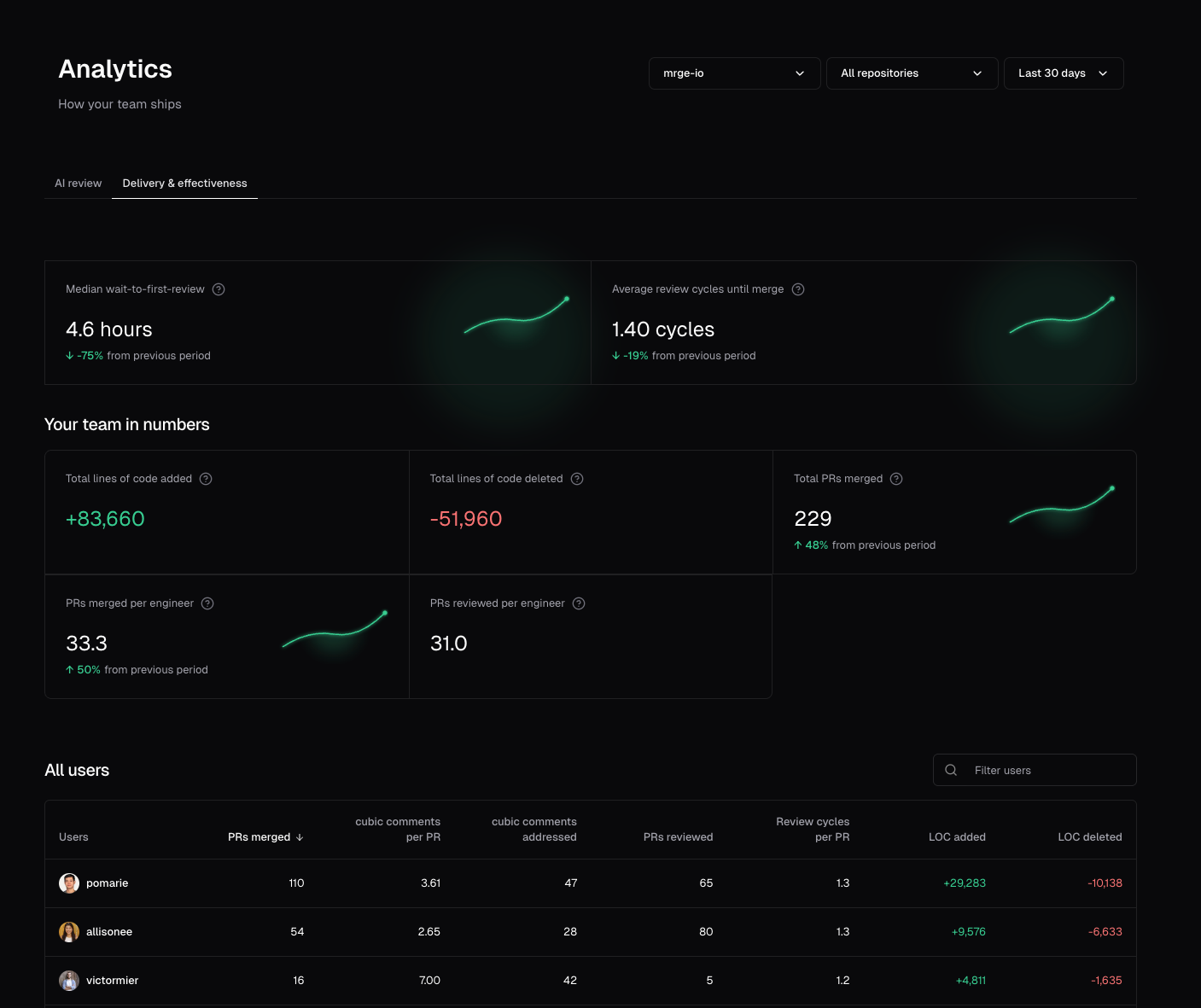
February 3rd 2026
Notifications now use work emails
Email notifications for repo scans, wiki completions, and other alerts now prefer your configured work email over your GitHub profile email.If you’ve set a work email in your team settings, cubic will send notifications there instead of your GitHub email (which may be a noreply address). This ensures notifications reach your actual inbox.February 3rd 2026
Faster CLI performance
The cubic CLI is now significantly faster across all operations.Command execution, file processing, and response times have been optimized for a smoother developer experience.February 1st 2026
Custom auto-approve criteria
You can now define your own criteria for when cubic auto-approves PRs. Choose the new Custom option in AI review settings and write a prompt describing when PRs should be approved.For example, you might only want to auto-approve changes to documentation, configuration files, or tests—while requiring human review for any source code changes. Your custom prompt gives you full control.Note that custom approval only applies when cubic finds no issues. The standard review always runs first; your criteria provide an additional approval gate for clean PRs.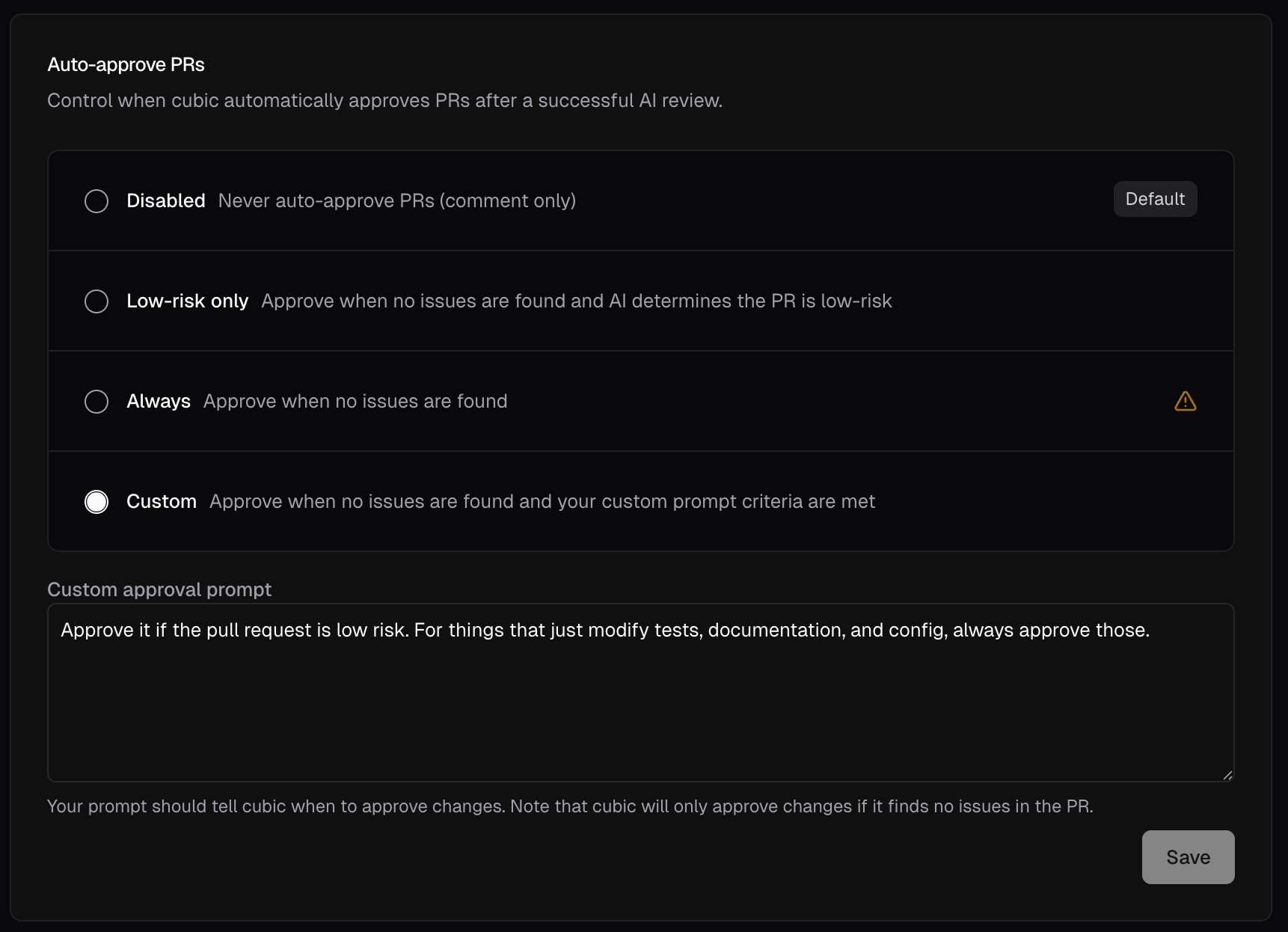
January 30th 2026
Faster onboarding
Onboarding is now significantly faster, especially for organizations with many repositories. UI performance has also improved throughout settings and configuration.January 28th 2026
Install the CLI without Node.js
The cubic CLI can now be installed without requiring Node.js or npm:January 21st 2026
Faster onboarding
Teams with many repositories used to face slow onboarding. We’ve massively sped that up and polished the experience, so you can get started with cubic faster.January 20th 2026
Update your senior reviewers
cubic learns from your senior engineers to produce more actionable PR reviews. You can now update your selected senior engineers directly in AI review settings.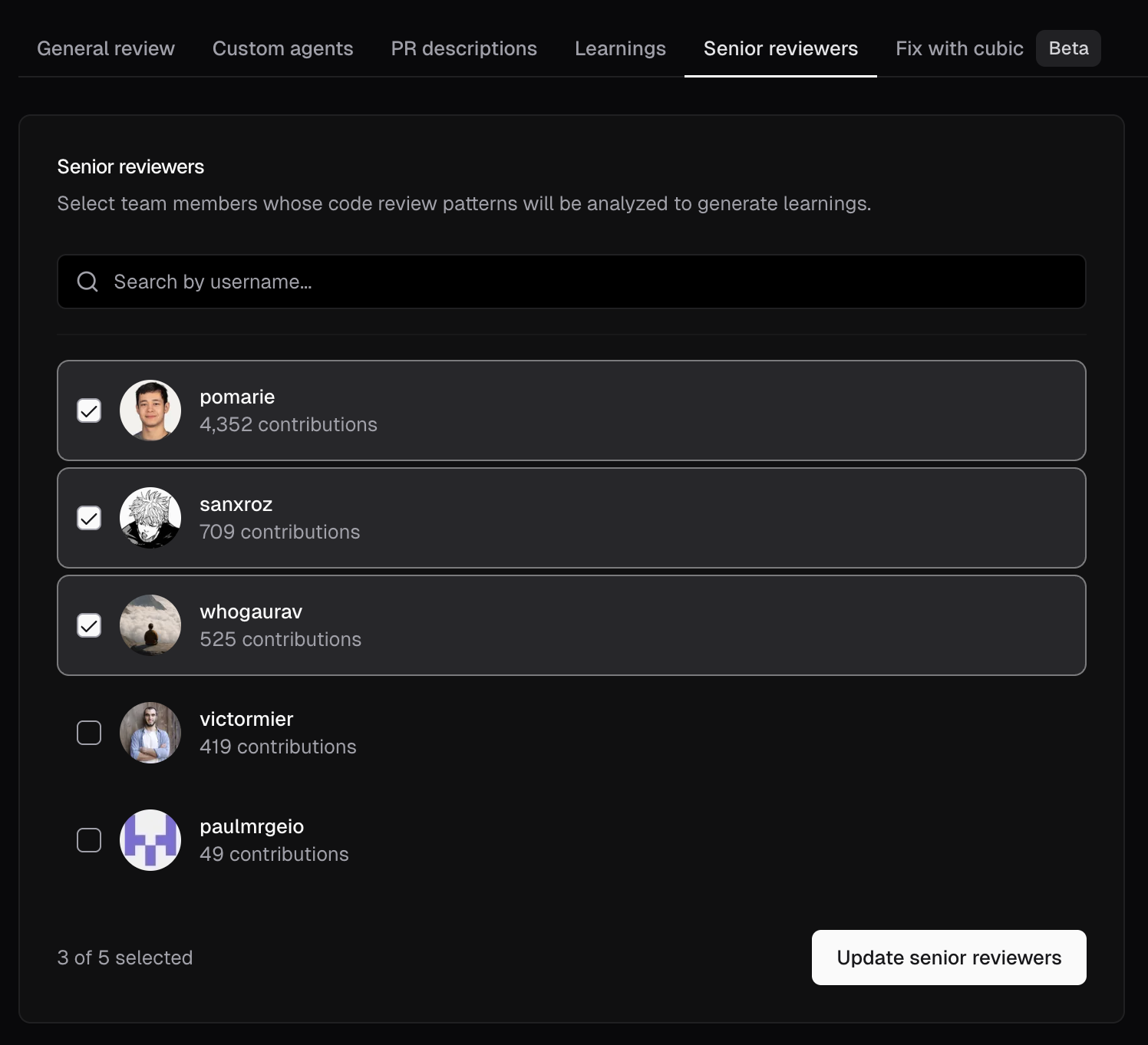
January 15th 2026
Review draft pull requests
cubic can now automatically review draft PRs. This is disabled by default, but you can enable it in AI review settings.January 11th 2026
Custom instructions for wiki generation
You can now add custom instructions to guide how your wiki is generated. Open the More actions menu on a wiki, choose Custom instructions, and your guidance will be applied on the next regeneration. Learn more in the AI wiki docs.January 10th 2026
Improved wiki sharing
Wiki pages now have dedicated Share and Integrations buttons for easier access. Share your wiki with a single click, and quickly connect to Cursor or MCP from the new integrations menu.January 10th 2026
Free plan updated to 20 PR reviews per month
The free plan monthly limit has been adjusted from 40 to 20 AI reviews per month. This change helps us maintain service quality while continuing to offer a generous free tier for individual developers and small teams.January 8th 2026
Smarter file selection for large PRs
When a PR exceeds the file review limit, cubic now prioritizes the most important files and skips lower-signal ones like tests.January 7th 2026
Learn from your senior engineers
cubic now learns directly from your best reviewers. During onboarding, select your most experienced reviewers, and cubic automatically analyzes their historical PR reviews to extract learnings from the patterns they consistently validate.- Automatic learning extraction: cubic identifies what your senior engineers care most about in code reviews
- Visible in Learnings Tab: All extracted learnings appear in your Learnings Tab as “Team patterns”
January 4th 2026
Merge confidence summary is now generally available
The merge confidence summary feature has graduated from experimental and is now available for all users. This feature adds a 1-5 confidence score to cubic’s reviews, helping you quickly assess the risk of merging a pull request.The score considers factors like test coverage, code complexity, and potential regressions to give you a high-level view of merge safety before you dig into the details.Enable it in AI review settings, or viacubic.yaml:January 3rd 2026
December 29th 2025
Auto-approve PRs [Experimental]
We’ve added a new experimental feature that lets cubic automatically approve PRs after a successful AI review. This is especially useful for teams that want to unblock low-risk PRs without waiting for a human reviewer.By default, auto-approve is disabled and cubic only comments on PRs. You can change this to approve when no issues are found and the AI determines the PR is low-risk, or approve all PRs without issues regardless of risk.Enable in AI review settings under Experimental, or viacubic.yaml:December 28th 2025
Search for settings with ⌘K
Finding the right setting in cubic’s dashboard can be tricky when you’re still learning where everything lives.Now you can press⌘K (or Ctrl+K on Windows) to search for any AI review setting by name, like “sensitivity”, “ignore files”, or “PR descriptions”, and jump straight there.December 28th 2025
Custom agents naming update
We’ve renamed this feature to “Custom Agents” across the product. This better reflects what they actually do - they’re not just static rules, but intelligent agents that understand context, learn from feedback, and adapt their review behavior.Everything works exactly the same. Your existing agents, settings, and configurations are unchanged.December 27th 2025
Review PRs in cubic directly from GitHub
AI-generated PR descriptions can now include a link to open the PR in cubic. One click takes you from GitHub to cubic’s review interface with full context, architecture diagrams, and AI insights.Enable this experimental feature in AI review settings under Experimental, or viacubic.yaml:December 25th 2025
Smarter reply intent
We improved the model that decides when cubic should reply, so it’s less likely to jump into human-to-human threads.Before, cubic was too eager to reply to these (see this example of a discussion between humans in the PostHog repository).December 25th 2025
Mention cubic to run a review
Until now, tagging@cubic or @cubic-dev-ai in a GitHub comment without a command would display a help message listing available actions. Now a bare mention triggers a review automatically.December 25th 2025
Merge confidence summary
Assessing the risk of merging a pull request often requires manually weighing test coverage, code complexity, and potential regressions.We’ve added a new experimental feature: a merge confidence score included directly in your reviews.It shows a high-level confidence score summarizing the safety of the mergeDecember 21st 2025
Experimental AI review section
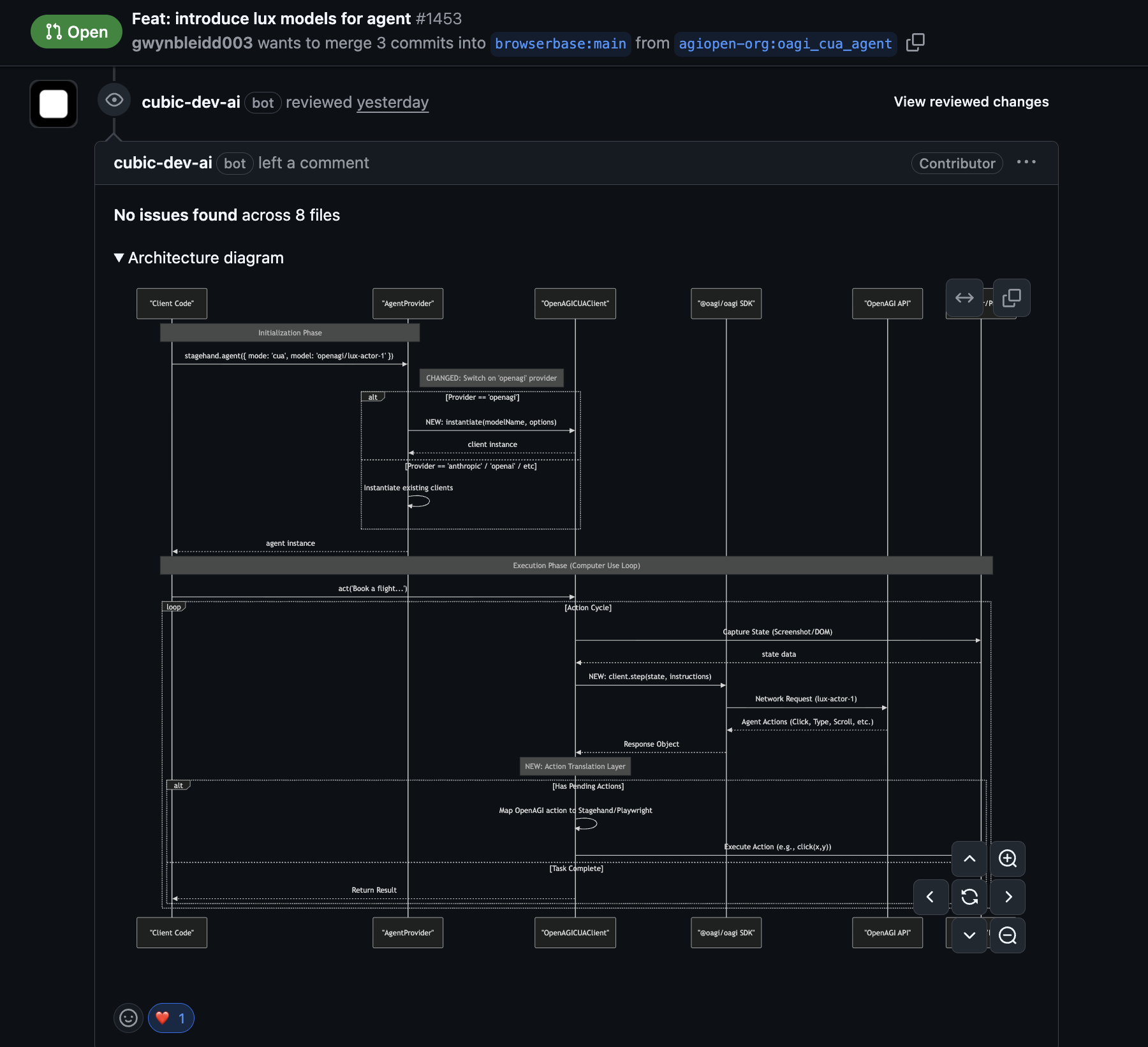
We’ve added an experimental section in AI review settings so power users can opt into early features. The first experiment available is architecture diagrams in cubic reviews.- Architecture diagrams visualize how changes connect across files and components
- They highlight scope and data flow before you dig into diffs
December 19th 2025
Background agent improvements
Tracking the status of AI fixes and managing how they were applied was often opaque. It’s now easier to follow the agent’s progress and control how fixes are delivered.- Direct fixes: cubic can now push fixes directly to your PR branch. Tag
@cubic-dev-aiwith “fix this in the commit” to apply changes directly. - Isolated PRs: Tag
@cubic-dev-aiwith “fix this in a new PR” to keep changes in a separate branch. - Faster execution: Agents initialize more quickly and handle transient errors better.
- Live status: Fix comments now include a link to a real-time progress page.
December 18th 2025
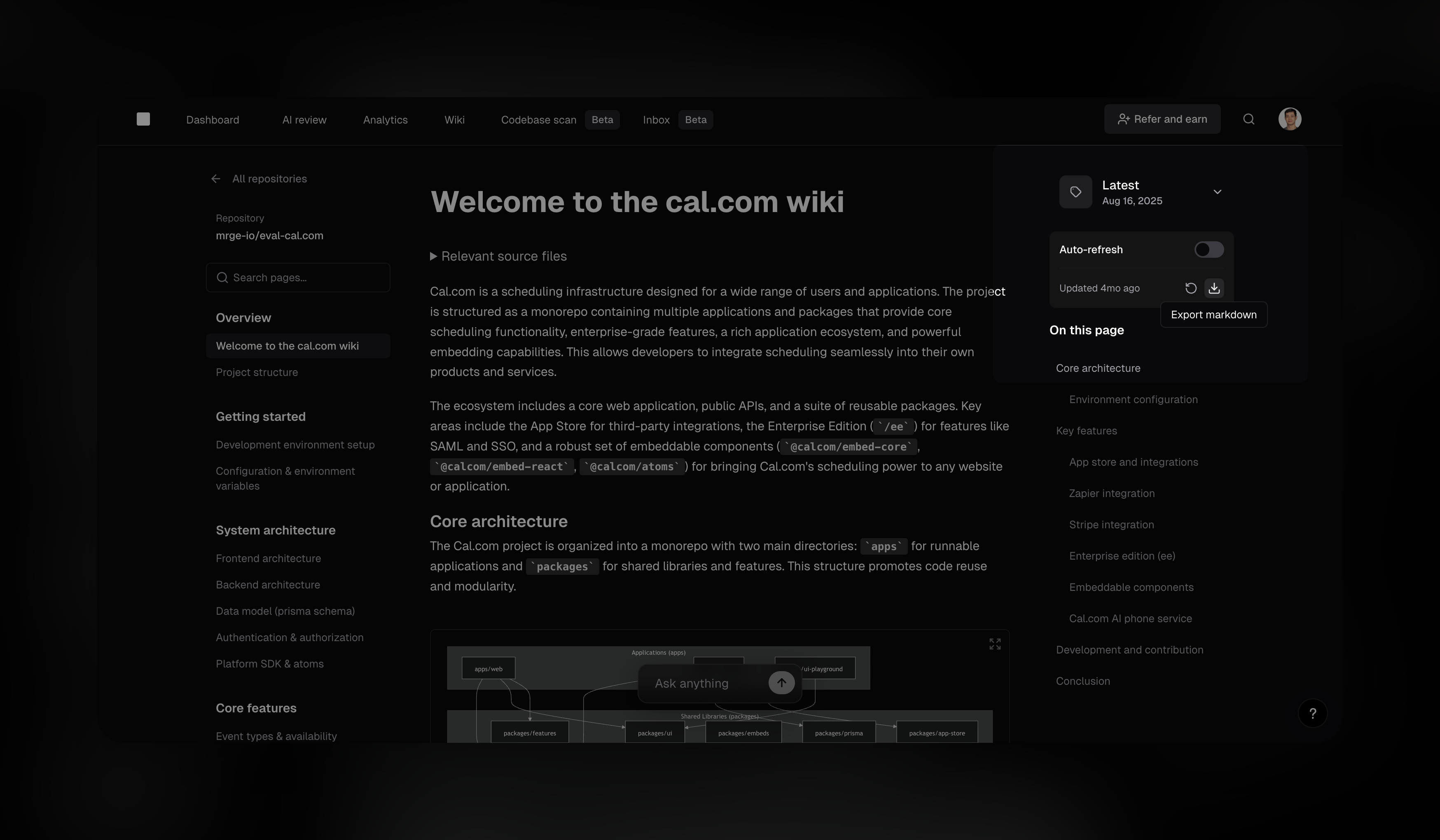
Download wikis as markdown
You can now export any AI wiki as a markdown file. This makes it easy to pipe the content into existing documentation pipelines or even commit it to your own repository.- One-click export: Download the current wiki version directly from the sidebar
- Great for docs tooling: Handy for workflows like Read the Docs and internal repos
December 16th 2025
Auto-resolve threads when issues are addressed
When cubic detects that a code review comment has been addressed by a subsequent commit, it can now automatically resolve the GitHub thread—no manual cleanup needed.- Automatic thread resolution: When you push a commit that fixes an issue cubic flagged, the thread is marked as resolved
- Enabled by default: New installations have this enabled automatically
- Configurable per repository: Toggle in AI review settings or via
cubic.yaml
cubic.yaml: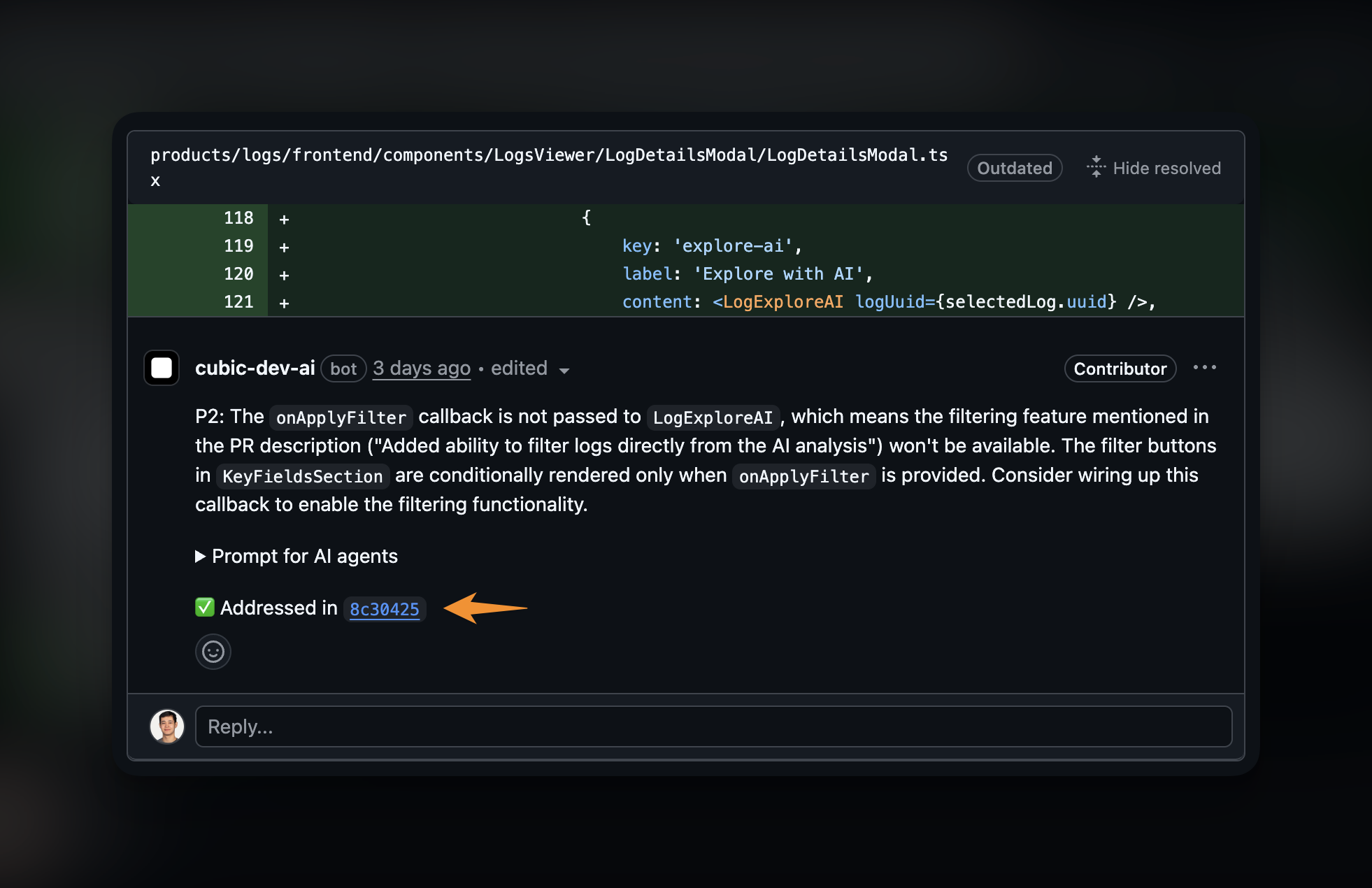
December 10th 2025
Wiki auto-refresh
Keeping documentation in sync with code is often a manual, forgotten chore.cubic’s AI Wiki can now automatically stay up to date. You can schedule wikis to regenerate weekly or monthly, ensuring your documentation always reflects the latest changes without any manual effort.- Set it and forget it: Choose your refresh schedule and let cubic handle the rest
- Always current: New team members and non-technical stakeholders always see the latest architecture and feature explanations
December 9th 2025
Incremental reviews
When you push new commits to an open PR, cubic will now review those incremental changes. Comments are only posted when new issues are discovered, so you won’t see repeated feedback on existing code.- Faster feedback: Reviews complete in seconds by focusing only on what changed
- Less noise: Existing issues aren’t repeated; only new problems are flagged
incremental_commits field in cubic.yaml.December 1st 2025
One-click feedback
Giving feedback on cubic’s AI comments is much easier. cubic now pre-populates a thumbs up and thumbs down on every review comment. This allows you to flag false positives or validate good catches in a single click – and ultimately improving cubic’s accuracy.You can enable this in the AI review settings.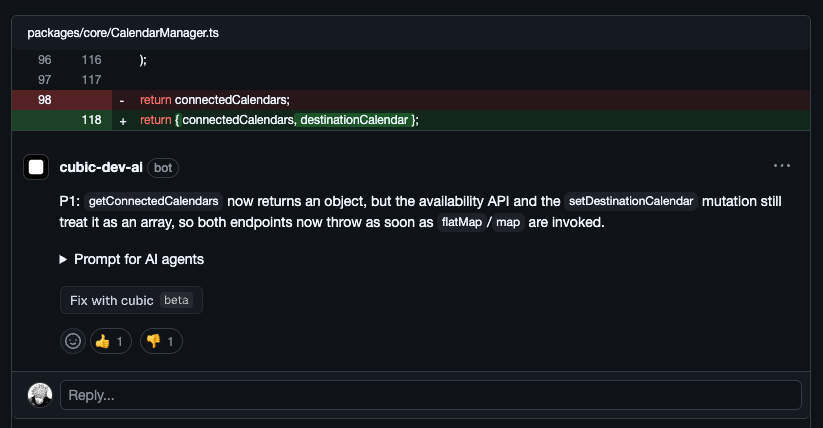
November 29th 2025
Priority labels on all AI review comments
AI review comments now display priority labels (P0–P3) that reflect the severity of the issue.- P0: Critical issues like security vulnerabilities, data loss, or crashes
- P1: High-priority bugs and significant logic errors
- P2: Medium-priority code quality and maintainability concerns
- P3: Low-priority style suggestions and minor optimizations
November 28th 2025
Identifying team members in your subscription
Identifying team members by GitHub handle alone in the cubic subscription team list was difficult.You can now see full GitHub display names alongside handles when managing seats and roles.November 25th 2025
Improved prompt for AI agents
The “Prompt for AI agents” copy now asks your AI to verify issues before fixing them. Many of you were already doing this manually—now it’s built in.November 25th 2025
Bulk update AI review settings
Managing AI review settings across dozens of repositories was previously a manual, repetitive process. It’s now easier to configure AI review behavior for your entire organization in one go.When you select “All repositories” in the repository picker, changes to your AI review settings—like enabling reviews or PR descriptions—are automatically applied to every repository you have access to.- One-click configuration: Enable or disable AI features for all repositories simultaneously
- Smart validation: Automatically checks permissions for each repository during the update
- Detailed feedback: See exactly which repositories were updated and if any failed
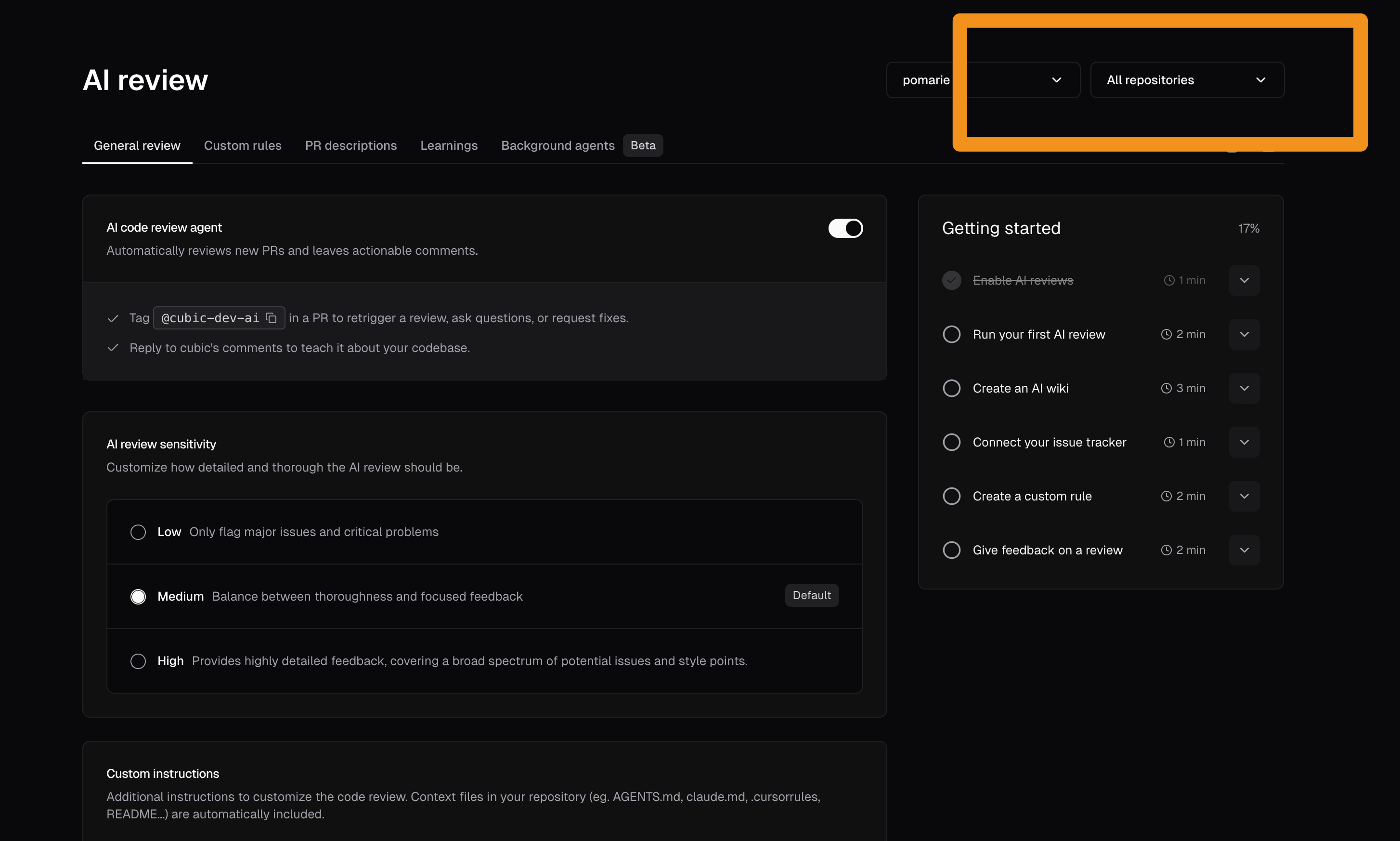
November 23rd 2025
Run your first AI review when you sign up
New users can now trigger an AI review as soon as they sign up—no need to push a fresh PR first. This lets teams see cubic in action immediately on their existing work instead of waiting for the next commit.November 21st 2025
Easily spot noisy custom agents
If a custom agent is often ignored by reviewers, it is probably too noisy.We now highlight these agents in your custom agents list with a “Low acceptance” badge. This makes it easier to find agents that need tuning or removal so your AI reviews stay focused on real issues.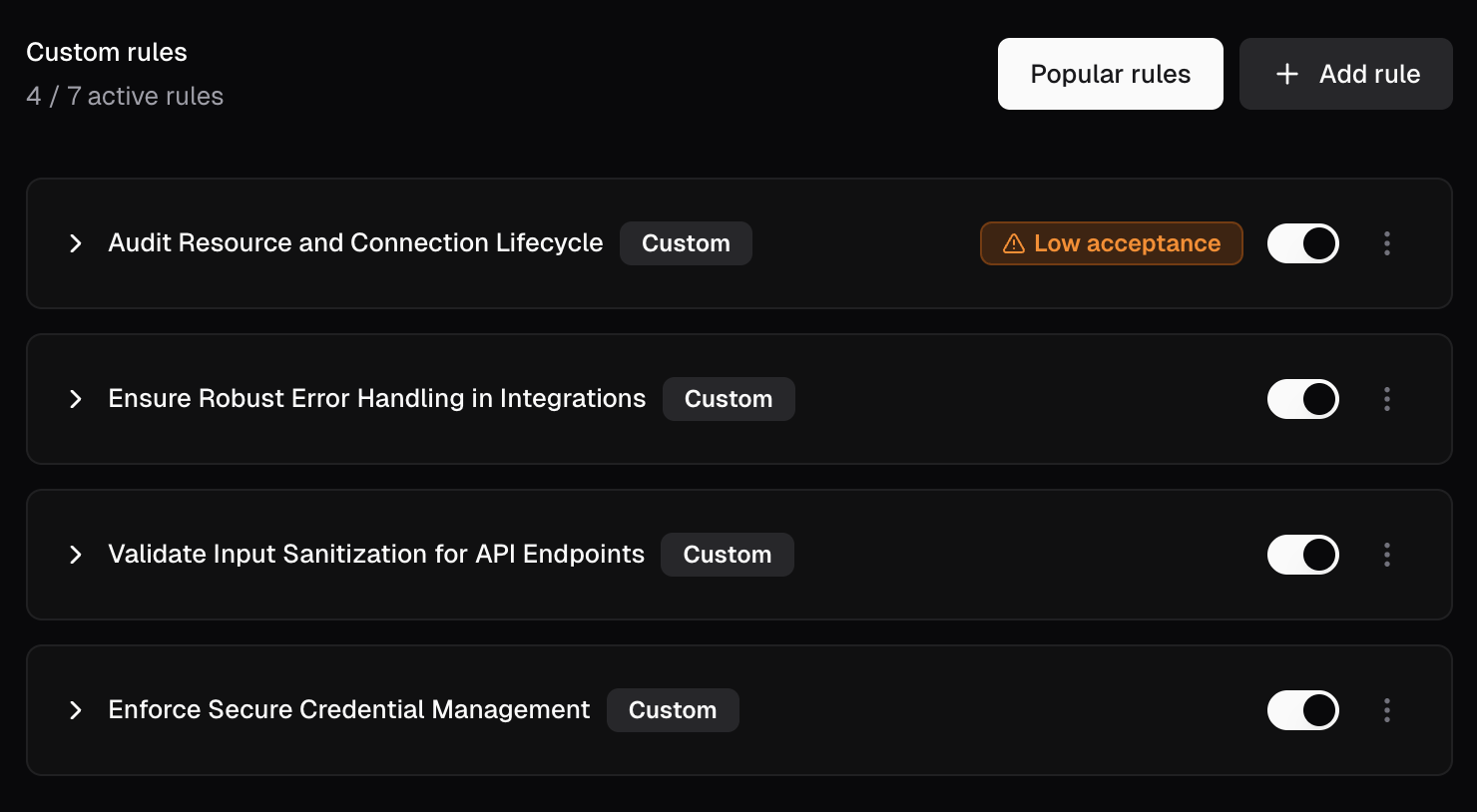
November 15th 2025
Version-control AI review settings with cubic.yaml [Public Beta]
You can now manage all your AI review settings in acubic.yaml file at your repository root. Commit the file and cubic automatically applies those settings to every review—no UI toggles needed.Already configured everything in the UI? Just download a cubic.yaml directly from your portal that contains all your existing settings, commit it once, and you’re set—no need to recreate anything by hand.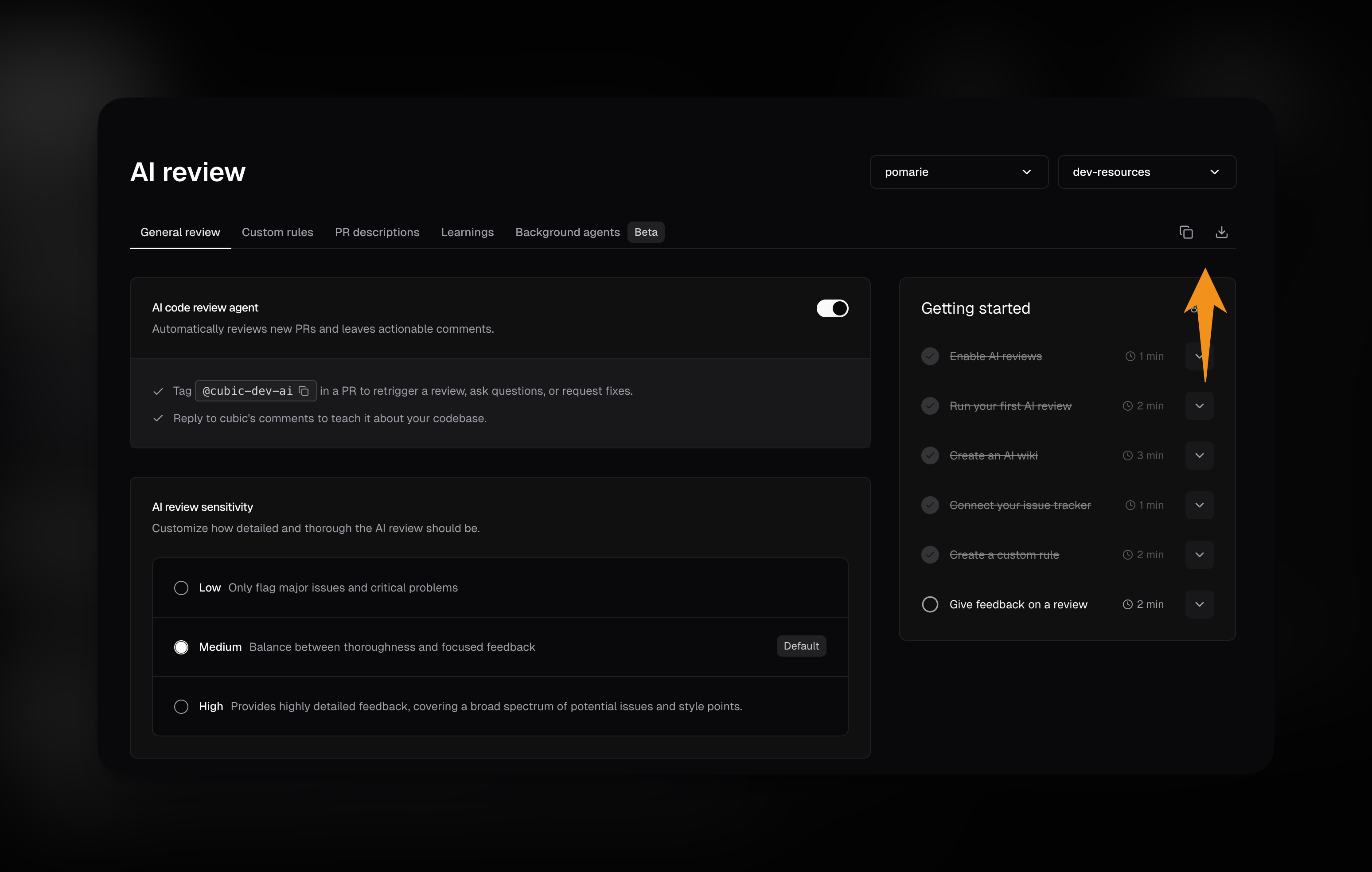
- Version-controlled configuration: Every setting change goes through code review, just like your code
- Repository-level settings: Configure AI review sensitivity, custom instructions, and ignore patterns
- Custom agents in YAML: Define review agents directly in the file instead of the UI
- PR descriptions and issues: Control PR description generation and issue fix buttons
- IDE validation: VS Code, Cursor, and JetBrains validate the file as you type with autocomplete and error checking
November 14th 2025
New dashboard home
We’ve added a new dashboard home page that shows you everything important right when you sign in. You’ll see your key metrics and next steps for getting started.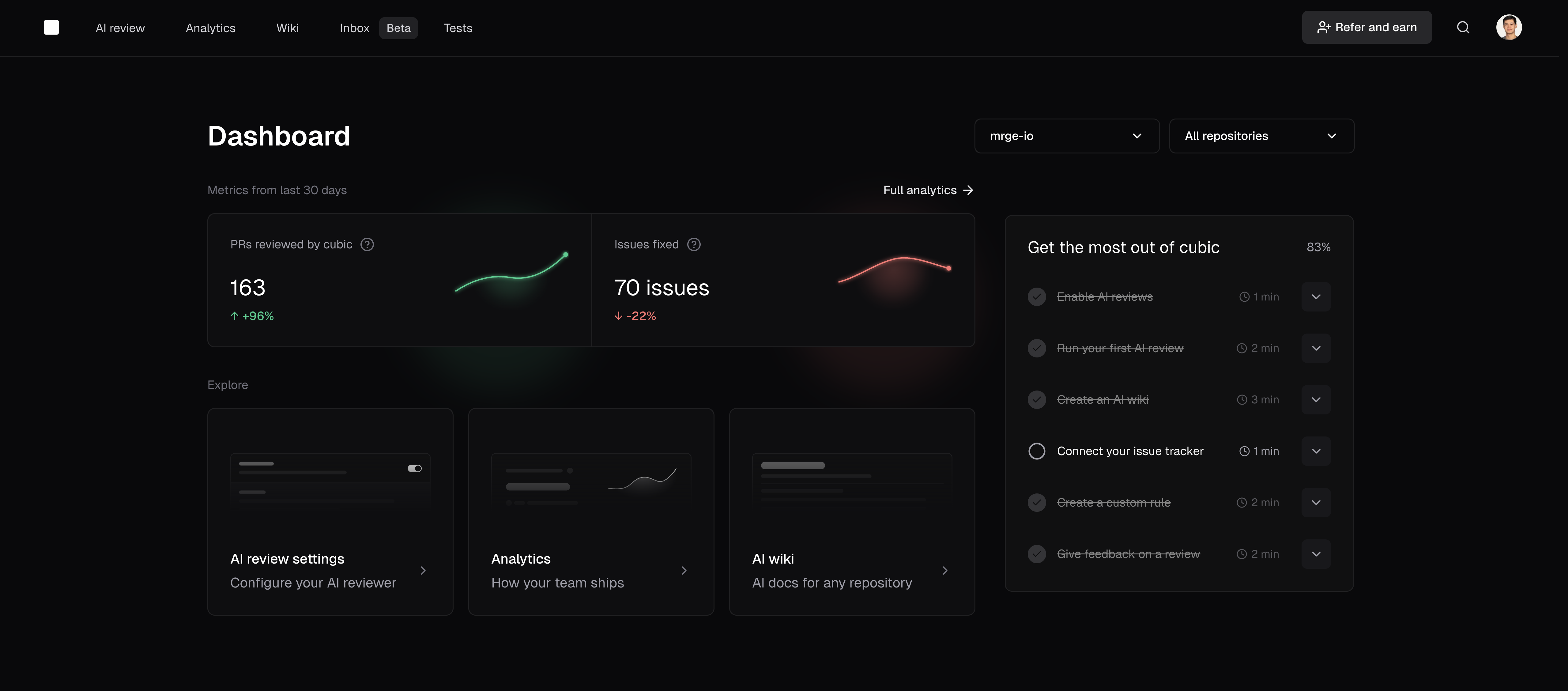
November 14th 2025
Cancel active AI reviews
You can now stop an in-progress AI review directly from the GitHub Checks UI. Open the cubic · AI code reviewer check on your PR and click Cancel AI review to immediately end the run.November 13th 2025
Simplified AI review settings navigation
We’ve simplified the AI review settings interface to make it easier to find and configure review options.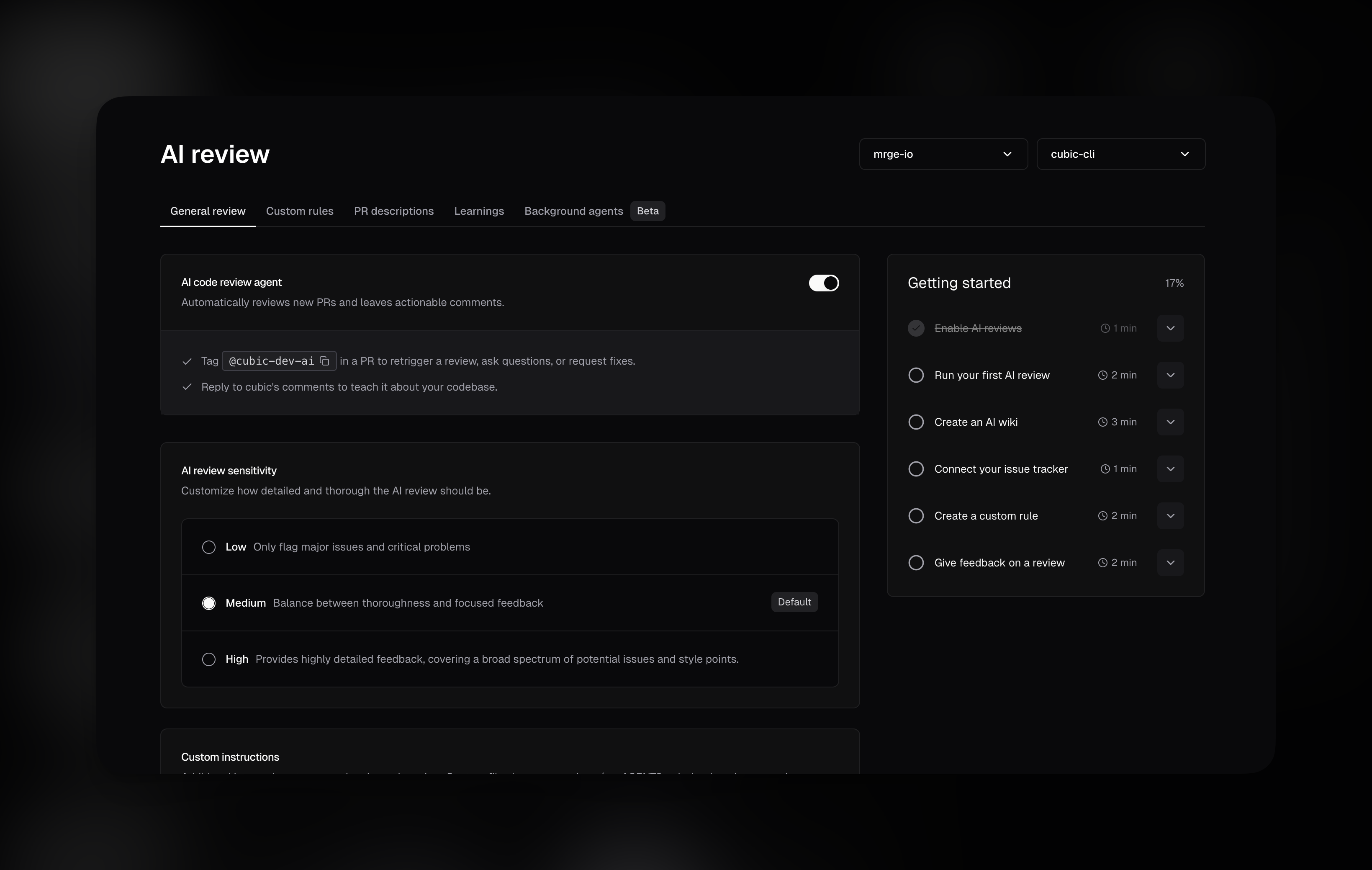
November 9th 2025
AI reviews now launch up to 10× faster
We’ve rebuilt how AI reviews initialize to reduce wait times and deliver faster feedback.- Large repositories: Cold starts could previously take 8–10 minutes. Now they complete in 1–2 minutes—a significant improvement for complex codebases.
- Small repositories: Reviews start a bit faster, typically within seconds for most PRs.
November 4th 2025
UI performance improvements
Loading and navigation in the cubic UI is now significantly faster thanks to a performance pass.This is especially noticeable when modifying AI review settings, working with custom agents, and navigating through settings across different repositories.October 31st 2025
Free plan now includes 40 PR reviews per month
We’ve increased the free plan monthly limit from 10 to 40 AI reviews per month. This gives free users more flexibility to review code across their projects while still maintaining the upgrade path for teams that need unlimited reviews.The monthly quota resets automatically on the 1st of each month, and all existing features remain available—unlimited platform access, analytics, stacked PRs, and notifications.October 30th 2025
PR descriptions update automatically on new commits (beta)
AI-generated PR descriptions now refresh automatically when you push new commits, so reviewers always see an up to date summary.This feature is enabled for all teams—no configuration needed.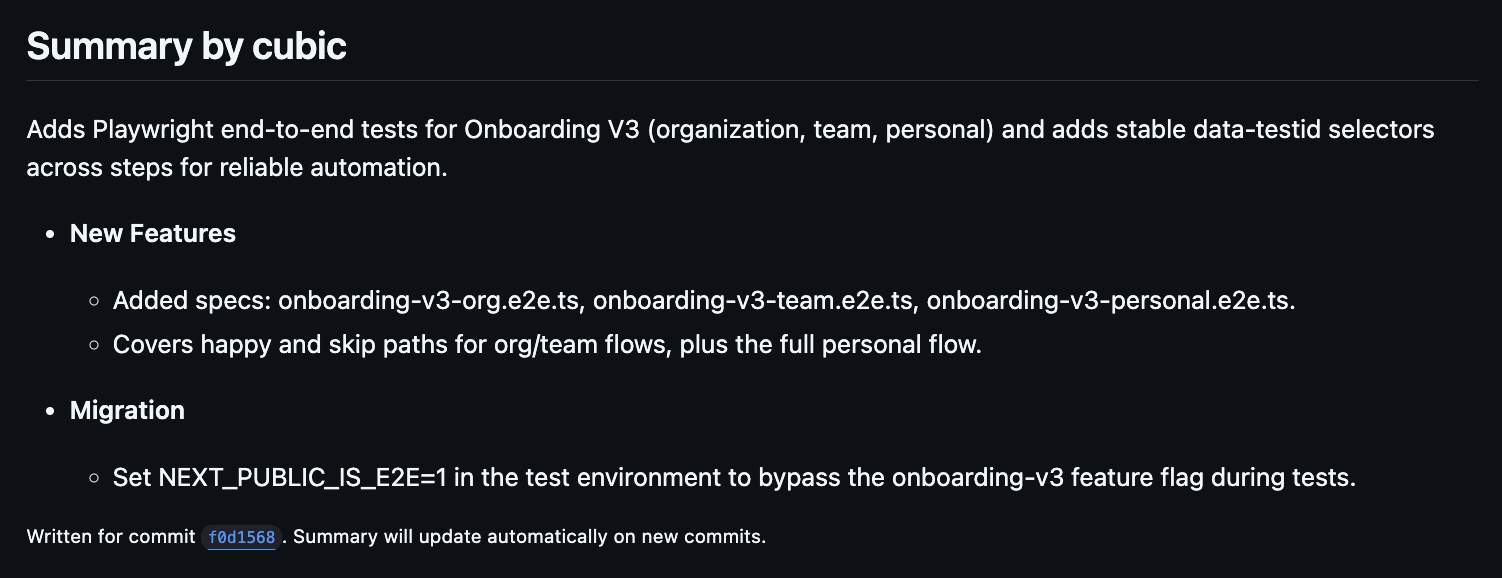
28th October 2025
Answer questions with latest documentation about libraries and frameworks
We’ve upgraded cubic’s ability to answer questions about libraries and frameworks.When you ask cubic questions in a PR, or in reply to a cubic comment, cubic can reply using the latest documentation in real-time. This means you get accurate, up-to-date answers about APIs, methods, and best practices, even for libraries that have changed since cubic’s training data.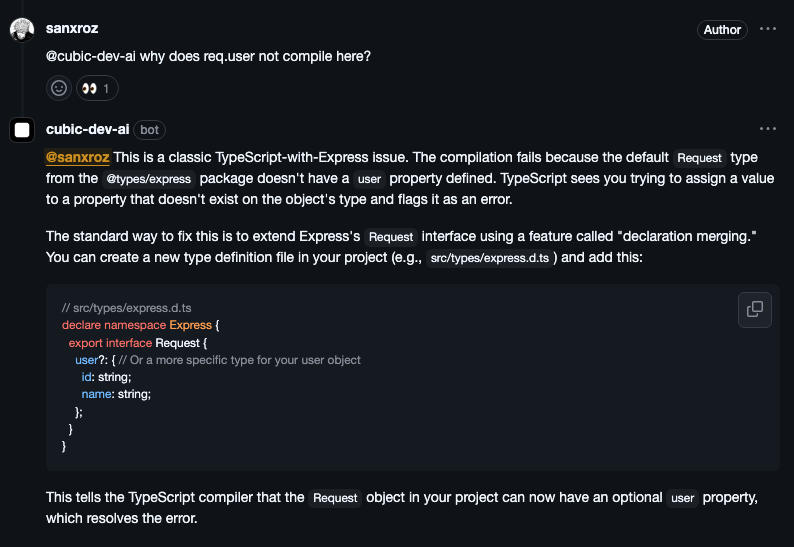
23rd October 2025
Archived repositories are now hidden
Archived repositories are no longer shown in the UI, reducing clutter for organizations with many archived repos.22nd October 2025
Real-time progress in GitHub check runs
cubic now shows live progress updates in GitHub check runs while reviewing your PRs.You can see exactly what cubic is analyzing in real-time, giving you better visibility into the review process instead of waiting without status updates.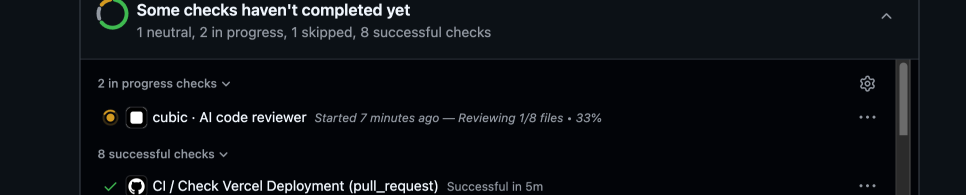
14th October 2025
cubic now links to stored learnings
From now on, when cubic learns from your feedback, it will reply with a link to where that learning is stored, allowing anyone to easily see all learnings and edit or delete them.Additionally, when cubic reviews a pull request and flags an issue because of a stored learning, it will reference that in its comment, making it easy to jump into the underlying guidance.9th October 2025
Memory & Learning improvements
cubic learns your team’s preferences from feedback you provide in comment replies.Until now, providing feedback on the same topic multiple times would create duplicate learnings. Now, when you provide feedback on a topic that cubic already knows about, it’ll smartly decide whether to update its existing learning or create a new one.15th September 2025
Automatic detection of resolved violations
cubic now automatically detects when code review violations are resolved in subsequent commits, streamlining your PR workflow and reducing manual tracking overhead.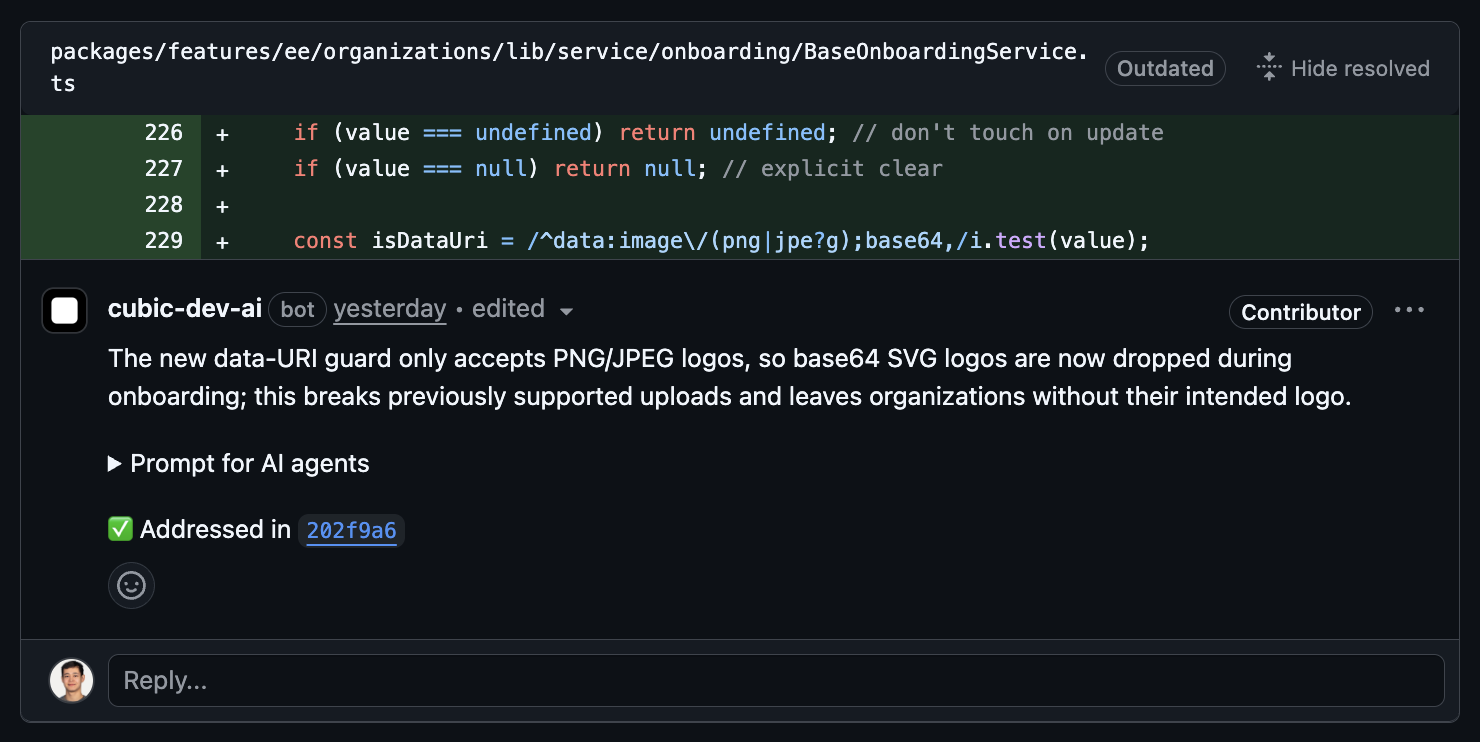
What’s new
- Violation tracking: When you push new commits to a PR, cubic analyzes the changes to detect if they resolve previously identified issues
- Visual feedback: Resolved violations display a clear indicator in PR comments showing which commit fixed the issue
How it works
- cubic reviews your PR and identifies violations
- You push commits to address the feedback
- cubic automatically analyzes the new changes against existing violations
- Resolved violations show a comment with the commit that fixed the issue
- No manual tracking or bookkeeping required
10th September 2025
Single AI prompt for all PR issues
Each cubic review now contains a single prompt that you can paste into your AI code editor to address all of the issues found by cubic.- Aggregated prompt: All issues in one expandable section in the main review
- AI-friendly format: XML structure that AI assistants easily parse
- Smart truncation: Prioritizes important issues for large PRs
1st September 2025
Welcome guidance for first-time contributors
New contributors now receive personalized onboarding when cubic reviews their first PR.The welcome message provides guidance on how to interact with cubic, request fixes, and give feedback, helping teams onboard developers more smoothly.27th August 2025
Introducing the cubic referral program
Earn up to $2,000 for every team you refer to cubic. Share the tools you love and get rewarded when teams upgrade to paid plans.What’s new
- Tiered rewards: Earn 2,000 in Amazon gift cards based on team size
- Extended trial for referred teams: 30-day trial instead of the standard 14 days
- Unlimited referrals: No cap on how many teams you can refer
How it works
- Get your unique referral link from cubic.dev/refer
- Share it with teams who could benefit from cubic
- Earn rewards when they upgrade to a paid subscription
22nd August 2025
Advanced ignore patterns for smarter AI reviews
Your PRs now get reviewed with much more precision. Beyond skipping certain files, you can now control exactly which pull requests trigger AI reviews based on branches, labels, and titles.Key improvements:- Branch-based filtering: Skip reviews for PRs from feature branches or targeting staging environments
- Label-based control: Bypass review for PRs tagged with “wip”, “skip-review”, or any custom labels
- Title pattern matching: Ignore draft PRs or work-in-progress changes automatically
21st August 2025
Custom instructions for AI-generated PR descriptions
Tailor PR descriptions to match your team’s style. Set custom instructions once, and every AI-generated description follows your preferences automatically.Key improvements:- Custom instructions: Define exactly how PR descriptions should be formatted
- Dedicated tab: Access all PR description settings from the new Descriptions tab
- Smart enhancement: Instructions work alongside existing PR content
- “Focus on business impact and user-facing changes”
- “Include performance implications and affected APIs”
- “Add testing steps to verify changes”
20th August 2025
Ask questions, give feedback, and request fixes from cubic without tagging it
Until now, developers often forgot to tag cubic when giving feedback or asking questions.Now, cubic can respond to comments that don’t explicitely tag it. Simply reply to any cubic comment to continue the conversation - no @ mention needed.What’s new
- Natural conversations: Reply directly to cubic comments like you would with a teammate
- No repeated tagging: Once cubic comments, just hit reply to continue
- Context-aware: cubic maintains full thread context for better suggestions
How it works
cubic responds in two ways:- Direct mentions: Tag @cubic-dev-ai anywhere (existing)
- Thread replies: Reply to cubic comments without tagging (new!)
- cubic suggests an improvement
- You: “This would break our legacy API”
- cubic provides an alternative approach
- You: “What about error handling?”
- cubic suggests error handling
14th August 2025
Asana integration: Bring task context to your code reviews [Beta]
Connect your Asana workspace to cubic and automatically verify that your code meets the requirements from your tasks. cubic also uses context from your Asana tasks to provide more targeted reviews and PR descriptions.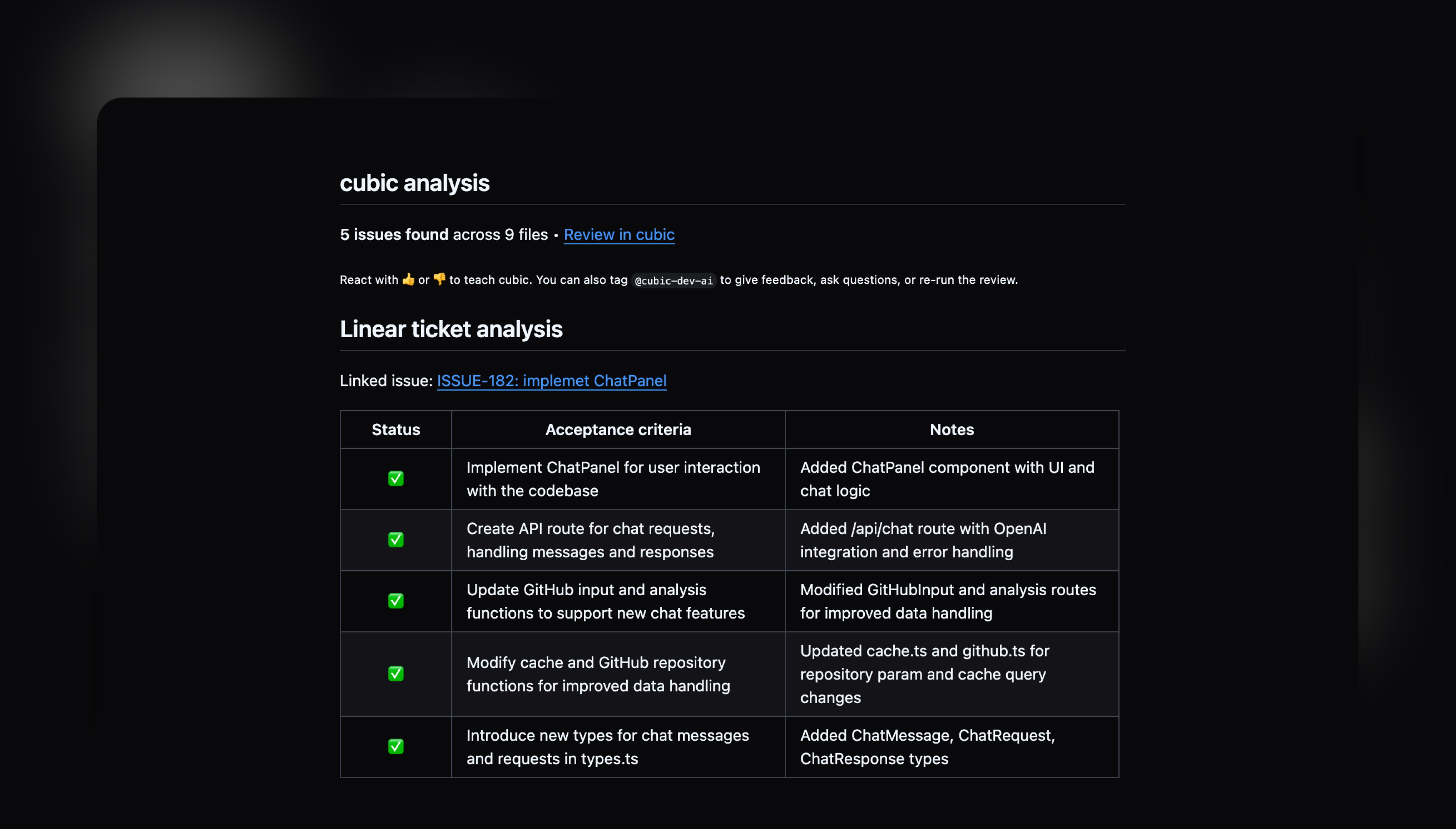
- Go to Settings → Integrations
- Click “Connect” on the Asana card
- Authorize cubic and select your workspace
- Start linking tasks by including Asana URLs in your PR descriptions
10th August 2025
AI Wiki: Your codebase becomes self-aware [Beta]
Understanding codebases required hours of digging through code and outdated documentation. It’s now easier to understand any part of your codebase instantly with AI-generated documentation and natural language search.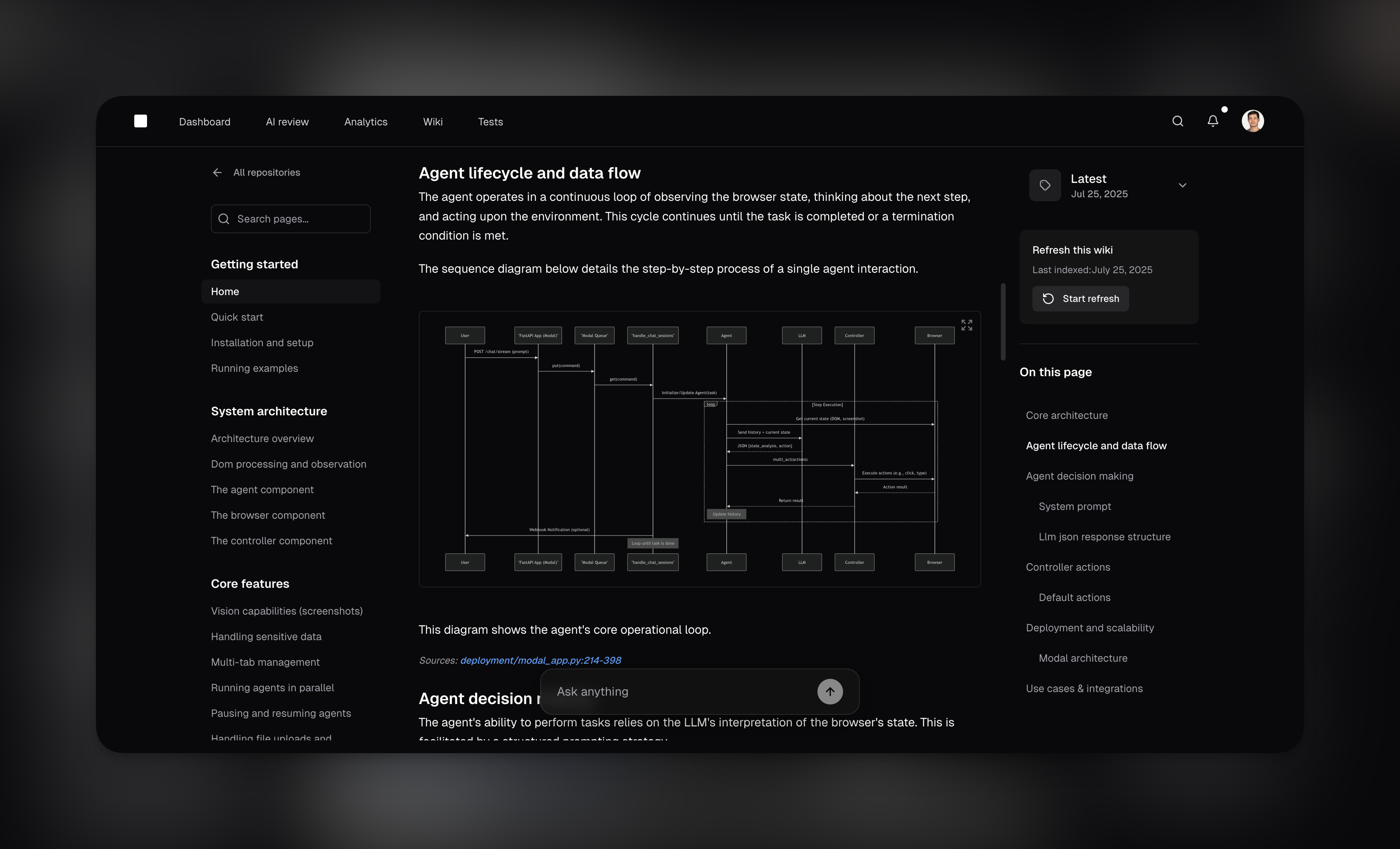
- One-click generation: Analyzes your entire repository and creates comprehensive documentation in 3 minutes
- Natural language Q&A: Ask questions like “How does authentication work?” and get instant answers with code references
- Shareable answers: Share search results with teammates via URL - anyone in your GitHub organization can access
- Auto-organized documentation: Browse by feature, service, or domain with automatic structure detection
- Full context for AI reviews: Wiki powers smarter code reviews with complete architectural understanding
6th August 2025
Manage custom agents across hundreds of repositories from one place
If you’re managing dozens or hundreds of repositories, you know the pain of creating the same custom agent over and over.cubic now offers a powerful rules library where you can discover proven custom agents from other successful teams and apply them across your entire organization with just a few clicks.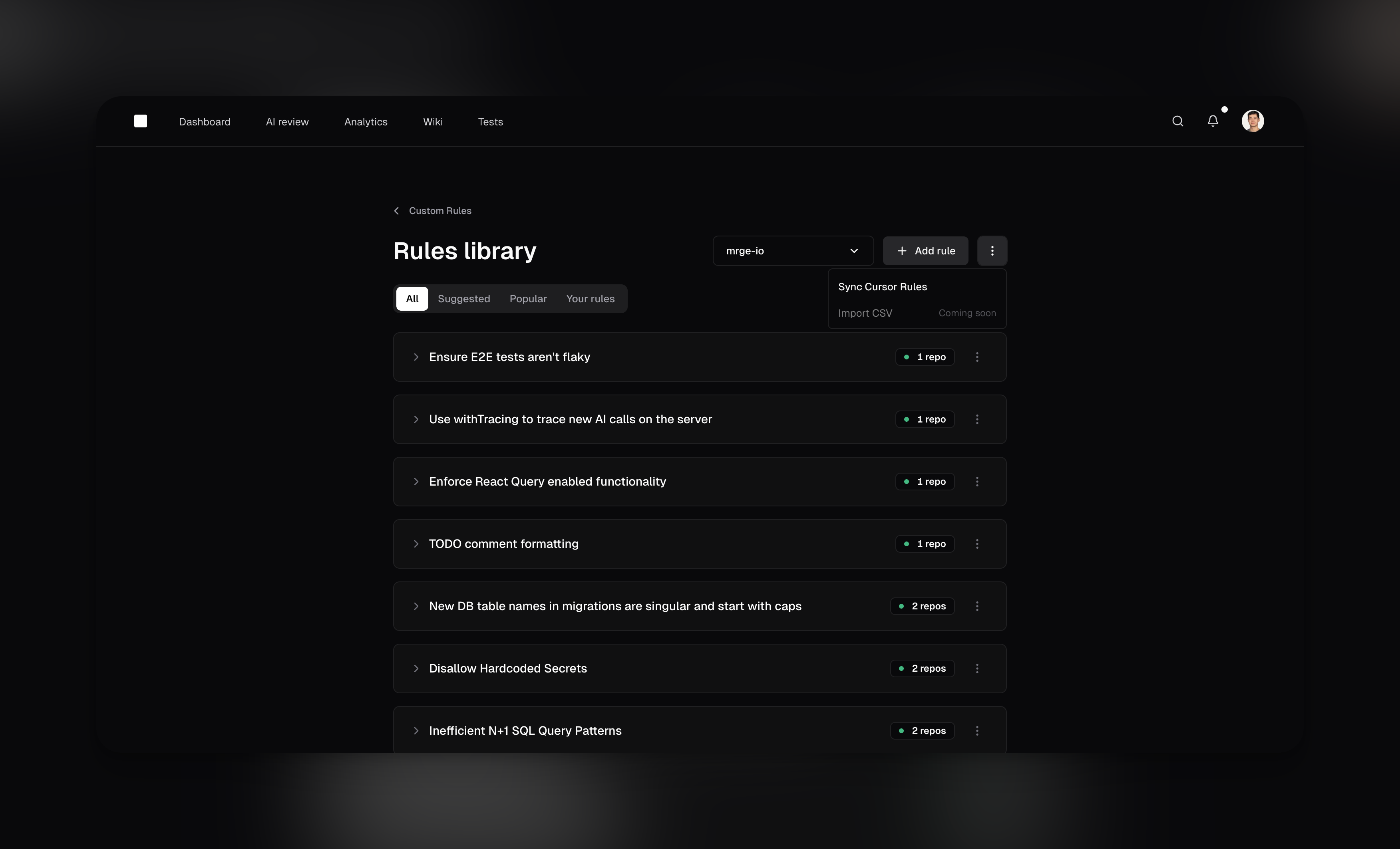
- Community-powered library: Browse popular rules from other teams, organized by category like security, performance, and best practices
- One rule, multiple repositories: Create a rule once and apply it to any number of repositories—from
- Central management: Enable or disable rules across all your repositories from a single dashboard
- Instant adoption: See a rule that would help your team? Enable it with one click
- Teams with microservices architectures managing dozens of repositories
- Organizations looking to standardize coding practices across all projects
- Engineering teams wanting to learn from community best practices
- Anyone tired of duplicating the same rules across multiple repos
1st August 2025
Analytics dashboard to track your team’s progress [Beta]
Understanding how your team ships code is now easier with cubic’s new analytics dashboard. Get instant insights into review performance, delivery metrics, and team productivity patterns.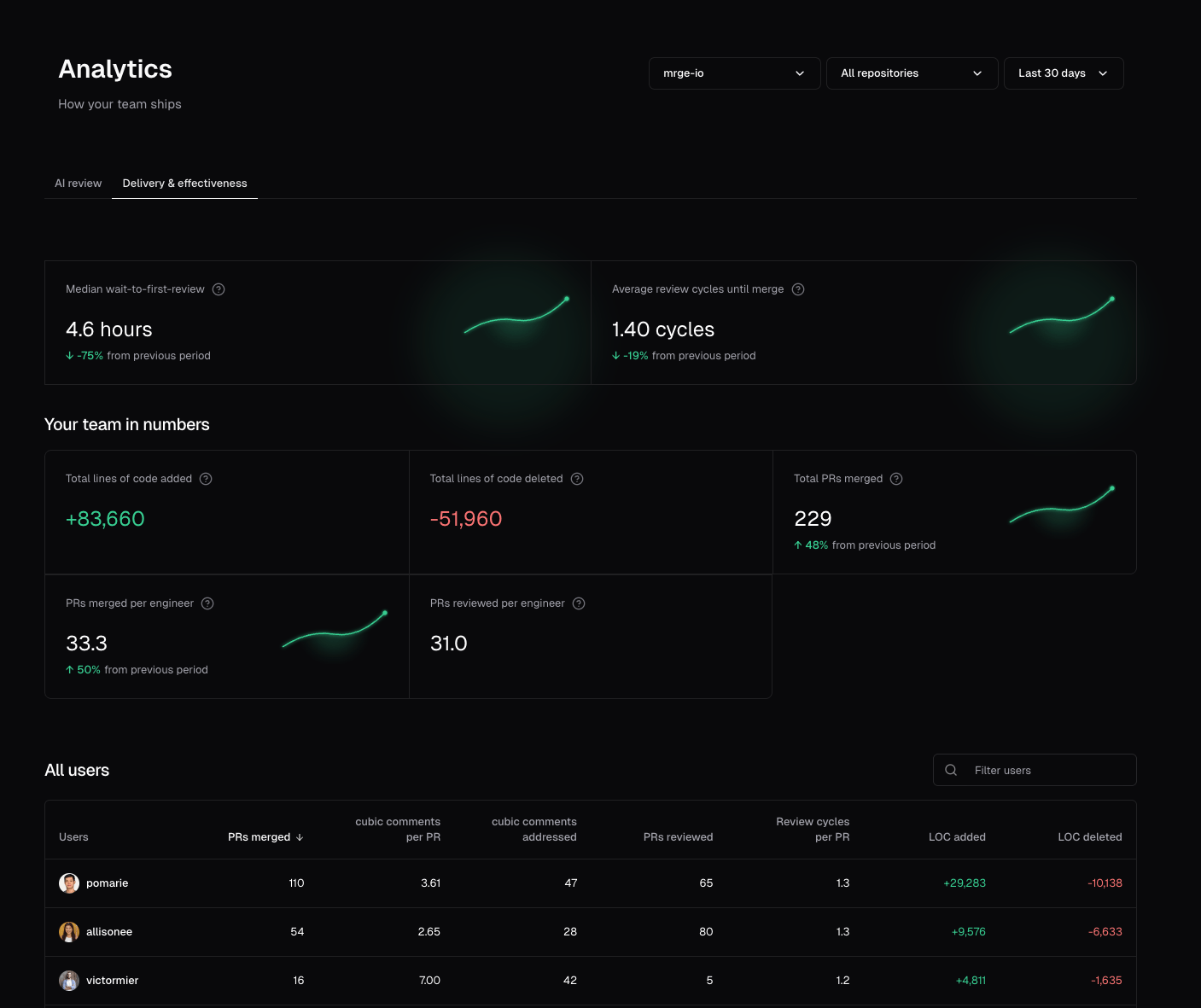
- AI review insights: Track how AI reviews are helping your team catch issues and improve code quality
- Team performance metrics: Monitor PR velocity, review times, and individual contributor stats
- Filter by repository: Focus on specific repositories to understand performance at a granular level
- Flexible time periods: Choose from last 24 hours, 7 days, 30 days, all time, or set custom date ranges
- Period-over-period comparisons: See how your metrics trend over time with automatic period-over-period comparisons
- How has our time-to-merge improved this week?
- Who are our most active reviewers and contributors?
- Are we catching more issues before they reach production?
- Which team members receive more review comments?
- Which repositories need more review attention?
30th July 2025
Automatically fix issues that cubic finds [Beta]
cubic can now automatically generate fixes for issues identified during code review. When the AI or your teammates spot a problem, you can request a targeted fix with one click.No more opening your IDE and checking out the branch to fix a minor issue.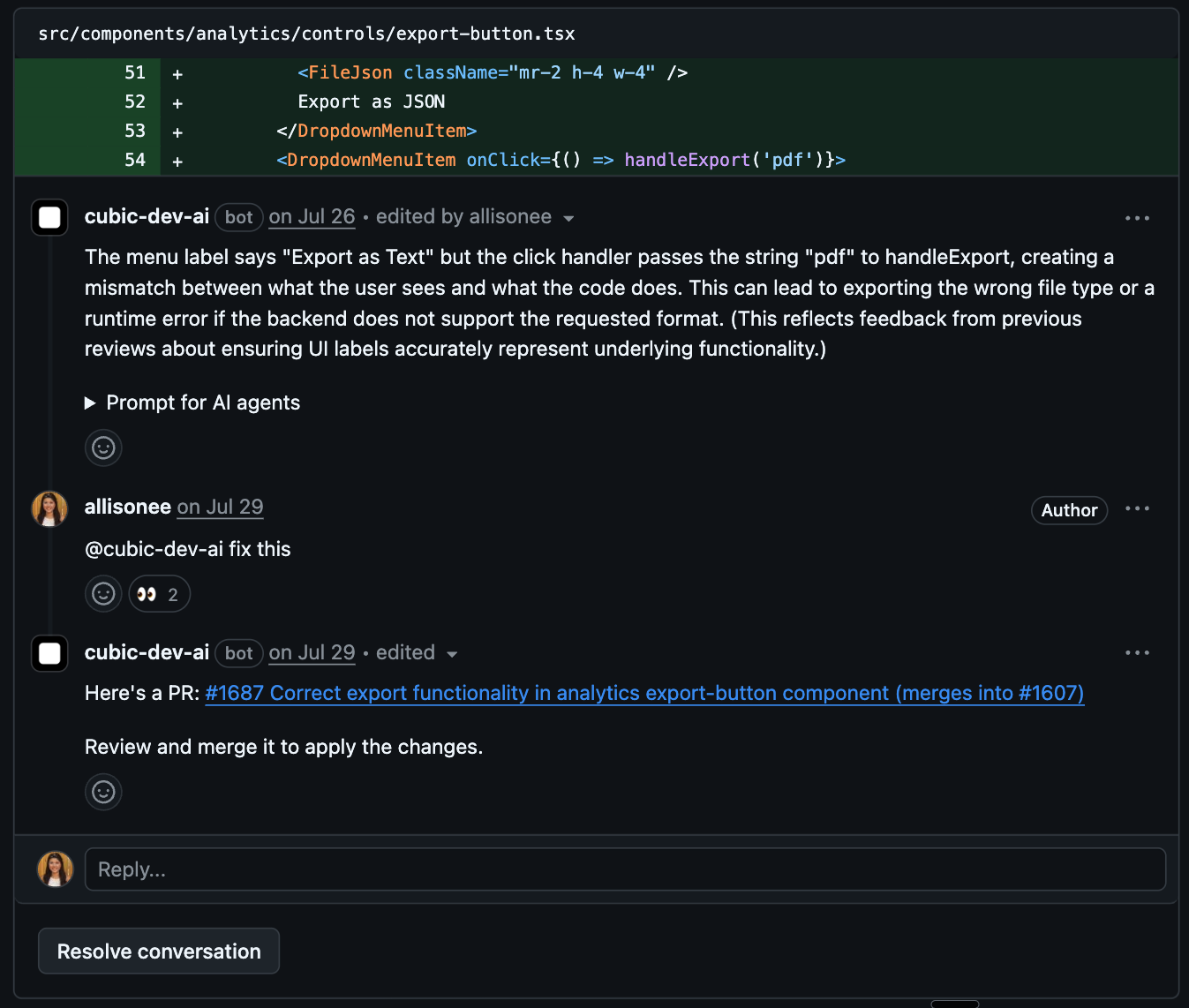
- Instant fix generation: Click the “Generate fix” button on any inline review comment or tag @cubic-dev-ai asking for a fix
- Targeted pull requests: PRs that cubic opens to fix the requested issue automatically target your original PR’s branch, not main. You can review the fix separately before merging
- Full context awareness: The AI understands the surrounding code and generates appropriate solutions
- Seamless workflow: Review, test, and merge fixes just like any other PR
- Look for the “Generate fix” button in comment actions on any AI review comment
- Or tag @cubic-dev-ai in a comment: “fix this issue” or “can you generate a fix?”
- cubic will create a new PR with the proposed fix in 1-3 minutes
- Review the fix PR and merge when satisfied—it goes straight into your feature branch
28th July 2025
Suggested custom agents
When you first sign up, cubic analyzes your comment history to suggest custom agents you can enable.Until now, these rules were suggested the same way for all your repositories.We’ve updated it so each repository now gets suggestions tailored to its specific comment history.24th July 2025
Acceptance criteria assessment for linked issue tickets
Your PRs now automatically check whether your code changes actually meet the acceptance criteria from your linked issue tracker tickets. No more merging code that doesn’t quite do what was asked.- Multiple issue trackers: Works with both Linear and Jira integrations.
- Automated verification: AI analyzes your PR against each acceptance criterion from the linked ticket.
- Clear status tracking: See which criteria are met, partially met, or not met in a formatted table.
- Detailed explanations: Get specific feedback on how your changes address (or don’t address) each requirement.
- Connect your Linear or Jira workspace in integration settings
- Include the ticket ID in your PR title, description, or commit messages (e.g., “PROJ-123” or “ENG-456”)
- cubic automatically links the ticket and checks your changes against its acceptance criteria
22nd July 2025
Less noise in TypeScript, Rust, and other statically-typed languages
cubic’s AI review helps catch issues early, but we’ve heard feedback on overly noisy comments in certain statically-typed languages.Until now, it would often flag errors that compilers or linters in languages like TypeScript or Rust would catch anyway.We’ve tuned this down, so you’ll now get fewer distractions and more relevant, high-value reviews.21st July 2025
Jira integration (beta)
We’ve launched a new Jira integration, now available in beta. Connect your Jira workspace to cubic and watch your AI reviews get way smarter with full issue context.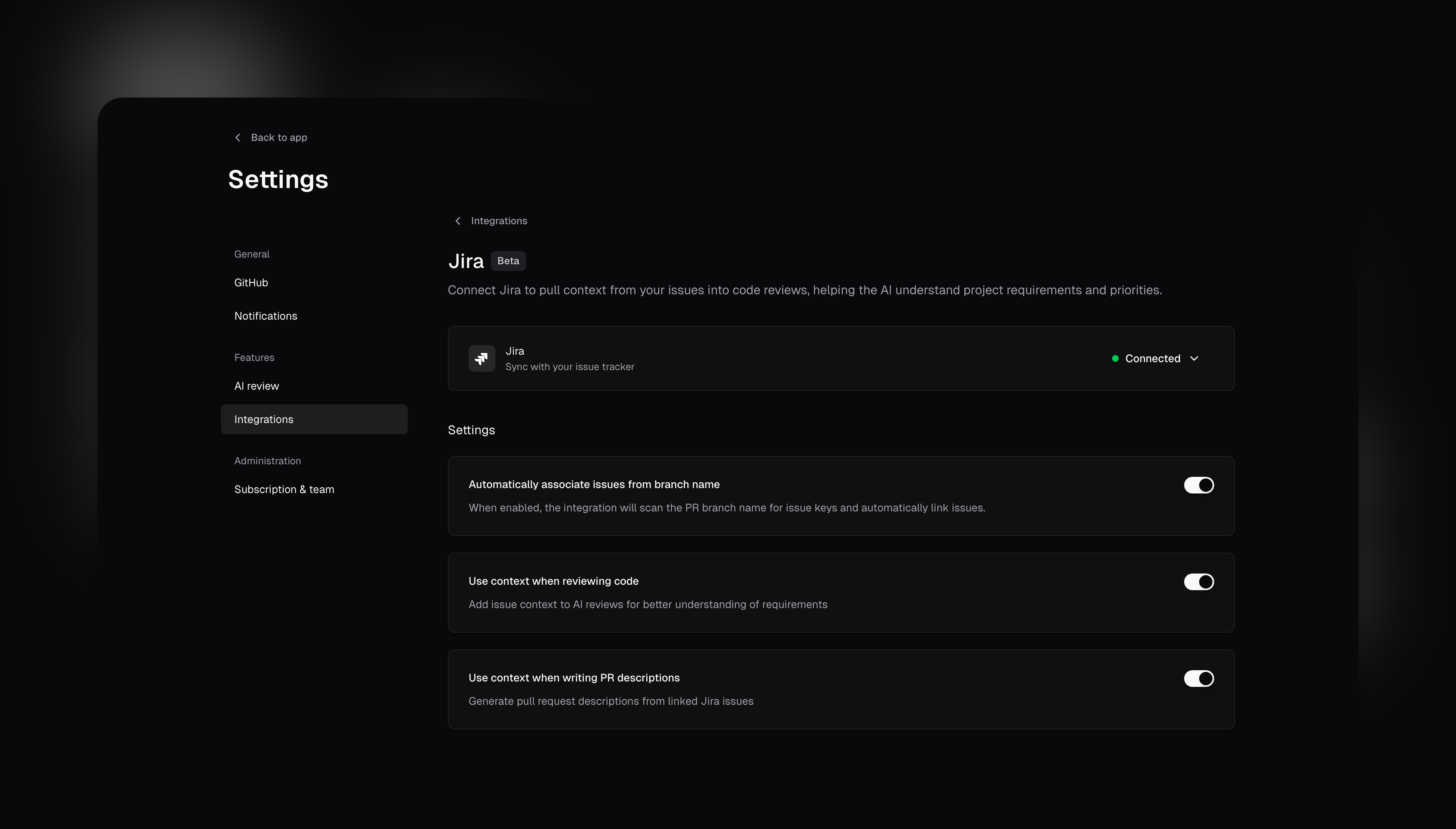
- Context-aware AI reviews: Your linked Jira issues feed requirements and acceptance criteria directly to the AI, making reviews much more accurate.
- Smart PR descriptions: Let cubic generate pull request descriptions based on your linked Jira tickets automatically.
- Automatic issue association: Branch names are parsed to link relevant issues - no manual tagging needed.
17th July 2025
Fix cubic comments in your AI IDE
When cubic leaves a comment, it will now include a helpful prompt that can copy and paste into your AI IDE to get help addressing the feedback.Key features:- Instant AI context: Each comment now includes a collapsible prompt formatted for AI assistants
- Complete information: Includes the comment, file name, line number, and relevant code diff
- Easy copying: Formatted as a code block for one-click copying
12th July 2025
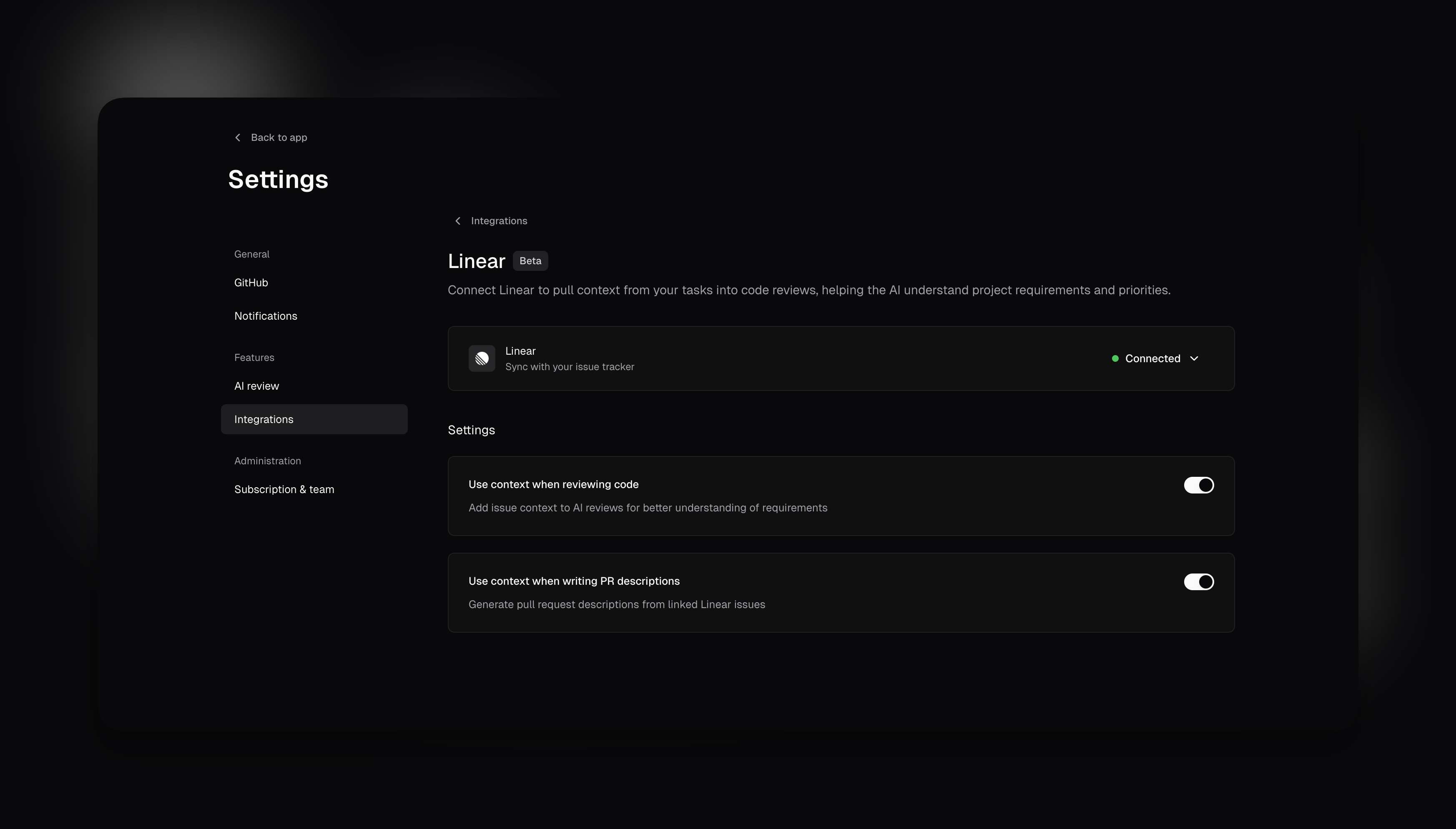
Linear integration (beta)
We’ve added a new integration with Linear, now available in beta. This connects your issue tracker to cubic for better context in AI reviews and PRs.Key features:- Context for AI reviews: Include details from linked Linear issues to help the AI understand requirements.
- PR descriptions from issues: Generate pull request descriptions based on linked Linear tasks.
- Settings controls: Toggle these options in your integration settings after connecting your Linear workspace.
4th July 2025
@file support in AI chat
When using AI chat in a cubic PR, you can now tag specific files to give the AI extra context. Just type @ and select the file you want to include. The AI will use these files to give you more relevant answers.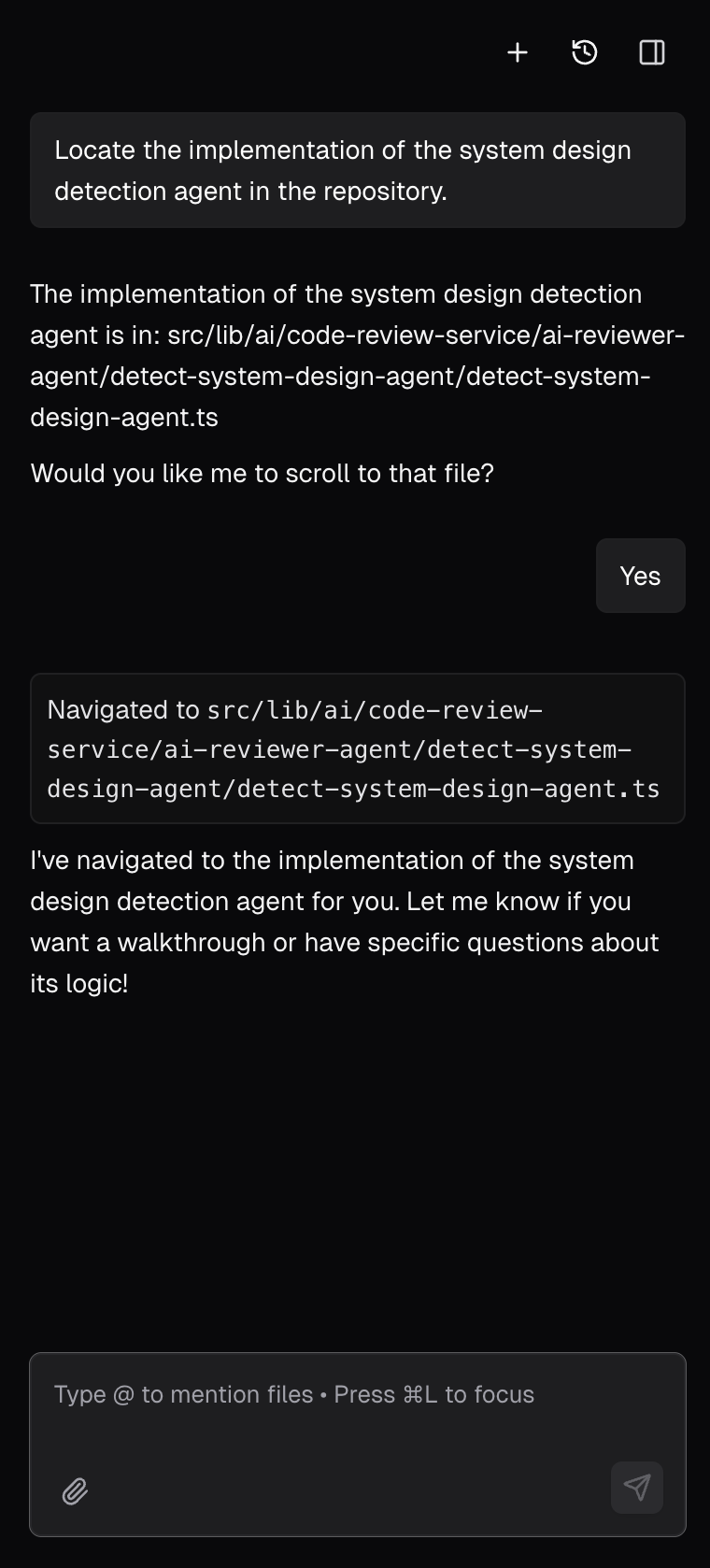
3rd July 2025
Configurable PR approval
A long-requested request from cubic power-users is to allow automatic approval of pull requests without detected issues.This is especially useful for teams who want to allow low-risk PRs to be merged without waiting for AI reviews.Now, this behavior is fully configurable in your AI review settings. By default, cubic will only comment on PRs with identified issues, ensuring branch protection rules always apply.However, you can configure cubic to automatically approve PRs without issues. You can enable this in the AI review settings.2nd July 2025
Architecture diagrams
Pull requests now contain AI-generated diagrams of the code changes, so you can quickly visualize how your code changes fit together.The diagrams are automatically generated on every PR and updated on new commits. You can click, zoom, and explore them to get a clear view of what’s changing.Here’s what it looks like: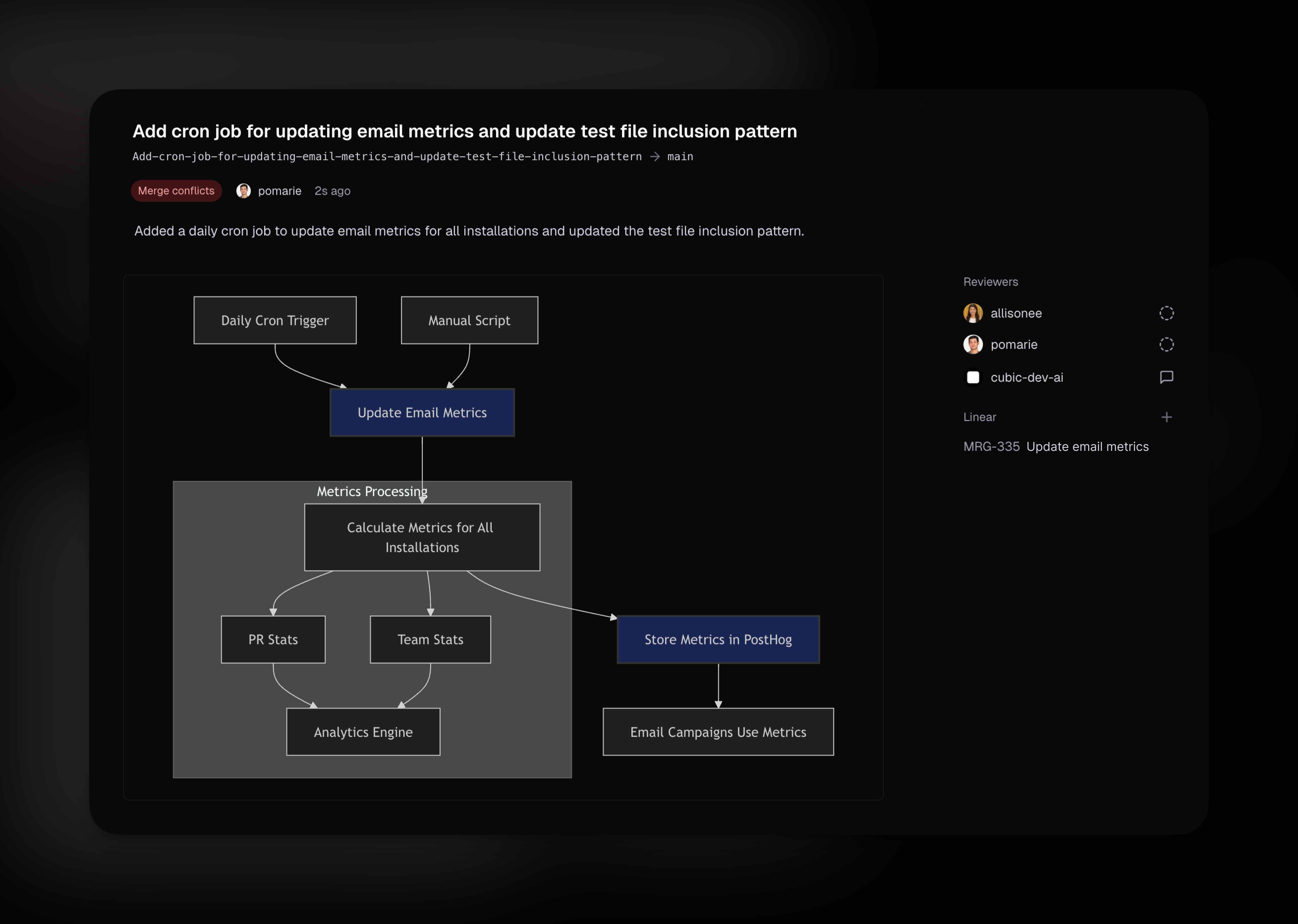
1st July 2025
Better help for cubic interactions
Tagging @cubic-dev-ai in any PR or PR comment without instructions now prompts cubic to respond with a helpful list of available actions. cubic shows you what it can do, including answering questions about the code, running AI reviews, and other available commands.Works with:@cubic-dev-ai, @cubic-dev-ai help, @cubic-dev-ai ?, or any unclear request.26th June 2025
Automatic free access for public repositories
cubic is now automatically free for all public repositories! No need to contact us or apply for open source access – simply install cubic on your public repositories and start using all features immediately at no cost.25th June 2025
Role-based access control for team management
We’ve introduced role-based access control to give teams better control over who can manage their cubic subscription and team settings. Every team member now has one of two roles: Admin or Member.What admins can do:- Manage seat assignments for team members
- Promote members to admin or demote admins to members
- Toggle auto-assign settings for new GitHub organization members
- Access billing and subscription management
- Use all cubic features (AI reviews, PR management, analytics)
- View team settings and subscription status
- Everything except managing seats, roles, and billing controls
- The first user who creates an installation automatically becomes an admin
- You cannot remove your own admin role (prevents accidental lockout)
- At least one admin is always required per installation
- Bot accounts (like Devin) are automatically assigned the member role and cannot be promoted to admin
22nd June 2025
Understand code faster with AI diagrams and navigation
The AI sidebar in cubic became more powerful. Until now, you could only ask it questions and ask it to run AI reviews. It’s now easier to understand code with visual aids and smart navigation.- Ask it to draw or visualize something, and it will create a diagram - useful for data flows or system design
- Ask it to show you where something is implemented - it will navigate you to the file or lines and highlight the relevant code. Helpful when reviewing code and need to find something quickly
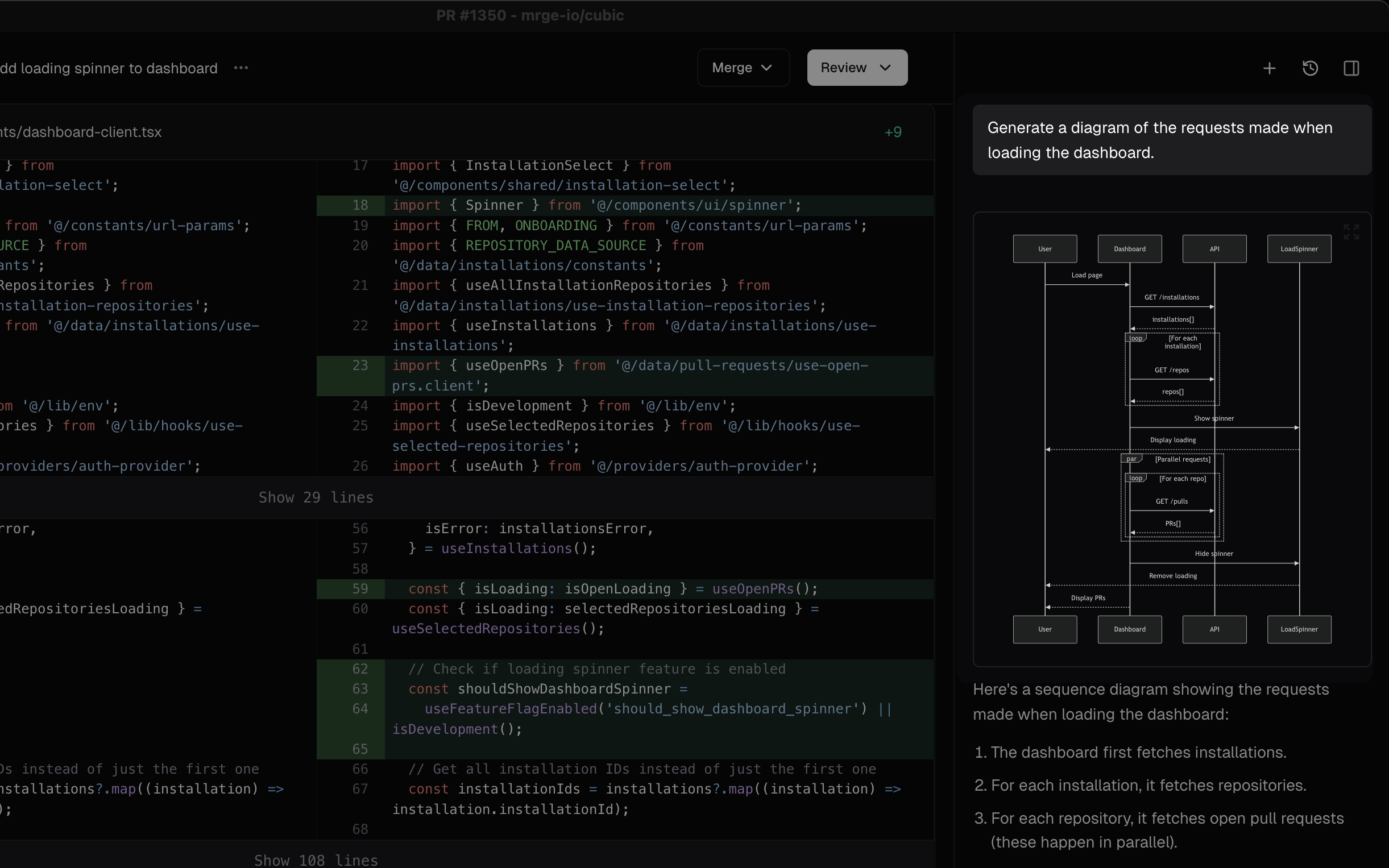
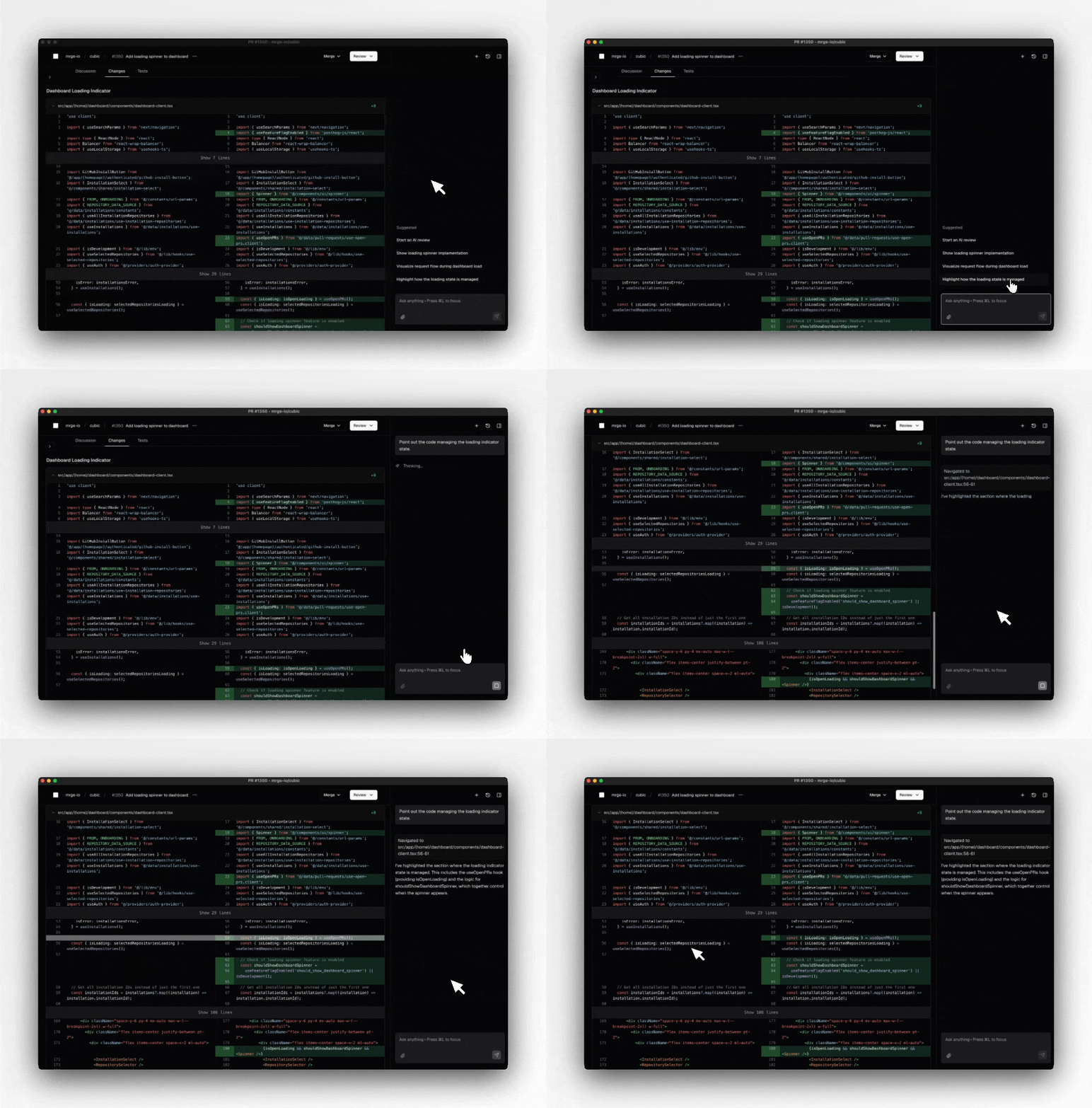
20th June 2025
Tagging cubic in comments to ask questions and trigger AI reviews
Until now, cubic would review your PR when you first opened it, but you couldn’t ask follow ups. It’s now easier to interact with cubic throughout your PR review process.- Tag @cubic-dev-ai in any PR comment to ask questions about code, design, or implementation
- Re-trigger AI reviews by tagging @cubic-dev-ai after making changes
- Get clarification on specific AI suggestions by replying to them
- Provide feedback on AI reviews to help improve future suggestions
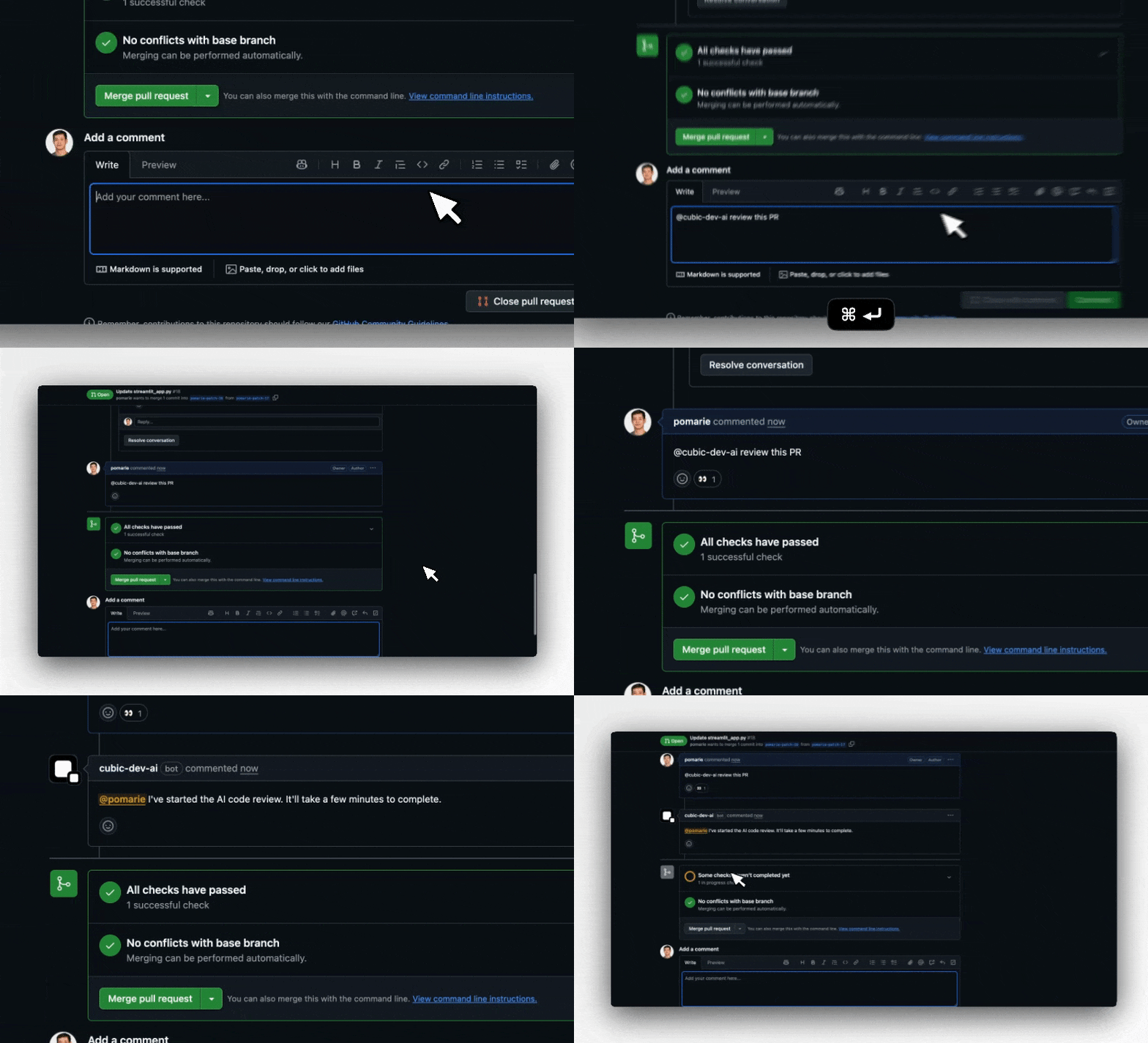
16th June 2025
Introducing cubic’s free plan
The barrier to getting started with AI-powered code reviews is gone. cubic is now completely free to use for every developer, with no subscriptions, trials, or credit cards required.What’s free:- Unlimited platform access - Browse, review, and manage all your pull requests
- 40 AI reviews per month - Get intelligent feedback on your most important PRs
- Full analytics & insights - Track your team’s progress and code quality trends
- All premium features - Stacked PRs, smart notifications, and advanced diff tools
10th June 2025
Only review the files you care about
Previously you could configure files and directories that cubic’s AI reviewer should ignore. Now, you can also tell cubic to run AI reviews on just the files or directories you specify, instead of the whole repository. This helps you avoid noise from generated files, dependencies, or folders outside your team’s responsibility.Set up include patterns in your repository’s AI review settings. For example, you might review onlysrc/** or apps/frontend/**. Exclude patterns let you skip files or folders you never want reviewed, such as dist/** or node_modules/**. Include and exclude patterns work together, giving you precise control over which files are checked. The AI pattern generator can help you write complex patterns if needed.5th June 2025
Improved AI review feedback deduplication
Pull request comments could be repetitive when similar issues appeared across files or rules. We’ve improved how cubic’s AI review deduplicates comments across all rules and files, making feedback more concise and less noisy.30th May 2025
Keyboard navigation for GIF picker
Selecting and inserting GIFs was previously only possible with a mouse, slowing down comment workflows. It’s now easier to browse and add GIFs using just the keyboard.Tip: When writing a comment, press⌘⇧G (mac) or Ctrl⇧G (Windows) to open the GIF picker.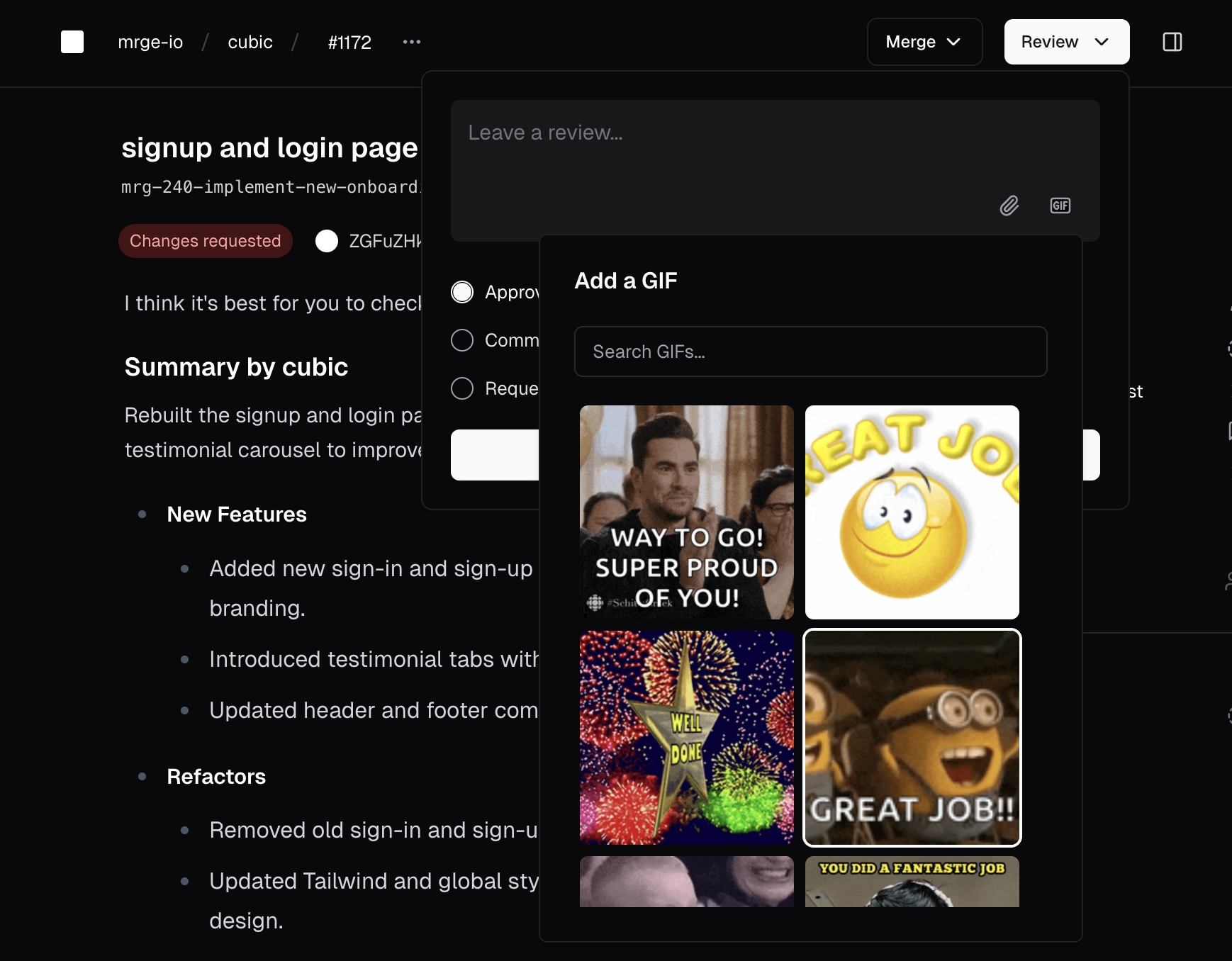
29th May 2025
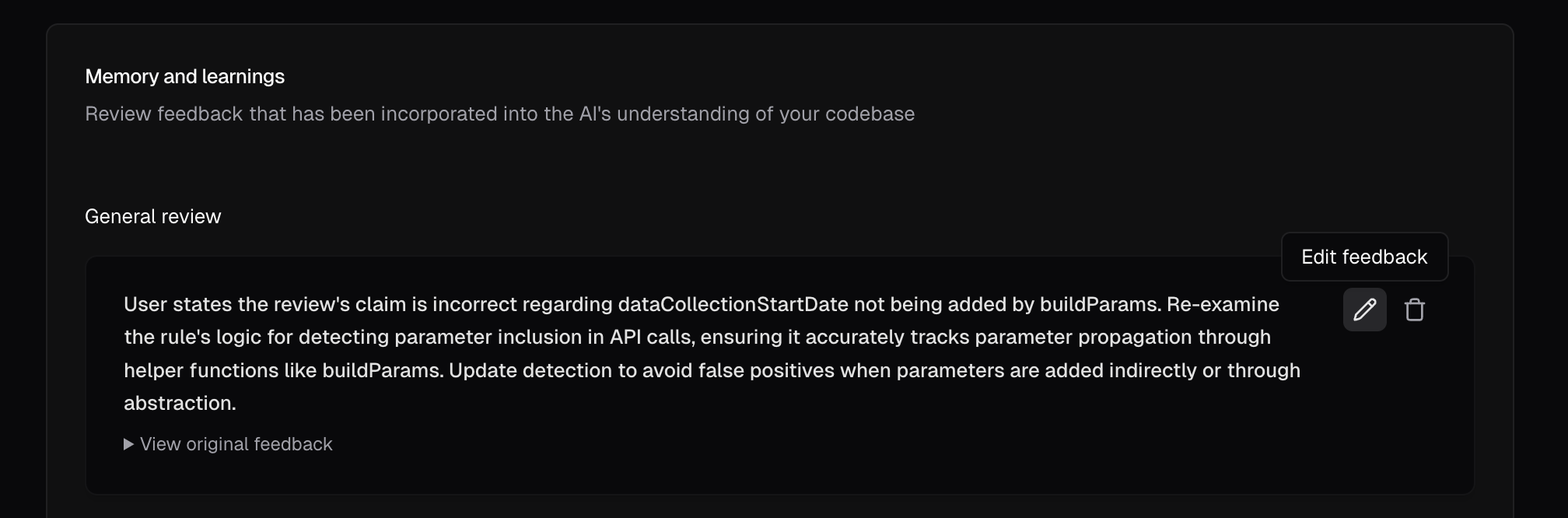
AI memory and learnings
Managing the AI’s understanding of your codebase was difficult without visibility or control over its learnings. It’s now easier to review and manage all feedback shaping the AI, in the AI review settings.You can now:- View all feedback incorporated into the AI’s memory, grouped by rule.
- Edit or remove learnings to keep the AI’s knowledge accurate.
- See actionable summaries and original feedback for each learning.
- Edit with keyboard shortcuts and confirm deletions in an accessible UI.
27th May 2025
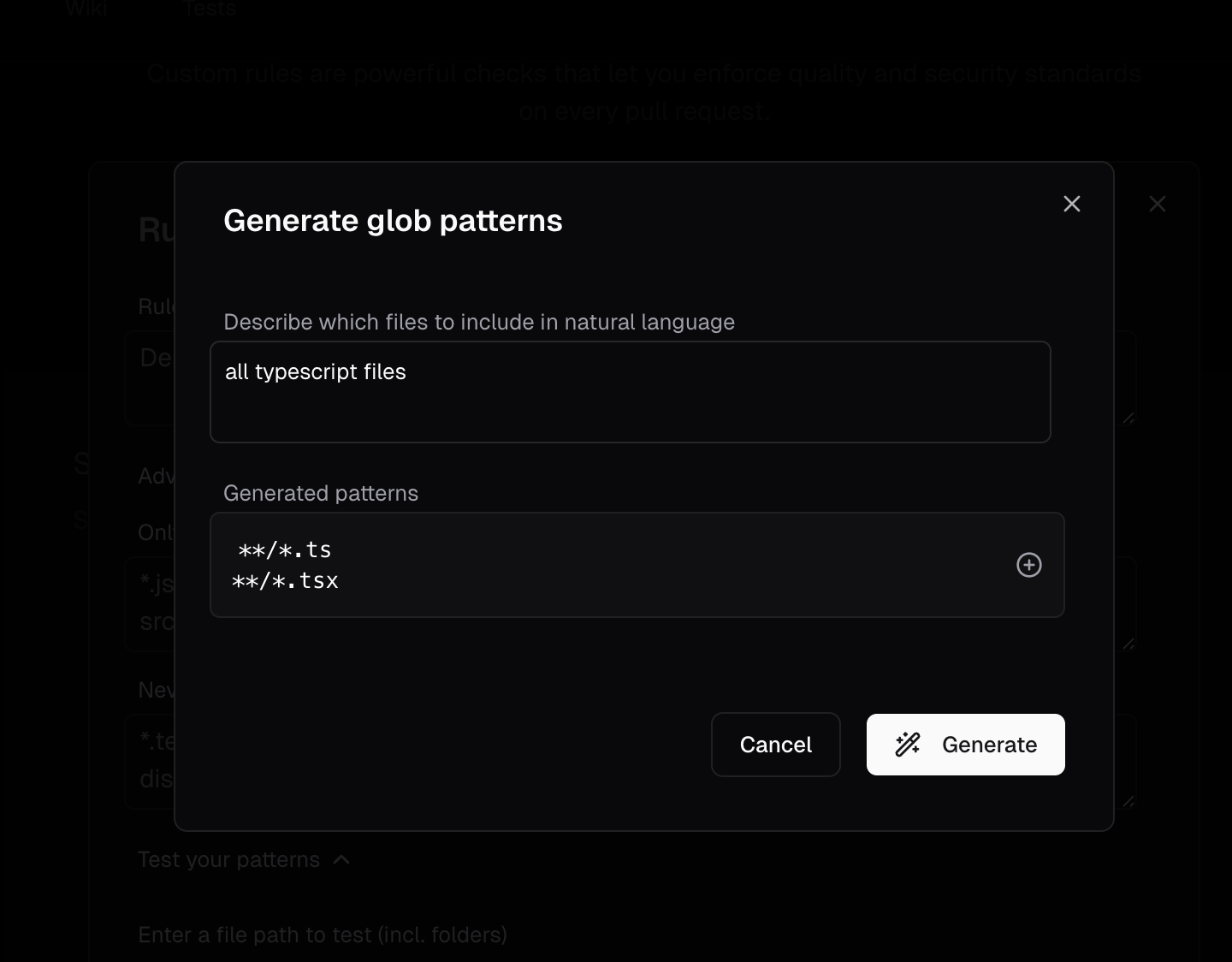
AI-powered glob pattern wizard
Writing glob patterns for custom agents required manual syntax and could be error-prone. It’s now easier to generate glob patterns using plain English.To use it:- Open the custom agent editor.
- Click the wand icon next to the “Only run on” or “Never run on” fields.
- Describe file inclusions or exclusions in natural language.
- AI generates the corresponding glob patterns.
- Preview and apply patterns with one click.
25th May 2025
One-click AI suggested fixes
Applying AI-identified fixes required manual code changes. It’s now easier to apply highly confident AI suggestions with a single click.- Suggested fixes available directly in GitHub or cubic.
- Recommendations appear only for high-confidence suggestions.
22nd May 2025
Full rebrand completed: cubic
We’ve fully transitioned from mrge to cubic. Expect to see our new name across the app, documentation, GitHub, and Slack.Same powerful tool, clearer identity.16th May 2025
Better sidebar chat
Manually trigger AI reviews directly from the sidebar for instant feedback on any PR:- Start AI reviews without leaving the cubic interface.
- Get immediate insights on code changes and potential issues.
- Streamlined workflow for on-demand code analysis.
11th May 2025
Improved pricing and subscription management
We’ve simplified managing your seats and billing:- Quickly select developer seats with instant pricing updates.
- Clearly see savings for annual plans (20% discount).
- Instantly toggle seats on or off with real-time updates.
- Automatically sync seat assignments with GitHub access to avoid errors.
5th May 2025
Customizable AI review sensitivity
You can now tailor AI feedback to fit your team’s workflow:- Low: Minimal noise, only critical issues flagged.
- Medium: Balanced insights (default setting).
- High: Thorough checks for style, best practices, and potential issues.
30th April 2025
New insights & analytics dashboard
Gain clarity on your team’s performance:- Merge speed: Quickly view median merge times.
- Issue tracking: Track fixes driven by cubic’s suggestions.
- Critical issues feed: Direct links to recently identified high-priority issues.
- Team statistics: Monitor review activity and trends over time.
- Flexible reporting: Preset and custom date range options.
24th April 2025
Trigger AI reviews with GitHub @mentions
Request instant AI reviews anytime directly from GitHub:@cubic-dev-ai review this PRReceive immediate feedback without waiting for the scheduled cycle.Instant AI assistance whenever you need it.