
The overnight workflow
- You start a scan at the end of the day, or a scheduled scan starts automatically
- cubic scans in the background, often for 6 to 12 hours
- You wake up to validated findings and, optionally, auto-created fix PRs with reviewers assigned
- Review the results, tickets, or PRs in the morning
Codebase scans are in beta and are available by request.
What you get
- Validated findings with evidence: agents focus on serious issues and investigate each potential finding before it shows up in your results.
- Issue ownership + routing: each finding is attributed to an issue owner so it lands with the right person or team.
- Learns from your team: scans apply learnings from PR reviews, and you can steer scans with custom instructions and triage feedback.
- Clear next steps: fix issues with cubic, open them in Cursor, create Jira or Linear tickets, or notify owners in Slack or email.
- Automation when you want it: enable automatic issue creation or auto remediation for findings that match your guardrails.
Issues that codebase scans find
Codebase scans focus on high impact issues:- Business logic flaws: billing edge cases that lose money, incorrect permission checks, broken invariants, off by one errors
- Data integrity risks: race conditions that corrupt state, missing validations, unsafe database operations
- Edge cases: null pointer exceptions, unhandled error paths, boundary conditions that break functionality
- Secret scanning: hardcoded API keys, credentials, tokens, and other secrets that should not be in your codebase
- Vulnerability scanning: known CVEs in your dependencies, unsafe version ranges, and security advisories
- Infrastructure as Code scanning: misconfigurations in Terraform, Kubernetes manifests, Dockerfiles, and CloudFormation templates
- Security vulnerabilities: authentication bypasses, injection points, insecure configurations
How it works
cubic clones your repository into an isolated sandbox and runs thousands of parallel AI agents plus static analysis across the codebase. These agents:- Navigate across files to trace data flows
- Follow call chains to verify issues
- Check external documentation (framework docs, security advisories)
- Access up-to-date documentation for the libraries and frameworks in your stack
- Apply learnings from PR reviews (feedback from your team, senior reviewers, and prior corrections) so scans reflect your codebase’s standards
- Test multiple hypotheses before confirming findings
- Use your repository’s AI Wiki to understand product context and prioritize investigations
- Maps your repository structure
- Checks for an up-to-date AI Wiki. If one doesn’t exist, cubic generates it automatically
- Runs parallel checks informed by the wiki’s understanding of your product
- Investigates suspicious patterns before reporting them
- Deduplicates overlapping findings
- Scores confirmed issues by severity and confidence
First scan vs continuous scans
Your first scan audits the repository broadly. After that, scheduled scans are continuous: they focus on what changed since the last successful scan. If there are no changes to scan, cubic can skip the scheduled run automatically.Why findings are actionable
Traditional static analysis tools are notorious for false positives. That includes security scanners, dependency scanners, secret scanners, and rule based linters. Teams report that up to 90% of findings can turn out to be non issues when investigated in context. cubic takes a different approach. Instead of pattern matching and dumping results, AI agents investigate each potential issue:- Contextual analysis: Agents assess whether a finding is real and impactful in your specific codebase
- Cross reference verification: Findings are validated against actual code paths, not just syntactic patterns
- Severity scoring: Only issues that pass investigation are reported, with confidence scores based on evidence
Starting a scan
Once codebase scans are enabled:- Navigate to your repository’s Codebase scan page
- Click Start scan
- Continue working. Scans run in the background
Working with results
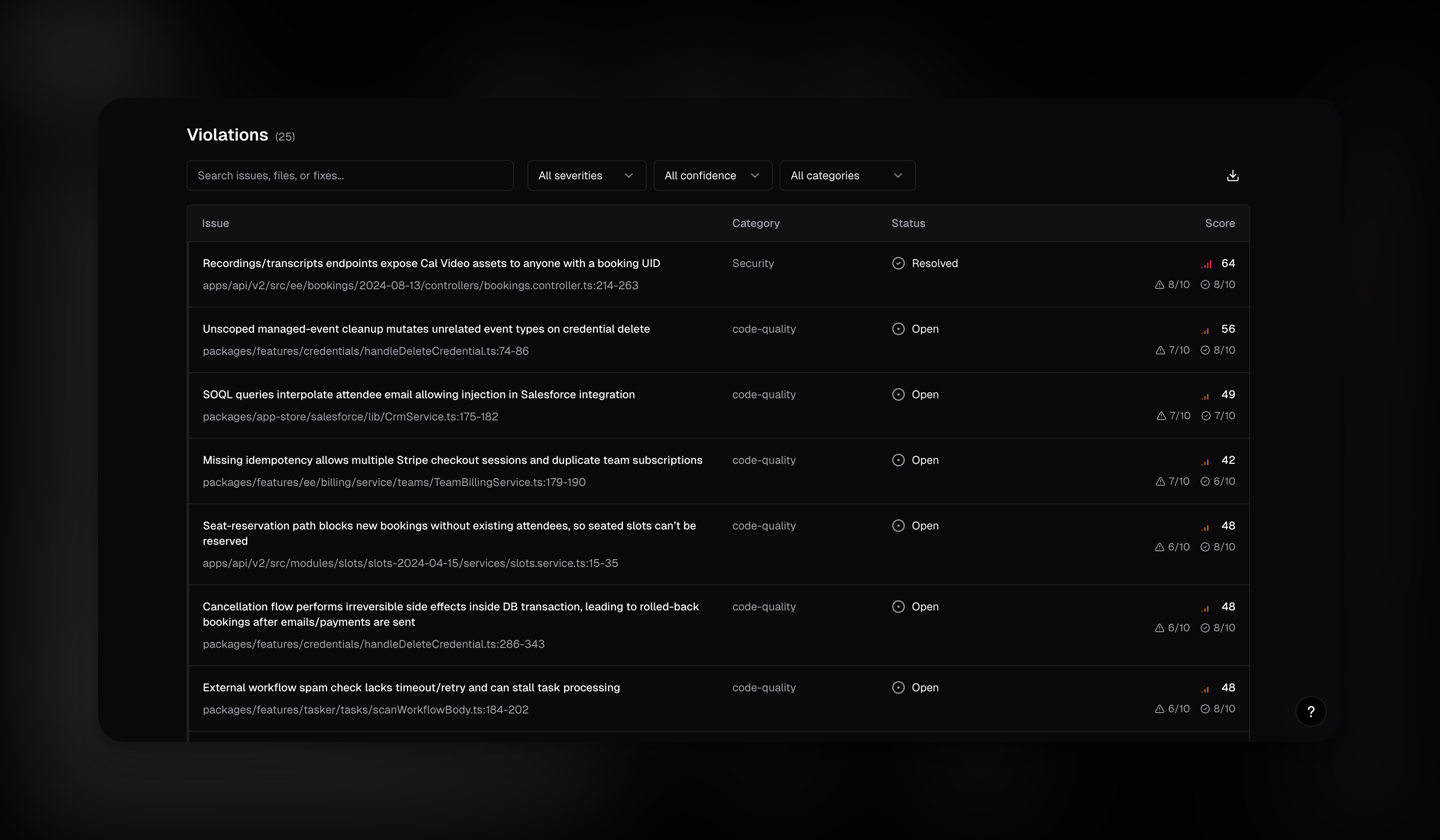
Every finding appears in a sortable, filterable table:- Issue: summary of what’s wrong, plus file path and line number
- Category: Security, Business logic, Data integrity, or Stability
- Owner: the issue owner, the person or team that should own the fix
- Risk: a combined score (severity + reachability + likelihood)
- Fix effort: estimated difficulty to fix (1 to 10)
- Status: Open, In review, Resolved, False positive, Won’t fix, Intended Behavior, or Accepted risk
Owner attribution
cubic automatically identifies who’s responsible for each finding using your repository’s CODEOWNERS file. This lets you route issues to the right team, for example@frontend-team, @security, or a specific engineer.
If your repository has a CODEOWNERS file (in the root, .github/, or docs/ directory), cubic uses it to determine ownership. If no CODEOWNERS match exists, cubic falls back to git history attribution.
This is especially useful for large codebases where different teams own different parts of the code. Filter by owner to see only your team’s issues, or export filtered results to share with specific teams.
Notify issue owners
You can notify owners when scans find issues in their code, via:- Email notifications
- Slack DM notifications (when Slack is connected)
Auto resolution
Scan violations don’t just sit there forever. When a PR is merged that fixes a scan finding, whether intentionally or as a side effect of other work, cubic automatically detects the resolution and marks the violation as resolved. Here’s what happens:- A PR merges into your default branch
- cubic checks the merged diff against any open scan violations in the affected files
- AI agents analyze whether the code change actually fixes each issue
- Resolved violations are marked with an audit trail: which PR fixed it, which commit, and an AI generated explanation of how the fix addresses the original finding
- Open the violation
- Click the More actions menu (
⋮) - Select Link fix PR and paste a PR number or a GitHub PR URL
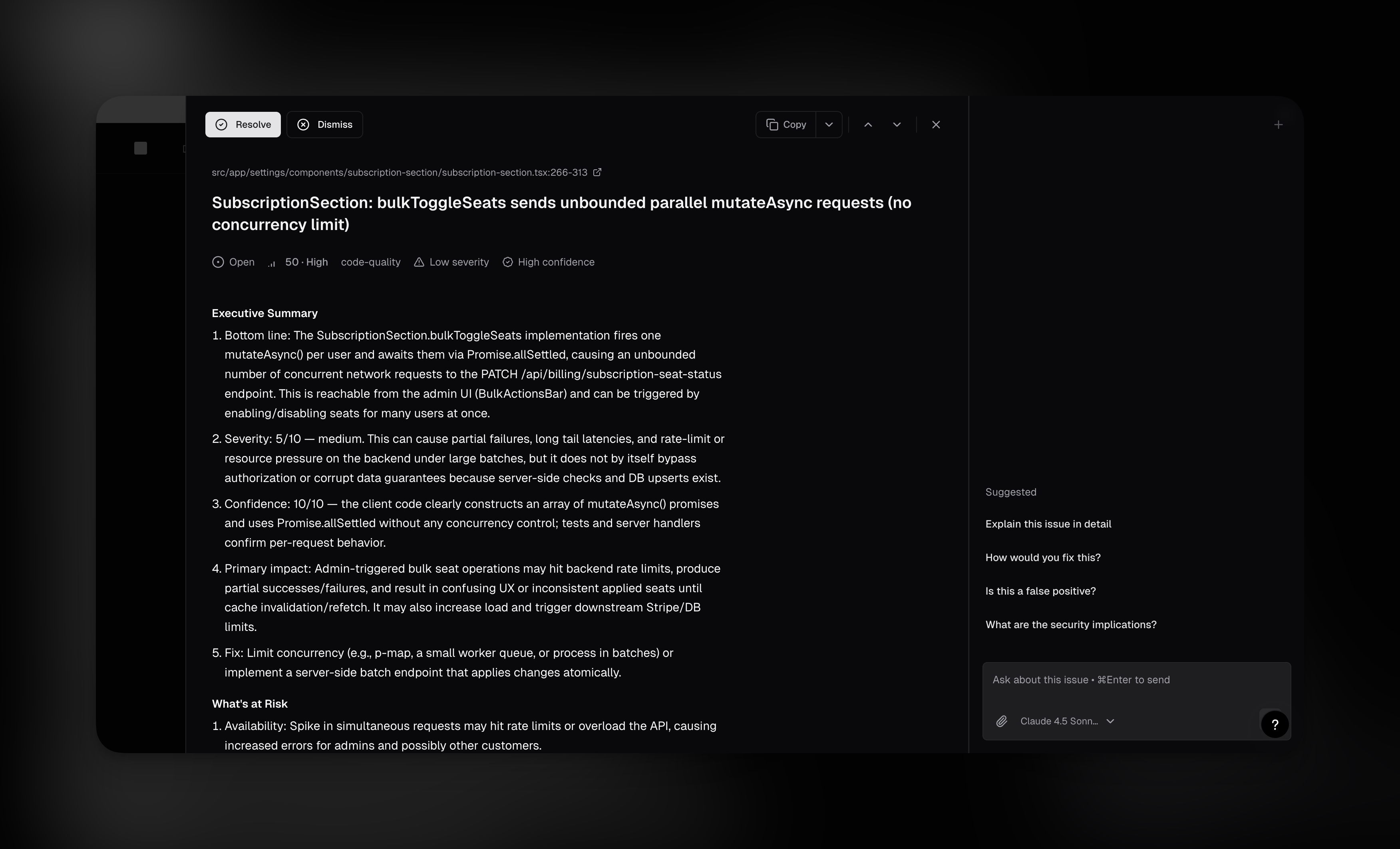
- Full explanation with code context
- AI sidebar to explore the finding interactively
- Copy prompt button for a ready to paste fix prompt
- Create Jira/Linear tickets to track remediation work
Ways to act on findings
Scan findings do not have to sit in a dashboard. You can turn them into PRs, tickets, prompts, or owner notifications.- Fix with cubic: creates fix PRs for selected findings.
- Open in Cursor: opens Cursor with a prefilled fix prompt for selected findings.
- Create tickets: sends findings to Linear or Jira.
- Notify owners: sends email or Slack notifications to the issue owner.
- Auto remediation: automatically creates PRs for findings that match your guardrails.
- Automatic issue creation: automatically creates Linear or Jira tickets after scans complete.
Fix with cubic
Use Fix with cubic when you want cubic to create PRs for selected findings.- Use the checkboxes to select issues in the results table
- Click Fix with cubic in the bulk actions bar
- cubic spins up background agents that investigate each issue, then create PRs with fixes
Open in Cursor
Select findings in the results table, then choose Open in Cursor from the bulk actions bar to open Cursor with a prefilled prompt containing the issue summary, analysis, and relevant code context.Create Jira or Linear tickets
If your repo is connected to Jira or Linear, you can create tickets directly from a finding.Automatic issue creation
Enable Issue creation in the repository’s codebase scan configuration when you want scan results to land directly in your team’s backlog. When enabled, cubic:- Creates issues only for findings that meet your minimum risk score
- Filters by the categories you selected
- Routes issues to your configured Linear team or Jira project and issue type
- Respects your Max issues per day limit
- Skips findings that are already linked or no longer open
Auto remediation
Auto remediation creates PRs for your highest risk violations without manual selection. When a scan completes, cubic evaluates each violation against your configured guardrails (risk, confidence, category, max fix difficulty) and triggers fixes for eligible issues. PRs are created in the background, with reviewers automatically assigned based on your settings.Scheduling scans
Most teams run scans on a biweekly, daily, or monthly cadence:- Biweekly scans: the default cadence for steady coverage without scanning every week
- Daily scans: best for fast-moving repos that want continuous coverage
- Monthly scans: a lightweight option for steady repos
- On demand scans: before major releases, after architecture changes, post dependency updates
Custom instructions
Guide what cubic focuses on during scans. Custom instructions let you define security invariants, baseline policies that should always hold true in your codebase. Security & compliance examples:- “All traffic must be encrypted, flag any HTTP endpoints without TLS”
- “Storage in infrastructure as code must have encryption enabled”
- “All user input must pass through our
sanitize()function before database queries” - “Authentication tokens must never be logged or exposed in error messages”
- “Focus on authentication flows and payment processing”
- “We use a custom ORM that wraps Prisma, account for this in SQL injection checks”
- “Our
validatePermissions()helper is the authoritative access control check”
- Go to your repository’s Codebase scan page
- Click the schedule dropdown, then Custom instructions
- Enter your instructions (up to 10,000 characters)
- Save
FAQ
How do I scan again after changing my code?
How do I scan again after changing my code?
Open your repository’s Codebase scan page and set a schedule using the schedule dropdown.
After the first scan, scheduled scans check changes since the last successful scan and update
the existing results. Opening a completed scan shows its results; it does not start a new run.
Contact support if you need an additional scan immediately.
Do scans consume my PR reviewed-line allowance?
Do scans consume my PR reviewed-line allowance?
No. Codebase scans have separate limits and do not consume the reviewed lines included in your
PR review plan. See AI review usage.
How is cubic different from traditional SAST tools like Aikido, Snyk, or SonarQube?
How is cubic different from traditional SAST tools like Aikido, Snyk, or SonarQube?
Traditional SAST tools use pattern matching rules that generate massive false positive rates. Teams report up to 90% of findings are non issues. cubic is fundamentally different in two ways:1. Exploitability analysis: Instead of just flagging patterns, AI agents trace code paths to verify whether each finding is actually reachable and exploitable. Dependency vulnerabilities are only reported when the vulnerable code path is called. CVEs are assessed for real world impact, not just version matching.2. Business logic bugs: SAST tools can only find what rules exist for, SQL injection, XSS, etc. cubic finds issues that pattern matching fundamentally cannot detect: billing edge cases that lose money, broken permission checks, race conditions, incorrect state transitions, and other logic flaws specific to your codebase.
Will this slow down our PR reviews?
Will this slow down our PR reviews?
No. PR reviews remain fast and inline. Scans run completely separately in the background.
How accurate are the findings?
How accurate are the findings?
Very high signal to noise ratio. Unlike traditional scanners that flood you with false positives, every finding is validated by AI agents before being reported. Teams report immediately actionable results without the triage burden.
What's the actual runtime?
What's the actual runtime?
Small repos: 2 to 6 hours. Medium: 6 to 12 hours. Large enterprise codebases: 24 to 48 hours. You get progress updates throughout.
Can this replace our SAST/SCA tools?
Can this replace our SAST/SCA tools?
For many teams, yes. cubic covers static code analysis (SQL injection, XSS, auth bypasses), dependency vulnerability scanning with exploitability analysis, secret detection, and infrastructure as code scanning. The key advantage is that cubic validates whether vulnerabilities are actually reachable and exploitable, not just pattern matching on version numbers. Teams using traditional scanners often report 90%+ false positive rates; cubic’s validation approach eliminates that triage burden. You may still want specialized tools for dynamic scanning, malware detection in dependencies, or SBOM generation.
How does pricing work?
How does pricing work?
Scans are included in your cubic subscription. Pro includes scans for up to 3 repositories in a rolling 90-day window. A repository counts toward that limit if scheduled scans are enabled for it, or if it has had a pending, running, or completed scan in the last 90 days.Usage is also subject to fair use to keep background scanning reliable for everyone.