
cubic can reason across pairs of related repositories during AI review. When a pull request in one repo changes something that another repo depends on — like a backend route that the frontend calls — cubic can flag the cross-repo impact and track the companion PR that ships the matching change. Both repositories must be installed in the same cubic GitHub installation.Documentation Index
Fetch the complete documentation index at: https://docs.cubic.dev/llms.txt
Use this file to discover all available pages before exploring further.
Linked repositories is currently rolling out. If you don’t see the Linked repositories card
in AI review settings, contact support to enable it for your
installation.
How it works
When you link two repositories and open a pull request in either one, cubic:- Judges relevance - Decides whether the linked repo is worth consulting for this specific PR, based on the changed files and the guidance you provided.
- Inspects the linked repo on demand - When the linked repo is relevant, the reviewer reads code from it to understand the contract being changed.
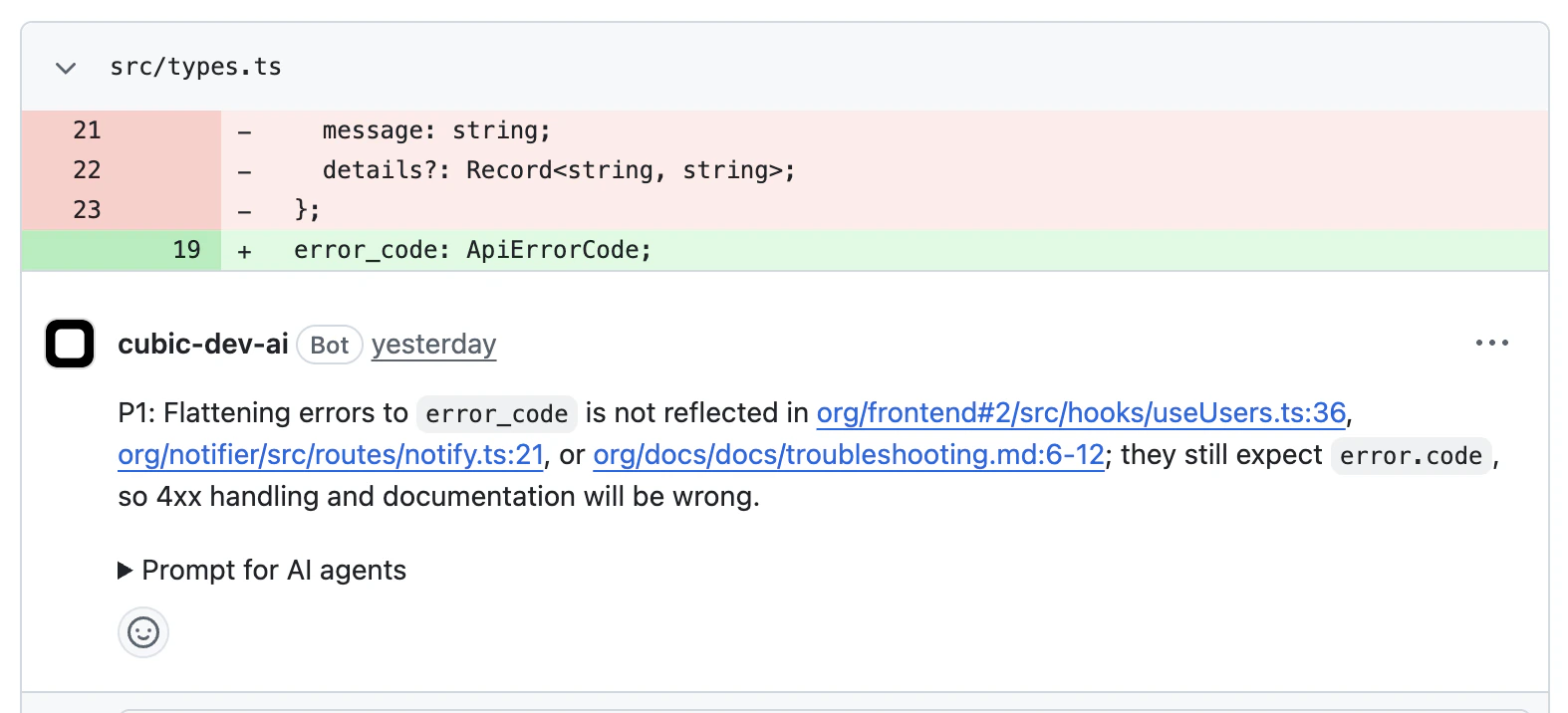
- Posts cross-repo findings - Issues that affect the linked repo are surfaced as comments on the PR, with a citation pointing at the affected file in the linked repo.
- Tracks companion PRs - If you reference a PR in the linked repo from the source PR description, cubic watches it and updates findings once the companion PR pushes a fix.
Setting up a link
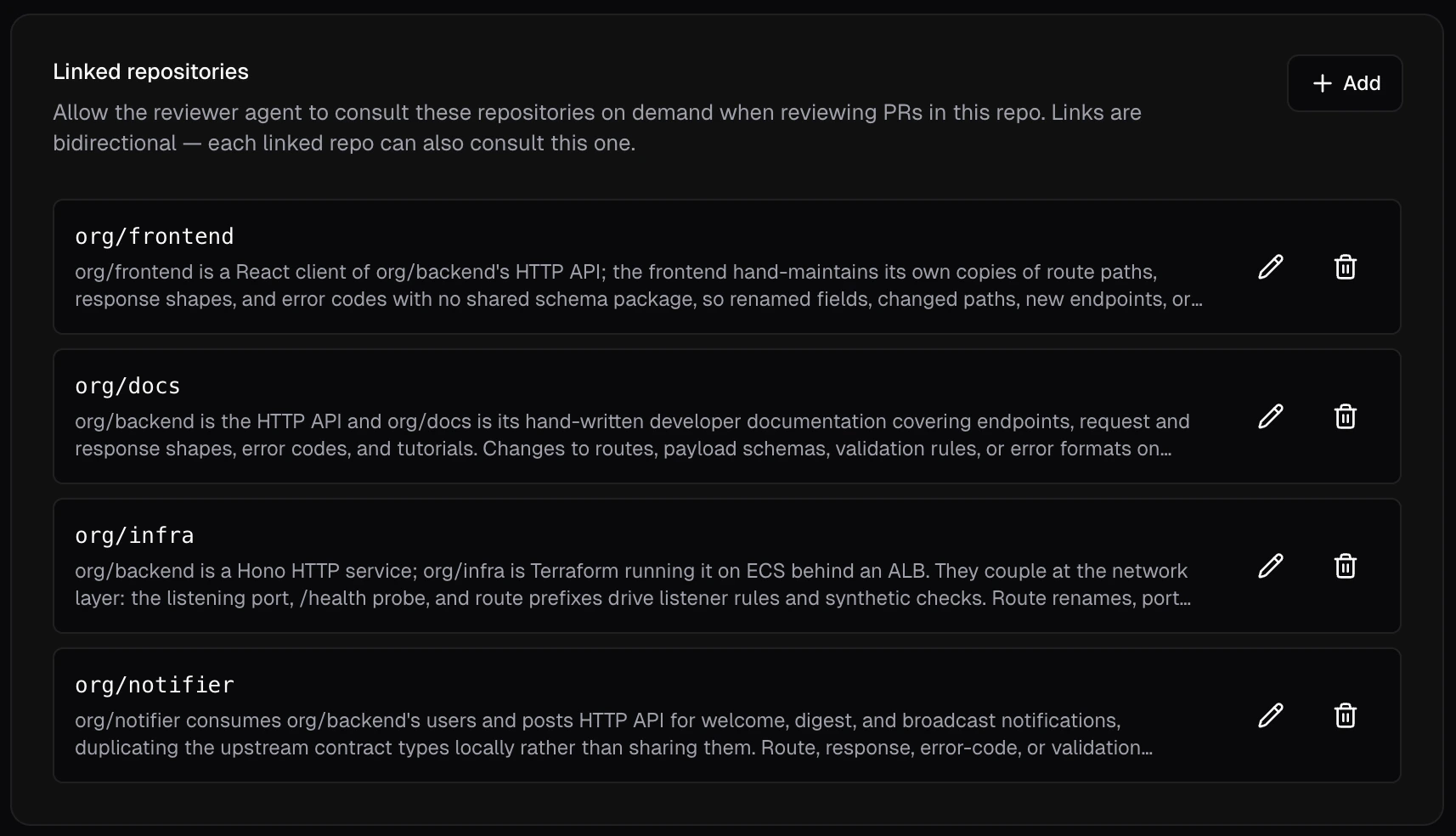
- Open AI review settings and select the repository you want to link from.
- Find the Linked repositories card and click Add.
- Choose the target repository from the picker. Only repositories in the same installation appear.
- Write 1-2 sentences of guidance describing how the two repositories relate, then click Link repository.
Links are bidirectional. You only configure a pair once — the link appears in both repositories’
settings, and the reviewer can consult either side when reviewing the other.
Constraints
- Up to 10 linked repositories per repo. cubic warns you at 5 and blocks new links at 10.
- Guidance is capped at 80 words. Aim for around 50 — the reviewer reads guidance verbatim, so concise text works best.
- Both repositories must be in the same GitHub installation. Cross-installation links are not supported.
- Archived repositories, repositories cubic no longer has access to, and repositories that have moved installations show an inaccessible badge and are skipped during review.
Writing good guidance
Guidance is the only signal the reviewer has to decide whether a linked repo is relevant to a given PR. Be specific about the shared surface and the kinds of changes that need coordination.Good examples
Frontend and backend share an HTTP API; route or response-shape changes need coordinated updates on both sides.
Both services read from the same Postgres database. Schema migrations and column renames require matching updates in both repos.
The shared @acme/types package is consumed by both repos. Breaking changes to exported types require updates wherever they’re imported.
What doesn’t work
They’re related repos.This is too vague for the reviewer to act on. The relevance judge will either skip the linked repo or consult it for every PR, neither of which is useful.
Referencing companion PRs
When your change spans two repositories, link the companion PR in the source PR description. cubic recognizes two formats:- Full URL:
https://github.com/myorg/backend/pull/456 - Shorthand:
myorg/backend#456
#456 shorthand is intentionally not matched — same-repo references can’t be companions.
Editing the PR description re-runs discovery, so you can add or remove companion references at any time.
What you’ll see in reviews
Troubleshooting
Linked repo isn't being consulted
Linked repo isn't being consulted
The relevance judge decided the linked repo wasn’t relevant to this specific PR. Check that
your guidance names the surface that’s actually changing in the PR — for example, guidance
that only mentions “API routes” won’t trigger consultation on a CSS-only change. If guidance
is already specific, the linked repo may genuinely not be affected by this PR.
Companion PR isn't being tracked
Companion PR isn't being tracked
Confirm two things: the referenced PR is in a repository configured as a linked repo, and the
reference in the source PR description uses one of the recognized formats (full GitHub URL or
owner/repo#number). Bare #number shorthand is ignored because it can’t point at another
repository.Can't add more links
Can't add more links
10 linked repositories is the hard cap per repo. Remove an unused link from the Linked
repositories card to free a slot.
Inaccessible badge on a link
Inaccessible badge on a link
The target repository is archived, has been removed from the installation, has moved to a
different installation, or cubic has lost access to it. Restore access or remove the link.