
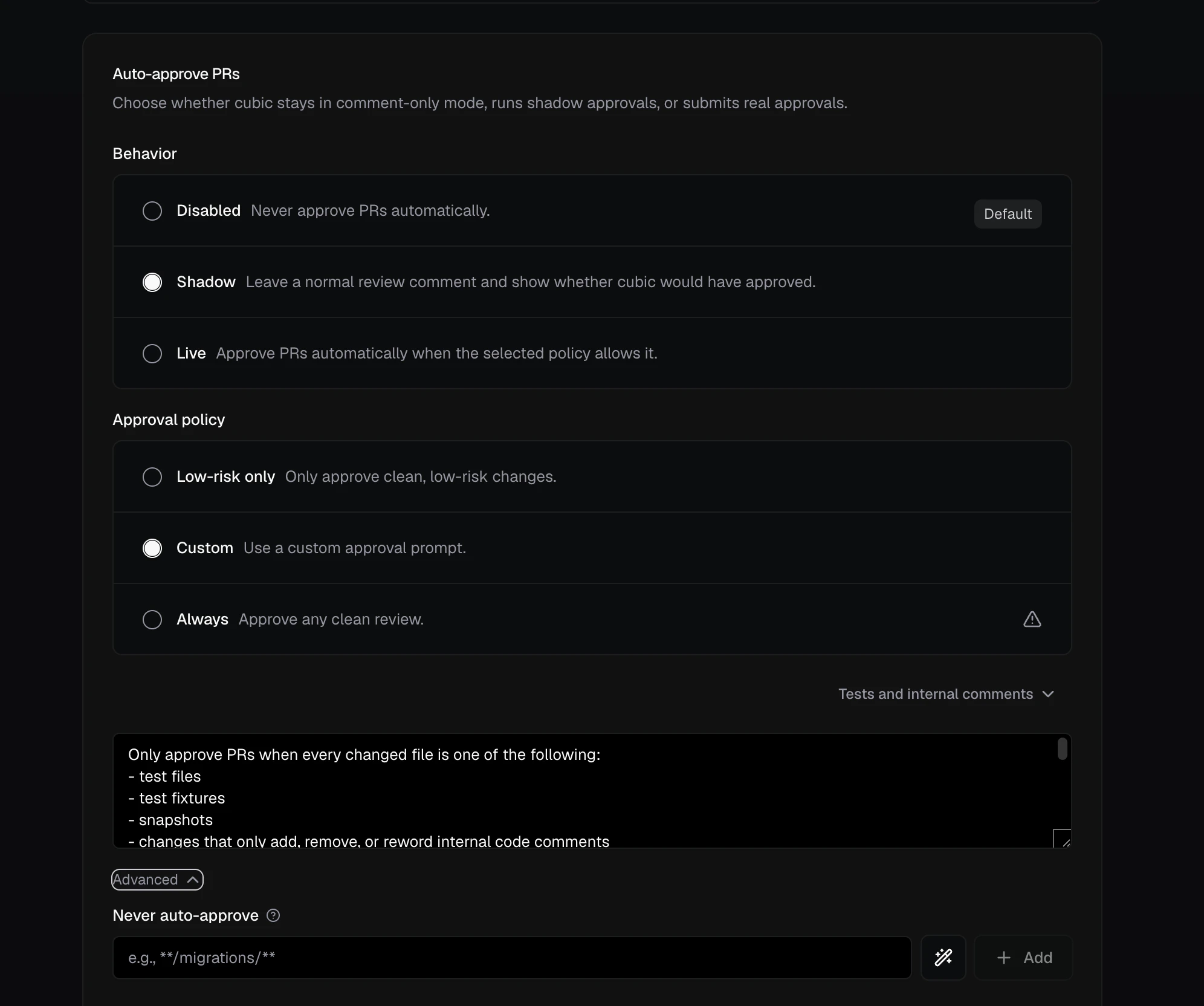
How it works
cubic treats auto-approval as part of the review outcome. If the review is clean and your settings allow approval, cubic can approve the PR. If the PR does not match your policy, cubic does not approve it. cubic also checks again when someone dismisses the last issue that blocks approval, so the PR does not wait for another push. See Dismissed issues. Shadow mode is the safe way to start. It keeps cubic in comment-only mode, but adds a summary showing whether cubic would have approved the PR.Recommended workflow
Start with repositories where the risk is low, such as documentation, internal tools, test fixtures, or repos with narrow change types. Auto-approval settings are configured per repository, so you do not need to roll it out everywhere at once.- Open AI review settings and select one repository.
- Set Behavior to Shadow.
- Choose Low-risk only or write a Custom policy for that repository.
- Watch a few real PRs to see which ones cubic would approve.
- Add never-auto-approve rules for sensitive paths, such as migrations or infrastructure, and for PR attributes such as authors or labels.
- Switch Behavior to Live when the shadow results match your team’s expectations.
Behavior and policy
Behavior controls whether cubic submits real approvals:- Disabled: cubic only comments.
- Shadow: cubic comments and shows what it would have approved.
- Live: cubic submits a real GitHub approval when the policy allows it.
- Low-risk only: recommended default for most repositories.
- Custom: your own approval criteria, such as “only approve tests and docs.”
- Always: approves any clean review. Use this only for repositories where that is acceptable.
Custom policy
The custom policy allows you to provide your own prompt for the auto-approval agent. When you select this option, cubic will first give you the prompt it uses for the low-risk policy. You can then edit the prompt to adapt it to your needs. The custom policy only runs when no open cubic issues block approval. By default every open issue blocks; Allow open issues lets issues at the priorities you choose stay open. If cubic finds issues in the first commit of the PR, but those issues are resolved in the next commit, the custom policy will run. It also runs when someone dismisses the last blocking issue. The custom approval agent receives the following context:Allow open issues
By default, any open cubic issue blocks auto-approval. Allow open issues lets a repository approve PRs while issues at the priorities you choose stay open. Pick the priorities in the dropdown; picking one also picks every lower priority, so choosing P2 allows P2 and P3. Nothing is selected by default.- Priority is the P0–P3 label on each cubic comment.
- Only findings cubic posts count. Findings dropped by the inline comment limit never block approval.
- When new issues are allowed, cubic posts its findings as a normal review, then submits the approval as a separate review.
- Every other rule still applies: behavior, approval policy, never-auto-approve and only-auto-approve rules, and external contributors. With Low-risk only or Custom, the approval agent sees the open issues and still makes its own decision.
cubic.yaml, set reviews.auto_approve_rules.allow_open_issues to none, p3, p2_and_p3, p1_to_p3, or all.
Dismissed issues
A cubic issue stops blocking approval when a later commit fixes it, when someone resolves its review thread, or when someone disputes it by replying that it is wrong. These authors can dispute an issue by replying:- A repository member.
- The pull request author.
- Anyone with write access to the repository.
- A GitHub App bot, such as a coding agent working on the pull request. The bot does not need to tag cubic.
@cubic-dev-ai the P3 about test coverage is out of scope for this PR. cubic works out which open issues the comment disputes, dismisses them, and replies with links to their threads. When it can’t tell which issue the comment means, cubic dismisses nothing and replies with a list of the open issues, so the author can reply in the right thread. cubic answers these comments from bots as well. The same authors can dismiss issues this way, and these comments never teach learnings.
When someone dismisses the last blocking issue, cubic checks approval again without waiting for another push. cubic waits about 10 seconds for further dismissals, then checks once.
Every other rule still applies: behavior, approval policy, never-auto-approve and only-auto-approve rules, and external contributors.
- With Low-risk only or Custom, the approval agent sees each dismissed issue and its latest reply. It checks the reply against the diff and can ask for human review when an issue still applies.
- With Always, cubic approves once no rule blocks approval, so resolving the last thread is enough to approve the PR.
cubic does not post an approval result when other issues still block approval, or when the last issue was dismissed by resolving its thread or by a pull request comment.
cubic checks again only when:
- Behavior is Live.
- cubic has reviewed the PR’s latest commit. After a push, the review of that commit decides.
- No cubic review is running on the PR. A running review decides with the dismissals in place.
Safety controls
Auto-approval is conservative by design:- cubic only approves when no open review issues block it. By default, every open issue blocks approval.
- A resolved or disputed issue stops blocking approval. With Low-risk only or Custom, the approval agent still checks each dismissal against the diff. See Dismissed issues.
- Shadow mode never submits a real approval.
- Never-auto-approve rules block approval when a PR changes sensitive files or matches a PR attribute rule.
- Changed-file allowlists restrict approval to explicitly approved paths.
- By default, public-repository PRs from external contributors are reviewed but not auto-approved. The same applies when cubic can’t confirm whether the author is an external contributor. This default applies to new settings; existing settings keep their saved value.
- Bots enabled in your team settings count as trusted authors for the external-contributor check. Their PRs still need to satisfy your approval policy and every other rule.
- GitHub branch protection still applies, including required checks, required reviewers, and code owner rules.
docs/** and cdk/** does not qualify when the allowlist contains only docs/**. Renamed files must match on both their current and previous paths, and never-auto-approve rules always take precedence.
Approval filters
Auto-approval can also filter on PR attributes: the author, the head or base branch, PR labels, and the PR title.- Never auto-approve when… rules block approval when any rule matches. For example, exclude PRs labeled
do-not-auto-approveor titledWIP:*. - Only auto-approve when… rules are allowlists. Once an attribute has rules, PRs must match one of them. For example, only auto-approve PRs from
renovate[bot]ordependabot[bot]that targetmain.
cubic.yaml.
Next steps
- AI review settings: Configure auto-approval in the dashboard.
- Configure with cubic.yaml: Version-control auto-approval settings.